Hi Guys, hoping someone can help me:
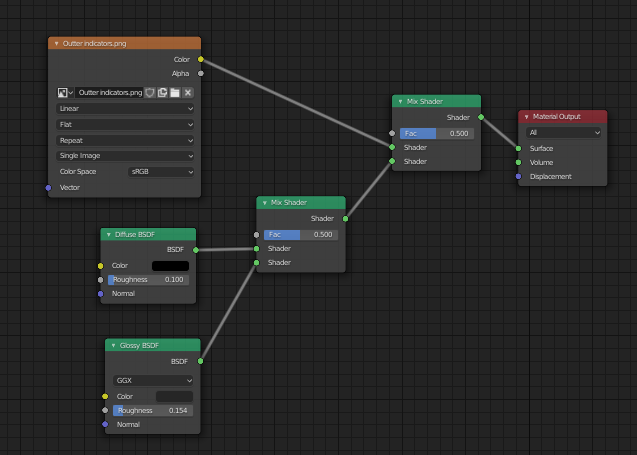
I seem to have an issue where image textures on a model i’ve created aren’t affected by lighting.
No matter how bright or dark I make the scene, these textures remain constant.
They are PNG textures placed on a UV unwrapped meshes.
Everything else in the scene is reacting fine.
I’m fairly new to blender, so hopefully is something simple i’m missing?
You cannot put color output into a shader input.
That’s not how it works.
You need a shader that accept your color data and then connect with the shader input of you mix shader node
Your shader setup is a bit off, my friend.
It’s actually much simpler than you think.
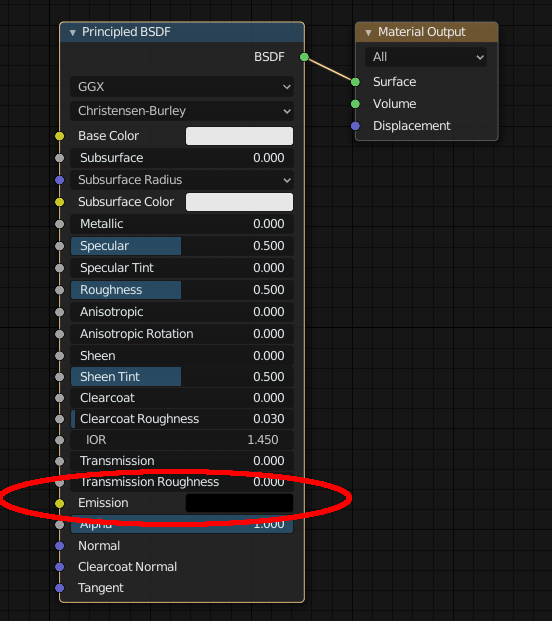
You need to feed the image texture into the ‘color’ slot of a principled shader node. (NOT into a mix shader node!!)
This is the only shader node you will need for your basic purpose.
Then connect the output of the shader node into the surface slot of the material output node.
That’s all.
You will not need any additional diffuse, glossy or mix shader nodes.
The roughness (glossiness) of the material you can control with the slider in the principled shader node.
0 is super glossy, 1 is completely matt. (You could also connect a special roughness picture into it. But that’s not needed.)
When working with nodes in blender always look at the colours of the sockets. Only connect green sockets to green ones, yellow to yellow ones, and so on. This helps you to understand how to use the nodes.
Hope this helps…
EDIT - boy, I need to speed up my typing…ha, ha. ha.


 )
)