Whenever making a character with both a solidify outline and some sort of shrinkwrapped part (eyebrows/etc) I always have to try and make sure the part shrinkwraps to the original part of the target, not the part created by Solidify. Is there some easy way I’m missing that will make it easy to always shrinkwrap the part to the original part of the target?
I know I could at least put the shrinwrapped object inside of the target and use Target Normal Project and so on, even though that isn’t perfect, and also that I could create a proxy of the target that doesn’t have a Solidify modifier that I could shrinkwrap to instead, but is there something better than that?
EDIT: Just realized that the Solidify modifier can generate vertex groups for the parts it generates, so then is it possible to make the shrinkwrap wrap just to those vertex groups (or rather, the inverse)? That would be perfect for what I’m hoping for
I tried to use very specific language here, but I guess it still wasn’t good enough. A different object has the Shrinkwrap, and the target has the Solidify. They are not modifiers on the same object.
While I assume that will work (as mentioned in the original post) I feel like there has to be something even simpler that we’re just a couple steps away from.
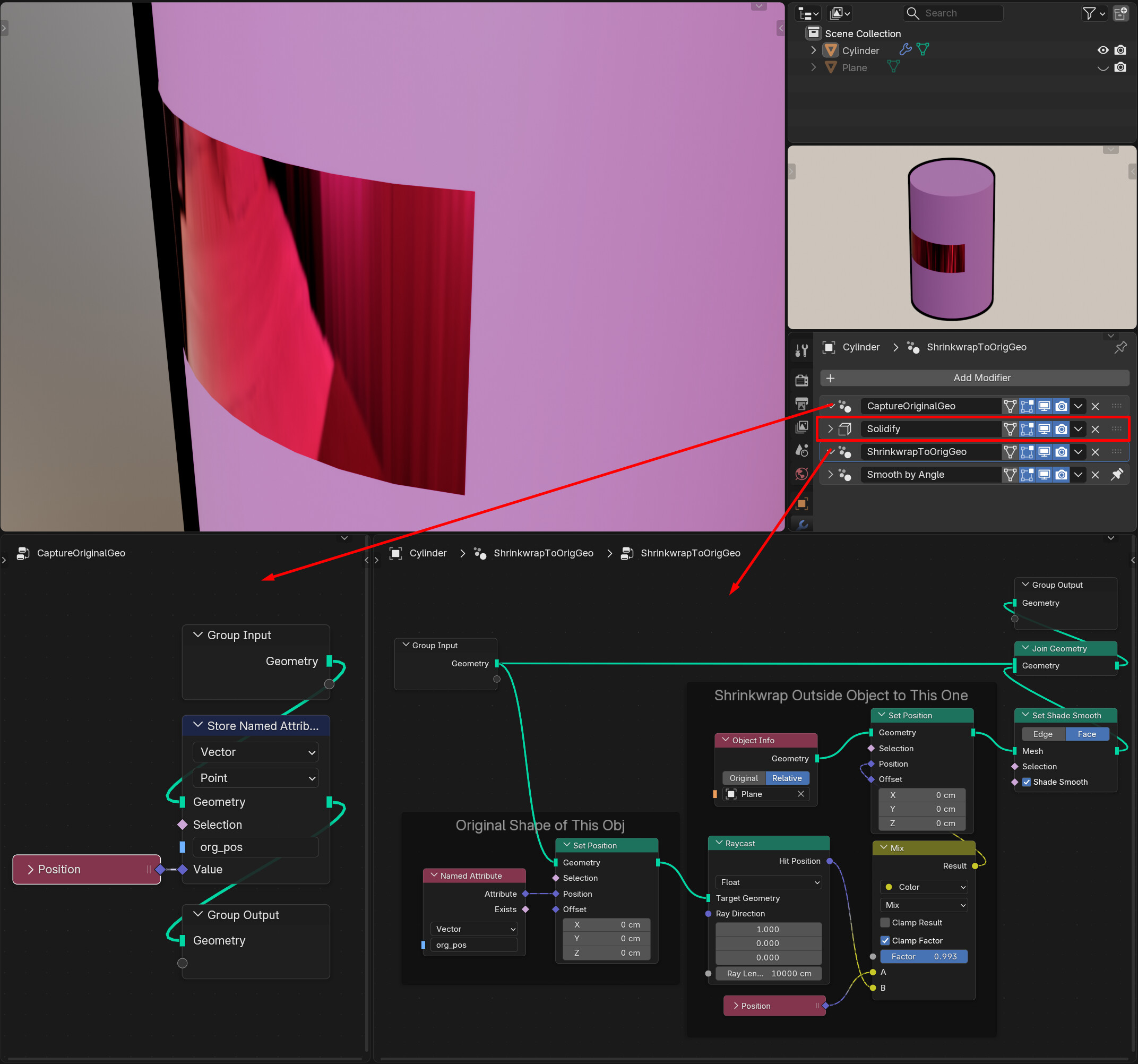
Here’s an incredibly silly and limited way to do it in Geometry Nodes. Not really a ‘solution’ (as it’s silly and limited) but maybe it would prompt someone to do it better:
Capture the original position info of your character in a GN modifier first,
then Solidify,
then bring in the objects you wanna attach in a second GN modifier to shrinkwrap it onto itself, to a version of itself that’s Set Position’ed to the original shape
I’m not that familiar with Shrinkwrap, I’m sure it’s much more sophisticated than the simple projection/raycast setup I employed here, but it is doable. It’s very possible that there’s a node group someone has already made that replicates Shrinkwrap, or it will be made into a native GN-based setup like the Array modifier anyways, so something like this could become an easier and more common setup in the near future, who knows…
Edit:
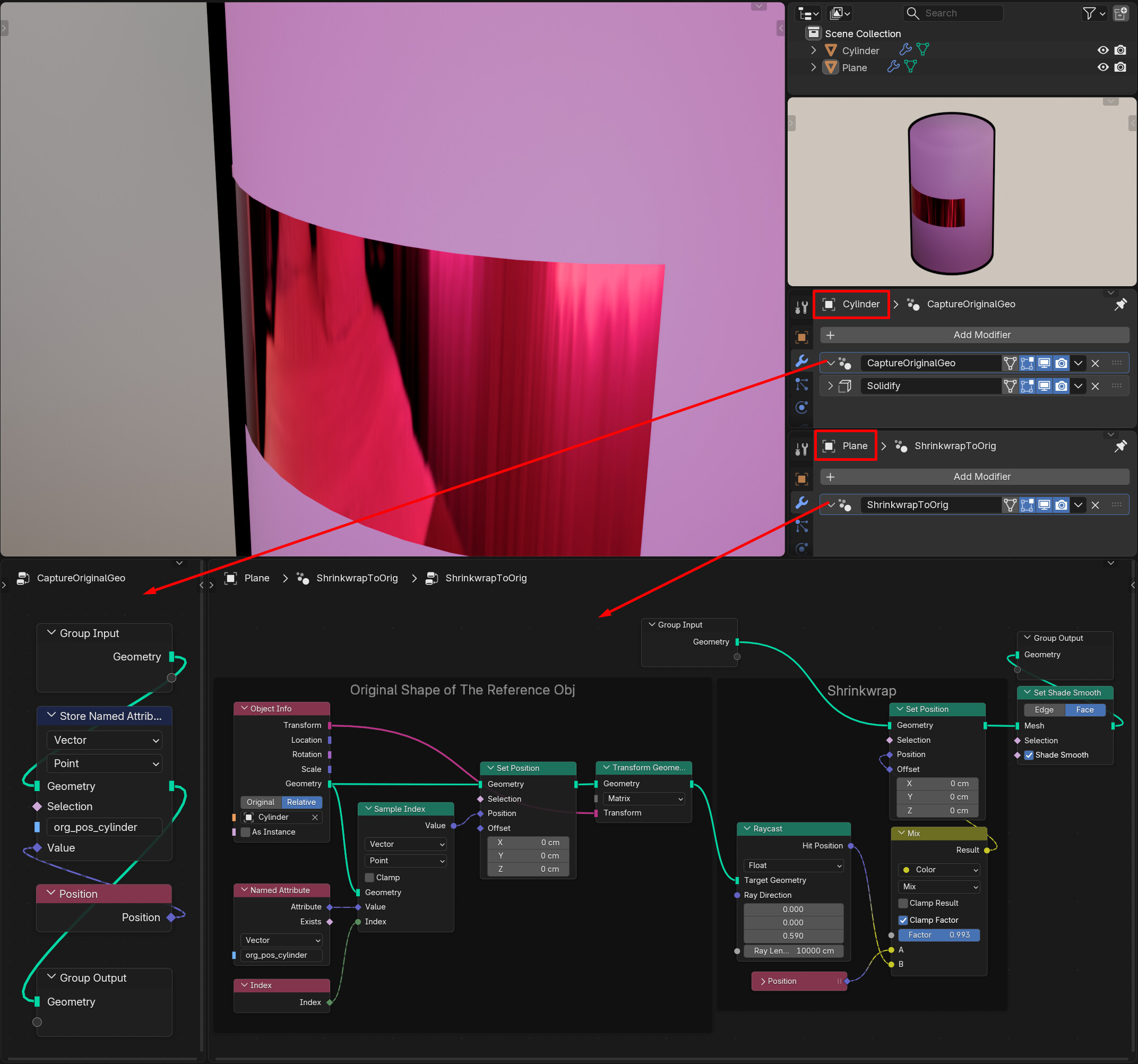
Or, if we don’t want to do it all on one object, something like this:
In both cases, I’m actually forcing the newly created vertices by the Solidify modifier to move to originals’ positions too, so even though the object takes it previous shape and the shrinkwrap works, there’s double vertices and overlapping faces everywhere underneath. That could cause problems with more complicated shapes so it’s pretty sus in general. But like I said, just thinking out loud.
AFAIK there is no way to reference any “inbetween” status of some modifiers… (except maybe with some geometry nodes trick but i didn’t yet understood @Kuboa’s suggestion ) so only a copy without modifier will work… you may also use duplicate linked and then delete the solidify modifer on “to be shrinked to” object…
This also works when editing the object afterward (!)
It’s not complicated, really, I tried to fit everything in the screenshots so that might’ve made it look more complex.
I’m putting a GN modifier before everything else to save that object’s original shape in memory, by capturing the positions of its vertices (Position > Store Named Attribute). This means now every vertex of that object has data written on it that says “Vertex#1 was in this position, and Vertex#2 was in this position…” and so on
Then you add other modifiers, Solidify for ex, which changes its shape, adds more geometry to it… whatever.
And then when it’s time to shrinkwrap, I tell the object’s vertices to go back to those positions we had saved. And tell the other object to shrinkwrap on to that version of the main object. Basically keeping a copy of the original object, but internally.
Since there are more vertices now than before (due to Solidify) there are actually double vertices at every point—we forced the new ones to move to those saved positions as well, but the shape is still the same, and that version is only used as reference for shrinkwrap (Raycast) purposes, so it might not matter much, though with more complex shapes it could… I would have to try and see, there would be ways to prevent it I’m sure. This is just a quick proof of concept for a corner case, so I didn’t bother…
To be honest i also didn’t looked too much into your example yet So: thank you for the extra explanation.
So in fact i though of something like stoted attributes… but i didn’t used this very much yet. Fun fact: i tried a lot about manipulating geometry via python (because i have some programmer background) but was always overtaken by some bigger version changes… than came geometry nodes… with there “drastic” changes… and the concept of fields (which almost understood from the beginning… but not completely yet… )… so i “just” have to use it more
Haha, sorry for overexplaining, it’s hard to gauge if someone doesn’t know about something at all or they just haven’t looked into this particular aspect of it yet. I completely missed the first attributes-based phase of GeoNodes, which turned out to be lucky as I didn’t have to learn things all over again.
 ) so only a copy without modifier will work… you may also use duplicate linked and then delete the solidify modifer on “to be shrinked to” object…
 It’s not complicated, really, I tried to fit everything in the screenshots so that might’ve made it look more complex.
 So: thank you for the extra explanation.