Hello,
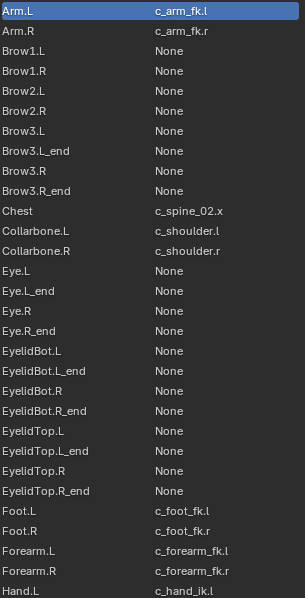
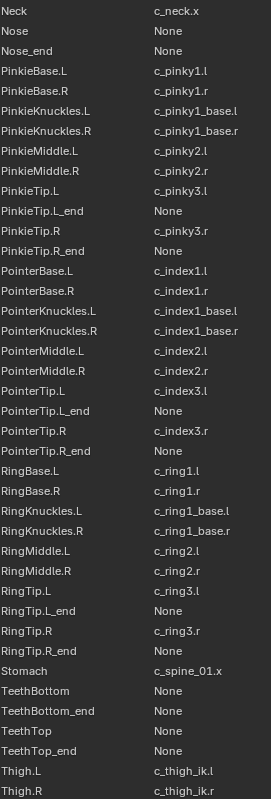
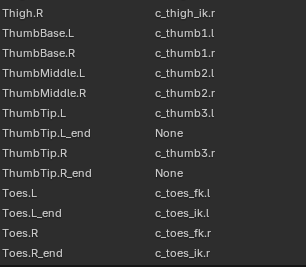
I am facing an issue while trying to perform retargeting on animations created with custom bones using Auto-Rig Pro. Despite applying the rest pose correctly, using the pre-existing reference bones, and manually listing all the bones for retargeting, I haven’t been able to achieve a satisfactory result. The animations are not behaving as expected.
I would like to mention that I excluded the face bones because I plan to animate facial expressions using Auto-Rig Pro’s built-in facial rig instead.
To better illustrate the problem, I’ve prepared some images and GIFs. I’ll also provide the .blend file along with the remapping data exported from Auto-Rig Pro, in case anyone is willing to take a closer look.
If anyone has faced a similar issue or has any suggestions, I’d really appreciate your help!
Thanks in advance!
https://www.dropbox.com/scl/fo/48k26upi9y8d6hk30vysl/AGrLxgsjWx5CSOxkoYUnwAQ?rlkey=iqixecbcyp5mqeq3oypn1c8m4&st=ayuq2zge&dl=0
.blend and .bmap files
Hi I had a quick look
(Disclaimer) ,I remain on Blender 4.1 for EEVEE legacy and your file is 4.2 so I had the usual warning about “potential data loss” but I doubt this affected my findings.
First I removed ALL actions from the Blend file and reset the ARP rig to its default pose and tested it with a retarget from a random mixamo animation and got perfect results, so your ARP rig is fine.
Problem:
Your source animations seem to all have a rest pose of the character sitting in a chair (at least the ones I tested.)
so I did not bother with loading your custom mapping preset
You need to use the ARP “reset rest pose” tool before attempting any retargeting.
Now if these mocap files are from the same source you should be able to mass retarget them in one shot with the “multiple source” function in the ARP retargeter but you need to sort out the rest pose issue for certain.

Thank you so much for taking the time to check the file!
You’re absolutely right — most of the source animations have a rest pose with the character sitting, which definitely caused problems. I had already tried to fix this earlier by using the “Copy Bone Rotation” feature in Auto-Rig Pro to manually match the source rest pose to the ARP rig’s rest pose.
That gave me some improvement, but unfortunately I’m still not getting satisfying results after retargeting — especially for certain animations. I suspect there may be additional issues beyond the rest pose alignment.
I’ll share some images shortly to show the process and what I’m seeing in the results. I’ll also send a GIF showing one of the retargeting results: the character ends up not sitting, and the fingers appear twisted or deformed. So it seems like there’s still something off.
Thanks again for your help and your time — your feedback has been really helpful!
1 Like
I do not know what the source of your mocap is.
However you have to realize that issues like distorted fingers etc. are always going to be part of a Mocap retargeting pipeline ,except in those scenarios where the source and the target rigs were both built to the specific template profile of the hardware capture system.
With that in mind, you should consider investing in the animation layers addon by Tal Hersko over on Superhive, and be prepared to manually fix those issues on nondestructive additive animation layers
as opposed to trying to get a perfect retarget from disparate sources which is unlikely to happen.
1 Like
Thank you once again for your detailed response!
Just to clarify, the source of the animation is actually a manually created animation inside Blender, not mocap. But I totally understand your points — especially about how hard it is to get perfect retargeting results from different sources.
I’ll definitely take a look at the animation layers addon you mentioned. Sounds like it could help a lot with cleaning things up non-destructively.
Thanks again for your help!