Rimasson: yeah loop tools are also great! but sometimes i feel like the input is a bit clunky - and I always liked the simplicity of set flow in 3ds max.
Bracer: this is already implemented, jsut select a few edges from a loop and it should make these linear / straight with set_linear
@YAFU i think if im honest im a bit too lazy to go though the hassle of submitting and updating it
@weee the reason it gives unexpected results is that you have crossing edgeloop selected - namely the ring and these two loops. try selecting only the loops, then it should work as expected.
im not surprised that not everyone gets what it does, it took my also quite some time to really see why this is a cool thing to have and where I could use it. We tend to do a lot of clean hard surface models at work which are bent like crazy in space, its hard to get this stuff correct without something like set flow.
glad you like it! Blender already has Open subdiv with creasing ? (user preferences > system + enable in modifier)
Personally I think that Blender needs these 2 modeling feautures/improvements to really be called “king”:
“EDIT POLY MODIFIER” ; very powerful modifier which allows for non-destructive editing of an object. Especially useful for modeling complex hard surface objects with many details. 3DSMax users know how powerful this modifier is.
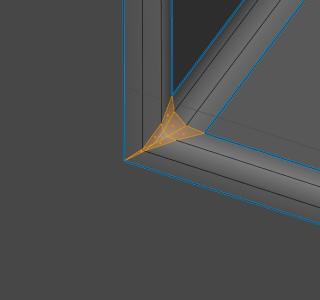
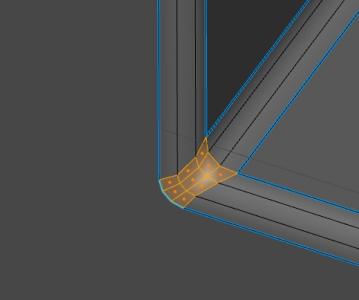
“QUAD CHAMFER” ; Blender has the great H-0ps toolset but sadly it cannot fix what is a native “bevel modifier” problem. The shading on corners like these really do not bake well. It would be lovely to have a functional quad chamfer bevel available like in MAX/MAYA.
Edit Poly modifier - too hard to produce.
Software builds around paradigm, 3dsmax was built around this modifier, also even in 3dsmax it causes more problems than solves, and even maya doesnot have it.
Quad chamfer was script written by local user for 3dsmax, and then it was built-in.
So you can basically find developer and order such tool.
i think you have a wrong perception of the edit poly modifier. Basically it allows you to edit the mesh at a certain point in the modifier stack - but this really locks your vertex order for everything earlier in the chain - you can’t easily edit the base object anymore (well you can, but this quickly kills your edits in the edit_poly modifier…)
It sure has its uses, but more often than not it just creates unwanted issues… so I 100% agree with @1D_Inc
(its also in very weird state in max, has its own tools - API is a total mess etc…)
Houdini is also built like that, and I guess it ‘suffers’ from the same issues regarding the vertex order - but if the node modifiers will ever come, one should look at how its done there (and not from max).
for now…I would rather have modifiers on collection instances, that would be NICE.
and yes…the bevel modifier needs an upgrade for these corner and 5 point intersection cases.
I am trying to get into contact with the original creator of this tool Im sure he will port it to 2.8 but it could take some weeks/months…
If there is no response soon I will make a rightclickselect request to get some attention to the subject.
Some tools are just ESSENTIAL for modeling on a high level and this is just such a tool.
Finally! This was one of my favourite feature in Max. I used it excessively for organic modelling like characters and such. i’m gonna check it right now!
All whats left to do is get rid of that annyoing 3D Cursor and replace it with Max’s Aligning Function and Blender would be nearly perfect (well, at least for us Max turncouts )
yes it does but its destructive by nature. It simply takes too much time to manually adjust these bevels using MESHMachine. The core problem should be adressed which is the Bevel Modifier
Luckily there is being worked on right now! very much looking forward to it.
@iceythe wow! thank you for sharing, hoping it works !
3d cursor is a very good tool in blender, please do not ask that make blender to become 3dsmax, 3d Cursor can be more interesting tool if it supports more transformations like scale rotation etc…
So you agree with me that the 3D Cursor in its current Form is not as useful as it could be and needs improvement. We’re on the same page.
Look, all im saying is there are more elegant, simpler and faster Solutions out there to align Objects in Space. Fortunately, the times are over where one mouse button is dedicated to just one simple function. That was an improvement in my opinion.