Salut les geeks !
Here’s a model that I’ve asked some of my students to create in Zbrush. This model is interesting because it allows for the use of various workflows directly within Zbrush, such as Shadow Box, Mesh Extrude, ZSphere, from Dynamesh to subdivision levels, ZModeler, Polygroups, Polypaint, and unwrapping.
It was rendered with Cycles on GPU, the falling pumpkins come from a Geonode system:


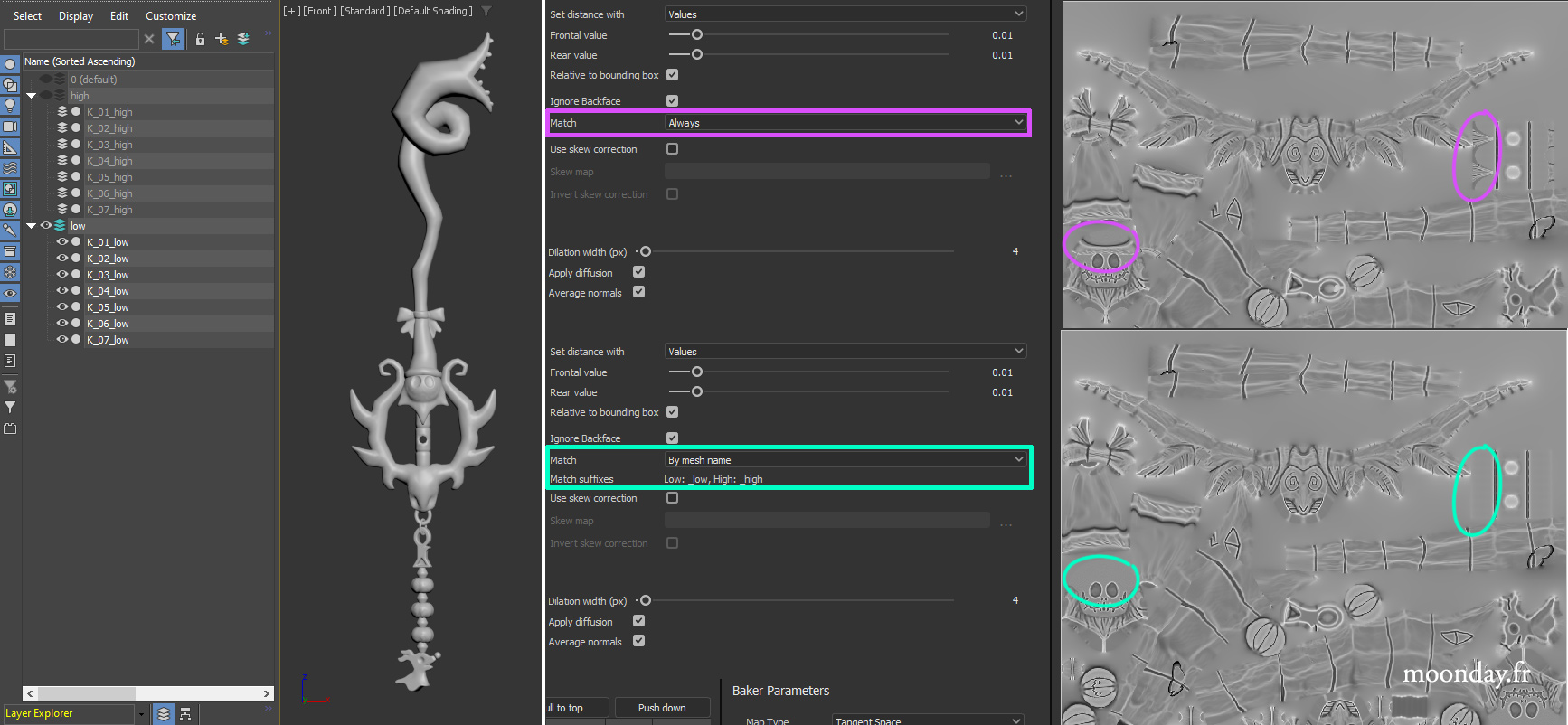
A quick word about texture baking on objects made up of multiple meshes. If, like me, you’ve spent years baking textures on split models (each mesh moved in 3D space) instead of RTFM, using the correct “low” and “high” prefixes will save you countless hours and also disk space. As an example, this Keyblade model: the meshes were separated into several models named with the “xxx_low” prefix, and the same goes for the HD model with the “xxx_high” prefix.
Everything was then exported as “Keyblade_low” and “Keyblade_high”.
Substance Designer will then analyze the content of the FBX files to match the low and high meshes, which will prevent the textures from bleeding from one mesh to another during the baking process.

You can have access to a few more info about the Zbrush process and a video render on my blog: https://blog.moonday.fr/2025/03/decisive-pumpkin.html
See you on a next project !