Be careful, as far as I understand it, while the gimp devs definitely want filter/adjustment layers, layer styles are slightly different in how they composite, and it made both boud and dmitry sad, so I doubt the gimp devs will implement layer styles specifically. (but again, with open source, every feature can be added by a surprise contributor, so who knows)
I suppose it’s different strokes for different folks (pun intended ;P). Some people prefer mouse mode, some prefer pen mode. Personally, I prefer mouse mode because I like the cursor to remain in its last position until I tell it to go to another position. It makes painting easier for me. Less arm movement, more control. I’ve tried painting in pen mode but I just cannot stand it. I can’t really blame that on them though. That’s my shortcoming. I’ve been painting like this for well over a decade so it’s a really hard habit to break.
Still, I hope the folks behind Krita allow for mouse mode drawing someday. I'll happily abandon Photoshop at that point. Adobe is on my !#$%&*list.
Pen mode works (EDIT: almost) fine in Krita 3.3 on Windows 10 64bit if you enable the Windows Ink API instead of WinTab. However the pointer appears to move on the canvas as if in a coarse grid and there is no subpixel precision (EDIT: also, no pressure sensitivity). Decreasing mouse speed both on the Wacom driver and Windows settings appears to somewhat improve precision with the Mouse mode in krita, but there is still no subpixel precision as with the stylus in proper pen mode.
I don’t think this is generally the recommended mode for content creation; it wastes the Wacom pen tablet’s capabilities/potential. I think it’s intended more for everyday operation like browsing (etc.) when the pen is used as a mouse replacement.

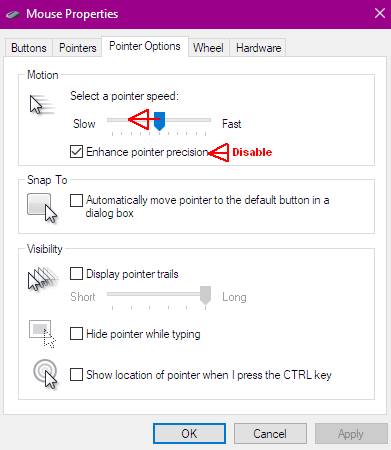
I would recommend disabling mouse acceleration for drawing.
EDIT: it looks like pressure sensitivity doesn’t work in mouse mode with this workaround, although I guess things like opacity/flow/size could still be adjusted with other commands, depending on the workflow.
Been using Huion tablets. They don’t even have mouse mode options. The h610 Pro software (Windows) that went with it didn’t even have anything about configuring the 8 express keys. (What a way to sell a product.) You get what you pay for, as they always say.
My 3 Wacoms’ stylus pen all died out. Will cost you half the price of the whole tablet to buy a replacement. Wacoms do have the mouse mode option. And I’ll probably use that option if my hardware allowed me to. Krita would then be a separate story.
I’m still on Windows 7. I’ve been avoiding the upgrade to 10. I don’t like the direction Windows is going. I feel like they’ve lost sight of what they stood for. However, I’m going to have to switch to 10 eventually so maybe by then there’ll be a fix for it. I can hope. Krita is shaping up to be a Photoshop killer, IMO.
https://krita.org/en/item/krita-3-3-1/ is out, with several bugfixes and two small features(extra options for brush texture, and a button to allow opening file layers)
I was the same: I held out as long as I could, and when Windows 7 began to resolutely resist downloading and/or installing updates, I made the switch. It was also becoming more and more unstable (regular blue screens of death).
The idea of Windows 10 almost offended me - but I had to either re-install Windows 7 and hope for the best, or get Windows 10.
It’s as if I had purchased a new machine - running rock-stable, smooth, and multi-screen support is vastly improved. There are many other little things that ease the workflow. Games run much better, and at higher quality. The flat design, while I am not a fan, is less distracting. The Start menu is very functional - much better again than the one in Windows 7 (I removed all the advertising crap).
I turned off as much of the privacy invading junk as I can, and I am still doubtful about that part of the equation. But I have to admit that I am pleasantly surprised. Some classrooms I teach still have Windows 7 installed - and I miss having the niceties of Windows 10.
Who would have guessed? Windows 10 is actually a very solid release. I hated 8, but love 10. 10 is better than 7 
I started seriously playing around with the making my own brushes but one thing that drives a bit up the wall is that when I make a brush and sketch a little icon for it (in space where you can test a brush stroke) I seem to lose my icon when come back later I want to experiment with little tweaks to my brush.
This is a little frustrating for me because I am still at a very experiment/learning stage where I want to play with settings to understand them better…
Is there a where not to lose the brush icons that you sketch out
Yes… sorta. the idea is that you press the brush button beneatht he scratchpad before you make a change, and you can open the resulting kpp file in krita itself to paint a proper icon. We’ve massively overhauled this part and the general brush settings in 4.0, it was admittedly a bit too fiddly.
Hello, krita users!
Is there some generator normal maps from greyscale images inside krita?
Yes, there’s a height to normal map filter in 4.0 I am pretty proud of. You’ll have to use a window nightly build or build yourself if you want to use it though, there haven’t been 4.0 pre-alpha releases since it got in earlier this month.
Damn it! It was right there with a helpful tool tip too, Thanks Therahedwig
I wonder whether the number of Krita downloads spiked three days ago? Jazza (quite a popular “how to draw” Youtube personality gave his thumb-up to Krita. He quite liked it (he’s an artist working in Photoshop).
(over 330.000 views so far - that’s GOT to be good for Krita 
According to scott, our webmaster, we got 13k views that day, but he hadn’t checked downloads.
Mostly, what we’re noticing is people sending help requests to the bugtracker instead of the forum like we specifically request them…
The video, aside from flattering was also sorta interesting. Like, that apparantly this guy read Krita’s docs, but he had trouble with figuring out the purpose of inkscape, which makes me wonder if Inkscape’s docs are just not as accessible. The circle test also really surprised me, I wonder what the logic is for other applications to do the weird snapping thing, because we constantly fight epic battles with the tablet drivers and qt to make sure we’re getting all the tablet events and proper coordinates for good strokes. The third thing that confused me was that he was surprised that Krita had no adverts or such, and that he ended up musing about how Krita is funded, even though it says it is open source right in the opening blurb. Which makes me sorta wonder if people know what is open source is, despite that we’ve been pretty quiet about our philosophy because we assumed that most people had proly been beaten to death with it…
Outside of that, the tribalism in the comments is interesting. Especially everyone upset he liked icky Krita while FireAlpaca was rated poorly.
I had similar issue and wanted to make customized brush icons. There’s too much to learn, it’s overwhelming. Not enough time. You end up focusing only on one to two aspects like 2 out of 100.  Pretty brush icons can’t be that as important as learning how to make paintings as pros do it. (I’m talking about my own issues, not necessarily related to the subject.)
I thought so. The followers of Jazz seem to be teens and of a younger generation - like himself. I have noticed that most of them really have no inkling about development and regard the bugtracker as a forum or a Facebook type communication platform. I’ve seen the same happen in other bugtrackers, such as the OpenToonz issues page. It’s ignorance on their part - they just don’t know better.
Jazz is a pretty young guy himself, and he doesn’t seem to be very tech-savvy as an artist. I think he responded to his Youtube crowd’s pleas to look into affordable Photoshop alternatives, since most of them are, again, teens and younger people - Adobe’s rental plan is just too expensive for most.
This one I found interesting as well. I downloaded and installed FireAlpaca on an old i5 intel video chip Asus epe121 slate with 4gb, and to be fair Krita really struggles to keep up and is slow to work with, while FireAlpaca does a much better job keeping track of the strokes I draw.
I tested both with a 600ppi A4 document. Opening an A4@600ppi is instant in FA, and takes a while in Krita.
BUT… This is to be expected. FA is by FAR a more simplistic drawing app, and not really suitable for more professional work in my opinion. And when FA can’t keep up with the strokes, the result is truly abysmal: instead of circles I got geometric hexagons :-P. At least Krita, while laggin, does finish with a nice circle.
FA starts up with an advert, and tries to make changes to the Windows registry to keep track of adverts. I hate that. The younger generation doesn’t seem to be surprised, and is, I suppose, used to seeing adverts presented to them on their phones. I noticed most of them just don’t care, and accept it as a given. Jazz shares this mindset: hence his surprise at the lack of any advertizing in Krita. In his and most of his (young) followers’ crowd I assume they expect to pay for good software without adverts.
It’s ignorance on their part (not meant in any derogatory way). And Jazz just doesn’t seem to be very aware of any creative software outside the Adobe ecosystem (I wouldn’t be surprised if he is sponsored by Adobe in some way - not sure). He seemed truly amazed and surprised to discover that Krita supports animation as well.
I believe that if he spent more time with Krita, and really discovered all the truly useful things Krita can do for digital artist (and which Photoshop lacks), he might consider switching. As it is, he is very much invested in Photoshop and Animate CC (nothing wrong with that, btw).
It is, isn’t it? Again, obviously a younger crowd. And a crowd wont to experiencing simplified GUIs on their mobile devices - and Krita seems intimidating compared. Jazz doesn’t mind, because he knows Photoshop very well, and works as a professional artist - and Krita’s workflow is quite consistent with that experience.
Yeah, it constantly surprises me how few people, even within the cg and game industry, simply have no concept of what open source means.
Well judging by some of the comments people post on most digital painting threads, they can’t even recognize Photoshop most of the time. Often times you can see the bloody interface and the PS logo and someone will ask in the comments, ‘So what program are you using?’ I have to fight so hard at that moment to not be snarky.
Bugfix release! https://krita.org/en/item/krita-3-3-2-release/
Other than that, we’ll be doing a preview build of 4.0 soonish. There’s uh, been a lot of work done.
And on the heels of the stable, a development update: https://krita.org/en/item/4-0-development-update/
We’ve been doing a lot.