So there seems to be something lagging when I render a video file. You see, rendering works great (about one frame per second) but when I try to watch the video it ends up really choppy, with the video frequently pausing for about a quarter of a second (doesn’t sound long, but it’s long enough to be noticed). I do close all other windows and background programs during rendering. Is there a way to tell it to take extra time for extra quality, or smoother camera settings, or anything like that that could help with this?
First off, wrong forum. use the support section for support questions.Now, to your question. Are you using the internal playback, or an external player? What format are you rendering to? When I use the internal playback, it takes a second for it to load the images into memory, and then it plays back smoothly.
So what compression are you using?
Your machine might be too slow to play un- or low compressed video streams in 50% 1080p.
Besides that. Don’t render to a video container.
Render lossless image sequences, generate video containers with a compressed stream from them.
The rendered images will remain, you can compress/resize to whatever you want and never loose quality.
I use default compressoin. As for not rendering to a video container, what other option is there if I’m going to render an animation?
If you render to an image sequence, you can always turn it into a video using the video sequence editor later. Rendering that way has the benefit of being more crash resilient. if you are on frame 300 of a 500 frame .mp4 animation and it crashes, you need to start over. But, if you are rendering image sequences, you can start at frame 301 and resume rendering. Also note that when you render to image sequences, you are going to want to put each animation in it’s own folder, as you will get a file for every frame.Really though, that’s just good workflow advice. You can render direct to mpg or avi or whatever, and it will work fine. But as you progress, maintaining a good workflow will save you a lot of time and confusion.
How do I render as image sequences?
Change the format to a image format (i would recommend PNGs or JPGs if you dont care about bitdepth, if you do care about bitdepth choose exr)
Then for the file output, create a new folder as you will get one image per frame… and then put the filename as prefix.####.ext , where prefix is your prefix for what you want… the #### is where it is replaced by frame number… and the ext is the extension…
So say im rendering to jpgs, and my project is bobsfarm, i set bobsfarm.####.jpg as the output name… and say its just rendered frame 234… it will create a file bobsfarm.0234.jpg and save it out.
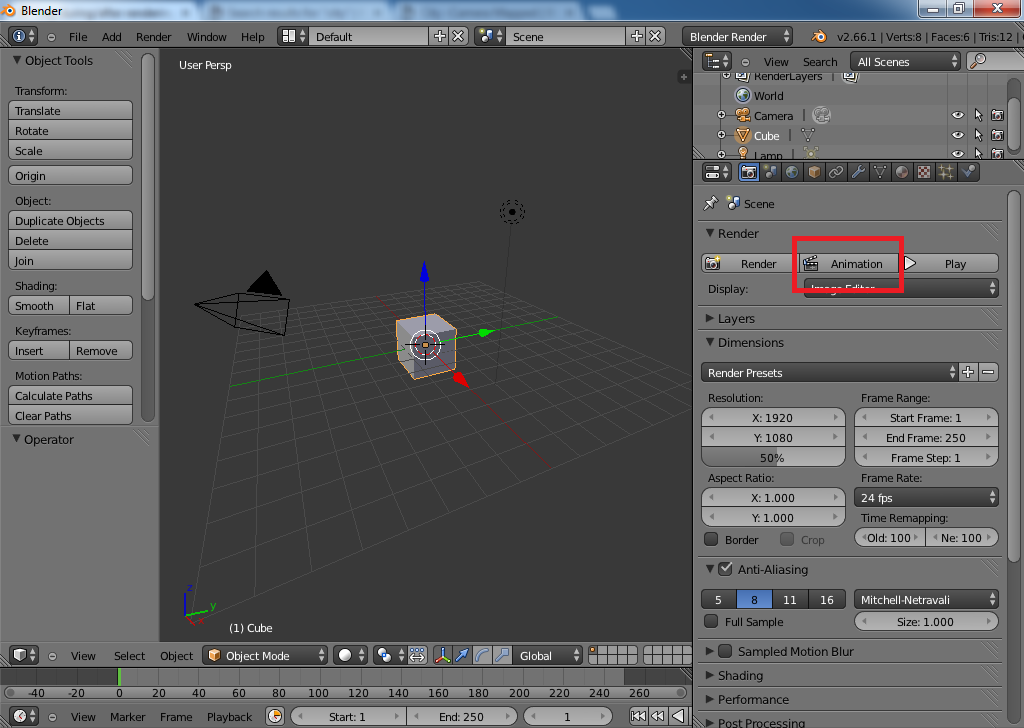
Is there a button that does it automatically, or do I have to do it frame by frame?
when you hit the animation button it does every frame in your timeline and saves out a unique file for each frame.
Moved from “General Forums > Blender and CG Discussions” to “Support > Lighting and Rendering”
I’m sorry, can anyone take a screenshot of and highlight that button?
EDIT: Never mind, I found it.