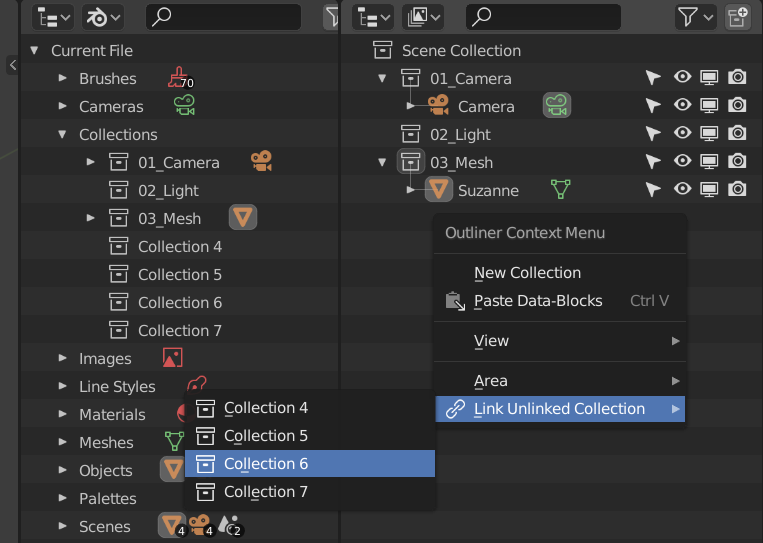
List and link collections that are not linked to the current scene
Eliminates the need to drag and link collections from all blender data in the outliner.
This is useful when you are handling multiple scenes and want to add the collection added in another scene to the current scene.
Download
gumroad
Menu
- Outliner > RIght Mouse Click > Context Menu
Link
忘却まとめ
1 Like
Hi Bookyakuno, this addon is extremly useful, so essential it’s absurd that it’s not in vanilla blender. But it has stopped appearing in the right click menu since blender 4.1
Working with collections is way slower without it, when you have many collections not currently part of the active scene, and want to add some.
Is there any way to revive it ?
Many thanks !
You can simply go to the outliner, set Display Mode to “Scene”, and then, right click a collection that is in another collection and hit “link to scene”.
Or even faster, rightclick the collection and hit “t”
1 Like
Thank you for reporting the bug.
I have added a file that fixes the problem.
Link Unlinked Collection ver1.0.1
- Fixed the problem that it did not work with Blender4.1.
- Changed the linked collection to link to the active collection.
The method suggested by Lumpengnom or the method of displaying two outliner screens and dragging and dropping may too be good. (Link the collection you want to link from the scene screen to the view layer screen with Ctrl + drag and drop)
1 Like
Yes I usually go in the blend file view, collections, so all the blend file collections are there, and can be drag & dropped in the scene. But that’s way way less practical and elegant as “link unlinked collections” as Bookyakuno addon is the only way to list the collections that are not part of the current scene, but unused, in the background of the blend file.
For me drag and drop does not really work because then it is put into the scene as collection instances and not the collection itself.
But yes, I understand what you mean. A “link unlinked collections” would be nice to have in vanilla Blender.