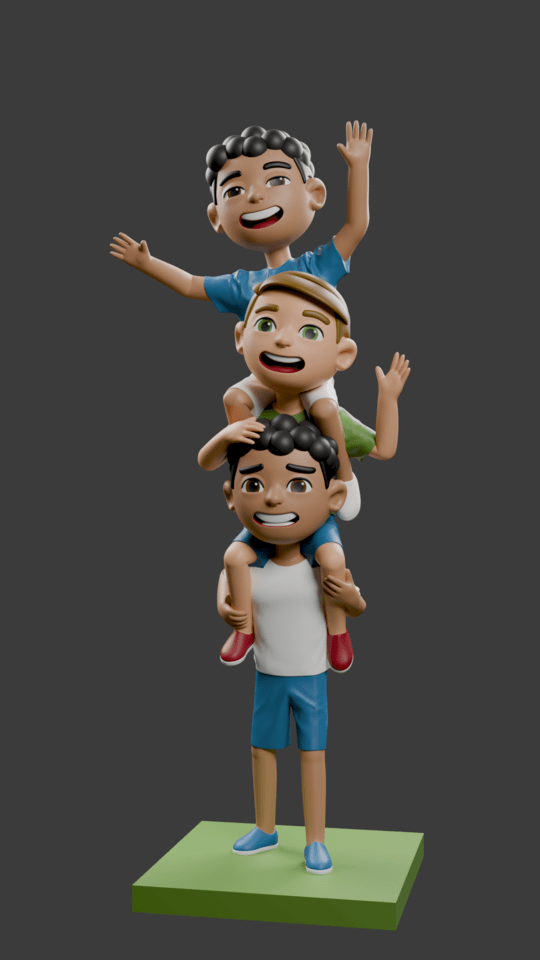
Hi there,
I also don’t have much experience with 3D printers, I know some people here do 3D print Blender files, however it might be better to ask on a dedicated 3D printing forum.
The few times I have done 3D printing the addon 3D print toolbox was very useful for checking that the object was ready to print. https://docs.blender.org/manual/en/4.0/addons/mesh/3d_print_toolbox.html
In general (from my very limited experience), it’s usually best to split it at natural joins, such as the base, the bottom person, middle person, and then the top person. If needed you could also separate the arms.
Depending on what 3D printer you have, doing a multi colour print like that is hard, since you need to change filament, it might be best to stick to just a few colours if you are new.
I can’t help you with 3d printing but I have to say that’s a really nice model.
There should be related videos on YouTube.
I assume the criteria are likely the printable specifications and whether deformation occurs during printing.
The modeling is excellent, but it is complex, so it seems some thought is needed to minimize the exposure of the cut surface.
Generally speaking, it doesn’t seem easy to just say “cut here.”
I am not an expert in printing, so I am not sure if this is accurate. 
adding on since nobody covered the pins you asked about:
to cut: add a cube, squash it flat, put it where you want the split (waistlines are good, the seam hides in the clothing line), boolean modifier set to difference. the cube needs to go all the way through the body you’re cutting.. but careful on this model, the kids overlap, so don’t let the cube reach into the head behind the cut
important: after the boolean it still LOOKS like one object. apply the modifier, then in edit mode select all and hit P > by loose parts. now its two pieces
for pins: small cylinder stuck onto one half, cut a slightly BIGGER cylinder out of the other half, like 0.2-0.3mm bigger (scale your model to real print size in mm first or the number means nothing). if the hole is the same size as the pin it won’t fit, printers always shrink holes a little. ask me how i know lol