Hello, I am still pretty new with Blender and tried to work on a animation of a hologram I saw on youtube. Its tricky to follow for someone like myself but, after a few attempts it was going well…In my opinion…At least I was able to progress despite the video quality not the greatest, the fast talking and a few minor missed hints but, I had gotten to what I thought was a good point in the creation on this animation…I had hit saved a few times prior to the problem and everything was going good. When I left the room and came back to do something… The screen says Blender had stopped working do you want to send report…When that window closed out Blender closes out. Ok no problem,I I saved it before and didnt really do much. When I restart Blender and go to my file, open the file, Theres no box showing the layers menu. Its there on start up. Disappears when the file is opened. I tried pressing m to see what happens if I wanted to move to a different layer and it only showed a grey box on the left of the screen. Could it be lost? This is the file if someone can see something. If its lost, its not a big deal to re do it but, its baffling to someone who doesnt know a lot on the software. I am using Blender 2.73hologram35.blend (1.78 MB)
You’re in local view (see top left corner of the viewport):
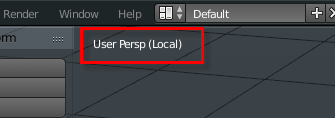
Hit numpad “/” and everything should get back to normal.
By the way: Whenever you’ve spoiled your user interface beyond repair in a certain file, just load that file with “Load UI” unchecked. Thereby Blender will keep the viewport layout it had before loading and will disregard the UI setup that has been saved in the file.
Wow…Thanks that solved it.