interesting l, adobe released a new after effects version

1 Like
Aside how stupid that graph looks like (speed gain:LONGER is better),
This has been established a while ago. If your’re an editor or solo youtuber. You probably won’t need more than M1pro macbook and M1 max is overkill most likely.
But for blender(RENDERING) or any high end rendering purposes, M1 is far behind Nvidia monopoly. There’s nothing apple does about M1 that makes it look a good choice as either good offline rendering GPU or next gen realtime GPU. It’s weak. And while a youtuber might have all he dreamt of out of M1, unless you only do asset creation, some basic simulation etc. You’re going to be disappointed in apple.
They are in the right direction but they need to do a LOT better to catch up. Apple was sleeping for a long time so it might take a while for them to catch up. Unless youtuber and editor kind of people are their main target anyways.
3 Likes
Beside Pro Res, which should be double as fast (!?)
Ultra vs Max mostly the same result and even Max vs Pro
does not scale very well …
The only thing that mostly scales is 20 CPU cores is 80% faster
than only 10 CPU cores - at least …
1 Like
Yes I am really wondering after being long time Windows user, then Mac Os user for 4 years if it is time to go Linux.
As much as I like it on Mac OS, I am not sure if I like were Apple is going and I am no even talking performance but reparability, upgrade possibilities and maintenance.
Always get exited when they release a new machine but once the excitement is gone and I really think about it, I end up canceling the order 
I also don’t believe the SOC excuse, Ps5 is one too and you can put a M2 SSD in with 7 GB/sec.
well for anyone tempted by apple silicon for premiere editing… I was just trying to edit a workbench playblast I rendered out of blender, and the premiere timeline playback was ABOMINABLE. But when I open it in blender’s video editor its buttery smooth?
I know premiere doesn’t like h264s, but this is absurd. I’m not generating ginormous prores proxies to do a simple edit on a playblast. it feels like this has gotten worse?
1 Like
Have you tried editing on Davinci Resolve with Apple Silicon? Just curious as Davinci Resolve on Intel Mac is pretty dang fast.
1 Like
Could it be that Apple’s Fusion does not yet work,
in cases where neither double GPU cores nor double video accelerators
seem to accelerate anything in Ultra vs Max (?)
Apple meanwhile updated Final Cut, to the preview version optimized for Studio
which was only available for youtube Studio testers so far.
Has anyone tried it lately ?
Linux is a whole other type of beast, I looked into it and ultimately (as much of a tinkerer as I am) decided that I really didn’t want to have to write code just to install an app.
As far as repairability etc, Apple is far from the outlier here – the entire computing industry is moving that way.
I think that if I was doing primarily audio or video work, I would have bought a Studio Max already and would be very happy with the price/performance ratio at the $2000 price point. What really screws it up for people like us is that CG is a whole different ballgame in terms of performance, and despite Apple’s insistence that their GPU’s can go toe to toe with Nvidia ones, they don’t.
If Apple manages to really optimize the Blender Metal code in the next few months, and gain substantial speed overall I might completely change my mind.
I’ve already switched 90% of my workflow to Blender in the past 6 months due to it running much better in MacOS than Houdini (which is just now deciding to catch up). When it comes to render, I was evangelizing for 3Delight for quite some time, but screw those guys – they don’t have any render speed advantage over Cycles or even Karma regardless of what they say except in very specific situations which don’t apply to most users.
But I digress – in closing if Apple Metal can take full advantage of the hardware, if they can begin leveraging their Neural cores to do some heavy lifting (I’m thinking noise reduction and upscaling), if Blender gains some unique functionality that runs very efficiently on Mac – then I’m happy to toss about $2000-2500 Tim Apple’s way (but most definitely not $4000+…that’s insanity!!!)
3 Likes
So I looked at Xcode and all the other 3D tools that come with it. Apple wants the 3D trophy. That’s all going to change fundamentally. 
3 Likes
As a Linux user, I’d be more than happy to spend the next 10 hours explaining to you in excruciating detail why it’s the obvious best choice for all your needs.
6 Likes
Hey man, if you can or are willing, I ended up doing random simple video editing on FCP… coming from After Effects (yes, was even doing short video editing there) I won’t look back ever again.
It took some pains getting used to, FCP and the magnetic timeline is off-putting, it specially feels constrained coming from a ‘free-for-all-by-default’, some parts feel incredibly wonky and old, yet at the end… there’s just no match, once you got the tools I just drag and drop videos, ‘titles’ (for adjustment layers, simple animations, and whatnot… these are all called titles), transitions, chop and cut at the speed of light.
Maybe DaVinci Resolve would have been a better choice in hindsight, you could give the Cut Page a spin as it’s the embedded ‘Premiere Pro’ of it.
Let us know how it goes!
Glad to hear that Blender’s video editor is more performant than Premiere 
Because there are like 100 distros and you will always find one that you like?
70% of the time, Linux works 100% of the time. You can’t say that about the other OSes.
Linux never crashes. At least until it does, but then it’s more like a gentle reminder that you that you’re not smart enough to use it, rather than a fault of the OS itself.
2 Likes
I have to say Mac OS is not bad in that regard have way less crashes than on Windows.
If this was further along or if I had a 2nd Mac I would try that.
1 Like
That’s not true at all :-). macOS runs better and more beautiful. I know all 3 operating systems for quite a long time. Linux I also get to crash and programs run amok there too. Only Blender runs best on Linux.
4 Likes
How’s C4D doing in that aspect? Do they already utilize Apple Silicon power?
I’m being semi-facetious here. 
MacOS is ultimately the most stable of the bunch. Windows? It’s actually a fairly stable OS these days, but it still feels a bit janky, and tends to harass you too much over every little thing.
Linux? That all depends on whether it likes you or not…
Personally, I’m perfectly happy with Fedora. Blender runs excellently. Krita is, of course, pretty solid. I have 3D Coat installed, which I used once to sculpt a little smiley face on a ball, and it seemed to work okay. Substance Painter and Designer look and act exactly how they do in Windows. I’m pretty well covered on the native app front.
For those occasions when I don’t have a native app, WINE is so solid these days that, 90% of the time, you can get a Win app to work with only a minimal amount of fuss.
It works great for me, though everyone else’s mileage may vary.
2 Likes
I’m very eager to know whether it’d be possible to run the Windows-only MagicaCSG editor on macOS via WINE.
If it turns out to work, would Crossover be the right tool for a WINE noob like me?
Looks like it runs just fine. I didn’t even have to make a customized environment in Bottles. All I had to do was rightclick on the executable, set it to open with WINE, and it popped right up.
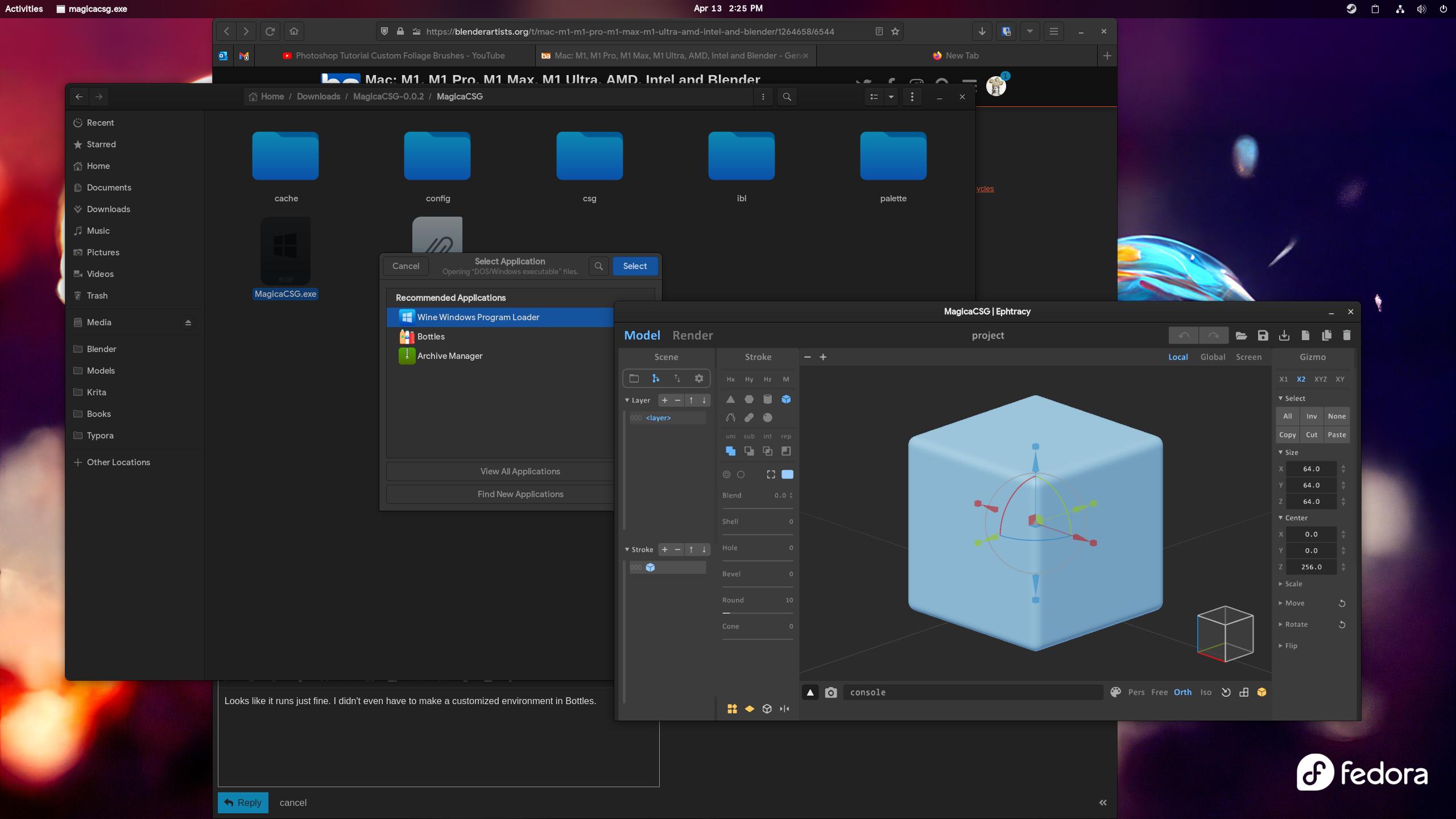
Let me goof around with it a bit to see if it has any issues. Right now though, it’s performing exactly how it did in Windows.
2 Likes
That’s great news, thanks for checking! I really hope this will also work via WINE / Crossover on macOS. MagicaCSG is just about the only Windows application I would dearly miss when I’ve returned to macOS.