Mac: M3 - *Hardware accelerated RT (Part 1)

It doesn’t require anything particularly fancy to get it running, so, potential Rosetta issues aside, I imagine it’ll work just as well on MacOS.

Also, after messing around and making a jumbly box with a couple of boolean subtracts and some cylinders, it looks and runs just like a native application.

1 Like

Cool, thanks again. :+1:

I’ll need to check how to install and use WINE on macOS, or buy Crossover. Any advice regarding that would be very welcome and appreciated. :slightly_smiling_face:

I dunno exactly how it works on Mac, but I imagine it’s fairly similar. Basically, when you first install WINE, it provides you with a generic, uncustomized Windows environment to screw around with. Think of it like a virtual C drive nested in a folder, complete with all of the directories you’d expect to see on a Windows machine.

You can use Winetricks (which I assume is also available on MacOS) to install extraneous stuff like .net, runtime libraries, .dlls, and other things Windows needs to run its programs. When you install an application through wine, it’ll drop it in a folder like ~/.wine/drive_c/Program Files, just as you’d expect it to on Windows.

Fortunately for you, MagicaCSG doesn’t require you do any of that. I just unzipped the file in my download directory, set the .exe to fire off with the WINE executable, and I was rolling.

If you find yourself needing other specific programs, you can start looking into the prefixes, which are like sub environments set up to run one specific application. I use Bottles to streamline that process, and there’s probably something similar over in Macland.

1 Like

Hmmh,

I don’t have any stability problems with Windows at all.
Since Win 10, or better finally with Win 11, it looks good and
the software compatibility is unmatchable.
It is just still some amateurish GUI, UI, UX and Telemetry issues.

Mac OS is stable, easy, comfortable and fast to use.
It simply doesn’t disturb you.
With ignoring macOS development over years and now Apple ARM,
Software compatibility got again worse but OK.

Linux is also stable.
But it makes it too easy to lose an installation. I lost a lot because just a
hardware change. Software compatibility is very poor on the usual Pro
app side. And what is compatible can be often terribly uncomfortable
to install - from a standard user perspective.

Basically you will want a rolling release (like Windows or macOS basically are)
and not completely reinstall after each upgrade. But Manjaro or Tumbleweed
GUIs look terrible by default.
Also to get more Software compatibility, ease of use and comfort, you’ll be
more safe with an Ubuntu derivate.

The only Linux Distro I really like and my recommendation for a typical Apple
user is … Elementary OS !
Looks very good, does not disturb and and uses Ubuntu compatible App packages.
But no rolling release. And for the last Upgrade, Elementary insisted to not install
into a free partition but flatten the whole disk -WTF.

3 Likes

But if you are not dependent on any commercial Apps for compatibility
with reactionary clients and can do your work with FOSS Apps like
Blender, Gimp, Darktable, FreeCAD, …
(Like Pablo Vasquez ?)
you may be one of the most happiest people on earth - with Linux.

No more license issues or subscription constrains, total hardware freedom
and the good feeling you are not doing (or supporting) anything bad.

I think Redshift would be the one to watch in that space. I wish people would still be doing render engine shootouts like they used to a few years ago. Unfortunately they’re a lot of work and I haven’t seen anyone do them in a while.

1 Like

Wasn’t there a link to a forum discussion where a Maxon developer
denied that C4D wasn’t really optimized for Apple ARM but said
he thinks that Apple SoCs are mainly optimized for saving energy
and not meant for raw power … ?

(Could have been on Modo Forum though)

Yes somewhere in there one if their guys made a similar comment https://redshift.maxon.net/topic/41339/m1-ultra-performance/169

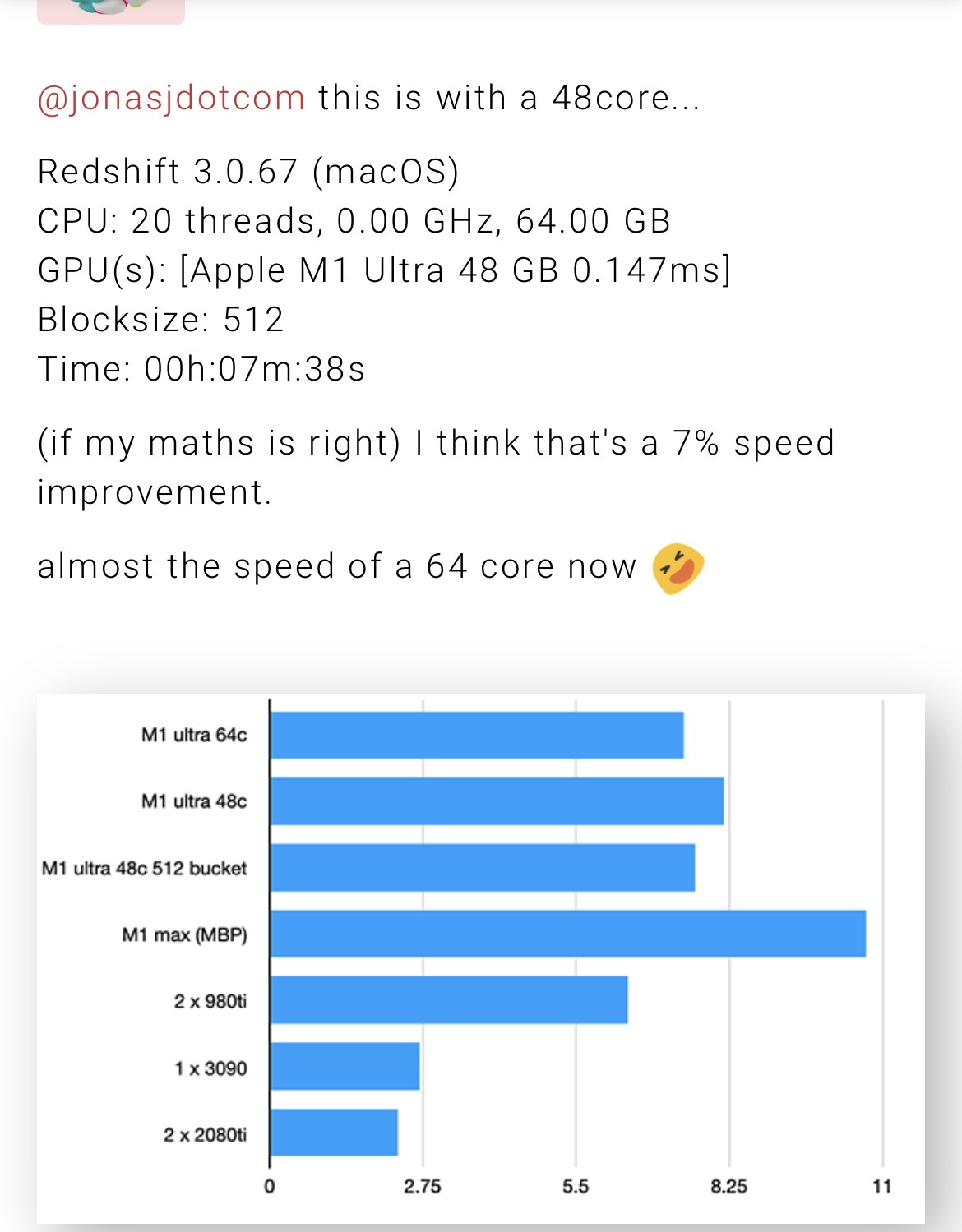
But there seems some room left for improvement, someone posted this. Looks like the new version and higher bucket size helps a bit.

Just for comparison too if anyone is wondering.

Redshift 3.0.67 (Windows)
CPU: 20 threads, 3.70 GHz, 31.85 GB
GPU(s): [NVIDIA GeForce RTX 3060 12 GB 0.025ms (RTX ON)]
Blocksize: 128
Time: 00h:05m:18s

Which makes the 64 core with 512 bucket size probably still slower than that.

Found it, but normal bucket size
Redshift 3.0.66 (macOS)
CPU: 20 threads, 0.00 GHz, 128.00 GB
GPU(s): [Apple M1 Ultra 96 GB 0.132ms]
Time: 00h:07m:22s

Also would eGPUs still be worth it with the loss in bandwidth… probably.
iMac 2017 + epgu

Redshift 3.0.66 (macOS)
CPU: 4 threads, 3.50 GHz, 40.00 GB
GPU(s): [AMD Radeon RX 6900 XT 16 GB 0.081ms]
Time: 00h:07m:00s

M1 Mini with an eGPU could have been fun.

3 Likes

This sure is an interesting find too.

So I guess the 2x faster the blender dev hinted had could be possible and probably 4x with heavy optimization.

Now will the manage?

Especially if I understood right and the TLB buffer is a limitation.

1 Like

Maybe the Mac mini will go to pro and the studio will remain being max and ultra

3 Likes

Based on what we see at school Adobe Premiere is just slow compared to DaVinci no matter if mac or pc.

It feels old and sluggish

We do university level work so take our work examples with a grain of salt !

3 Likes

So I found a mac studio base model in stock today (m1 max , 32gb ram , 512gb ssd) at the apple store today and picked it up to try it out. In Canada it came to like 2600$ and change with tax.

I was curious about real world testing and how it compares to my main PC.

My main computer is a amd threadripper 3970x , 128gb ram , rtx3090.

First thing I noticed is how quiet the room was after hooking up the mac studio. It makes no sound, like NONE. Not when idle not when under full load it’s quiet. I didn’t know how nice it is until I experienced it. My pc sounds like a vacuum cleaner in comparison on idle.

For editing/color correction I use Davinci and it flies on this thing. Definitely more pleasurable to work on than my pc. Having native support for prores is awesome and I will be doing my edits on the mac studio in the future. I don’t know if FCPX is faster than davinci on apple systems but I never clicked with it.

Blender runs fast in shaded view. I am running the latest 3.1.2 build. There is noticeable lag when scrolling through menus. For example if I click on the “Add” menu and move the mouse up and down that menu it is not keeping up with the mouse, the highlight freezes on a menu item then jumps to mouse position. Curious if anyone else had this problem.

When you turn on evee it goes to shit. It is slow to interact with, in shading mode changing material properties lag. Wasn’t expecting miracles but disappointed regarless. Again this is the base model with 24gpu cores so maybe the higher end models are better.

From a purely modeling standpoint though it is more than adequate, I didn’t notice any slowdowns when modeling. Handled everything I threw at it.

Only other app I installed so far is zbrush and that runs like a dream on the mac studio. Definitely feels snappier than my pc in zbrush.

Overall I love this thing. I hope in the future Apple can figure out increasing the gpu power without sacrificing too much on power draw. I would not recommend it for a only computer for a serious 3d artist. But it is an amazing additional computer.

5 Likes

Hmmm, I was wondering about inconsistencies in GPU performance and a diminished return of performance of the Ultra compared to the Max. Probably best to wait for the M2 where it is expected to be fixed.

https://twitter.com/VadimYuryev/status/1514295682777059329?ref_src=twsrc^tfw|twcamp^tweetembed|twterm^1514295682777059329|twgr^|twcon^s1_&ref_url=https%3A%2F%2Fforums.macrumors.com%2Fthreads%2F3d-rendering-on-apple-silicon-cpu-gpu.2269416%2Fpage-29

From the MacRumors 3D Rendering on Apple Silicon, CPU&GPU thread:

Problem: Apple shows that the M1 Ultra GPU can use up to 105W of power. However, the highest we could ever get it to reach was around 86W. No, the Mac Studio cooling wasn’t a problem because the GPU stayed cool, around 55-58°C compared to in the past when Apple allowed 100°C. This makes it pretty clear that the Mac Studio cooling system is OVERKILL in most apps, which means that there was a disconnect between Apple’s Mac Studio cooling system engineers and the M1 Ultra chip designers/engineers. Something has gone terribly wrong in terms of chip perf.

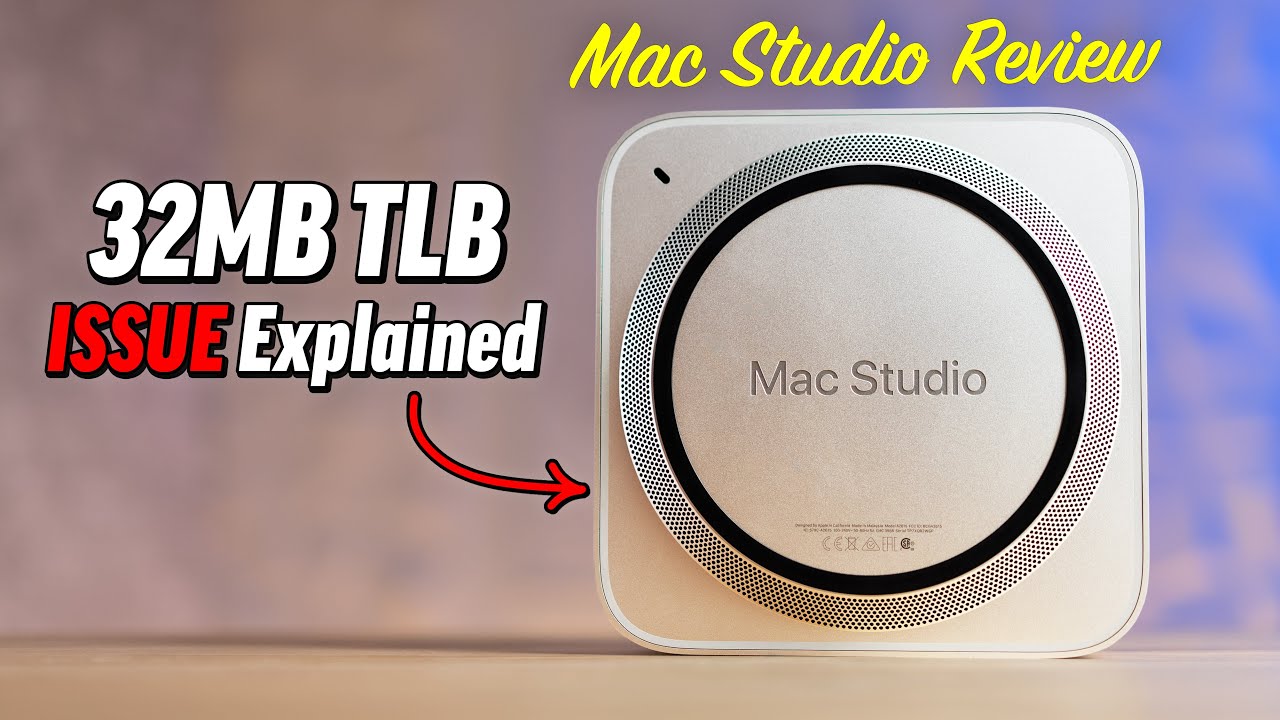
Culprit: Each cluster of GPU cores within an M1/M1 Pro/M1 Max/M1 Ultra chip comes with a 32MB TLB or Transaction (ed: this is wrong and should be “Translation”) Lookaside Buffer, which is a memory cache that stores the recent translations of virtual memory to physical memory, used to reduce user memory location access time.

Hishnash: “If an application has not been optimized for the M1 GPU architecture’s tile memory, (not just Metal optimized) then every read/write needs to go all the way out to system memory. If the GPU compute task is issuing MANY little reads, then this will saturate the TLB. The issue is if GPU data hits the TLB and the page table being read/written to is not loaded, then that entire thread group on the GPU needs to pause while the page table is loaded into the TLB. If your application is using MANY reads/writes per second, this results in a lot of STALLED GPU thread groups. Unlike a CPU, when a GPU is waiting for data, it can’t just switch to work on something else. So the GPU sits there and waits for the TLB buffer to clear in order to get more work to process.”

This is why we only saw 86W peak GPU usage in an app that was considered to be decently optimized. However, for apps that CLAIM to support Apple Silicon support but have NOT been rewritten to take advantage of Apple’s TBDR tile memory system, they will be severely limited by the 32MB TLB if there are many reads/writes.
The problem is that ALMOST ALL apps out there haven’t been optimized for Apple’s TBDR tile memory system. Many software developers simply get it to work using the traditional TBIR model and call it good to go, being unaware of the 32MB TLB limitation that bottlenecks performance.

Hishnash: “What apps should be doing is loading as much data as possible into the tile mem and flushing it out in large chunks when needed. I bet a lot of the writes (over 95%) are for temporary values that could’ve been stored in tile mem and never needed to be written at all.”

Hishnash: “I expect that the people building the M1 family of chips didn’t expect applications to be running on it that are not TBDR optimized. So they thought 32MB would be enough.”

WRONG. Most apps aren’t optimized for Tile-mem, even if they claim it supports Apple Silicon.

Keep in mind that between the time when Apple started engineering the M1 family 5-7 years ago, reliance on GPU performance has skyrocketed, so the chip designers probably didn’t think there would be so many reads/writes to the 32MB TLB.

What does this mean? The M1 family of chips, including the M1 Ultra, has a major limitation that can’t be fixed unless apps are properly optimized. Here’s the problem.

Hishnash: “The effort needed to optimize for tile memory is MASSIVE. It requires going all the way back to the drawing board, re-considering everything, like the concept that there is a local on-die memory pool you can read/write from with very very low perf impact is unthinkable in the current desktop GPU space. It’s a matter of a complete rewrite at a concept/algorithmic level.”

Why is this such a big problem for M1 Ultra?
With the M1 and M1 Pro chips, there wasn’t enough GPU performance to hit that 32MB TLB limit. However, the M1 Max is where you see GPU scaling fall off a cliff due to the TLB, especially the 32-core GPU model.
This problem scales linearly, so if, for example, 26 cores is the sweet spot for the M1 Max, with the rest of the 6 cores being bottlenecked by the TLB, the M1 Ultra will be bottlenecked by 12 GPU cores because it features two 32-core M1 Max dies. No wonder it scales poorly.

The solution from hishnash: “Increasing the TLB will help a lot for applications that are not optimized. This is important because many apps will NEVER be optimized, and even fewer games.”
This is why gaming performance is so poor on M1 Ultra, apart from the Rosetta bottleneck.

Hishnash: “For game engines that are not TBDR aware/optimized, they might be currently bottlenecked on reads… and depending on the post-processing effects, might have some large bottlenecks on writes if they’re not using tile memory and tile compute shaders where possible.”

The reason World of Warcraft runs so well and compares well to the RTX 3080/3090 is because APPLE helped them optimize the game PROPERLY to take advantage of the new TBDR tile-based architecture. (WoW Metal Update Released one week after M1 event proves they got help from Apple.)

The solution from our source: Future M-chip families (Hopefully and probably M2) will see a big increase in the TLB to solve this problem since developers are likely to be slow in optimizing apps. Apple will likely release white papers at WWDC on how to optimize apps properly.

This means that the M2 Ultra will see a HUGE boost in GPU performance over the M1 Ultra if the 32TLB bottleneck is removed. And that performance boost will be on top of higher clock speeds and potentially higher GPU core counts.

The only hope for the M1 Ultra is that developers finally decide to completely rethink and rewrite their apps to support the TBDR tile-based memory architecture. (Good luck)
Oh, and by the way, expect hardware ray-tracing support on future M-chip families. (Hopefully M2 Pro+)

Video version:

5 Likes

Tile based deferred rendering is a rasterization technique. I don’t know if and how much influence this has on pure compute applications like Cycles or if this is only relevant for Eevee.

2 Likes

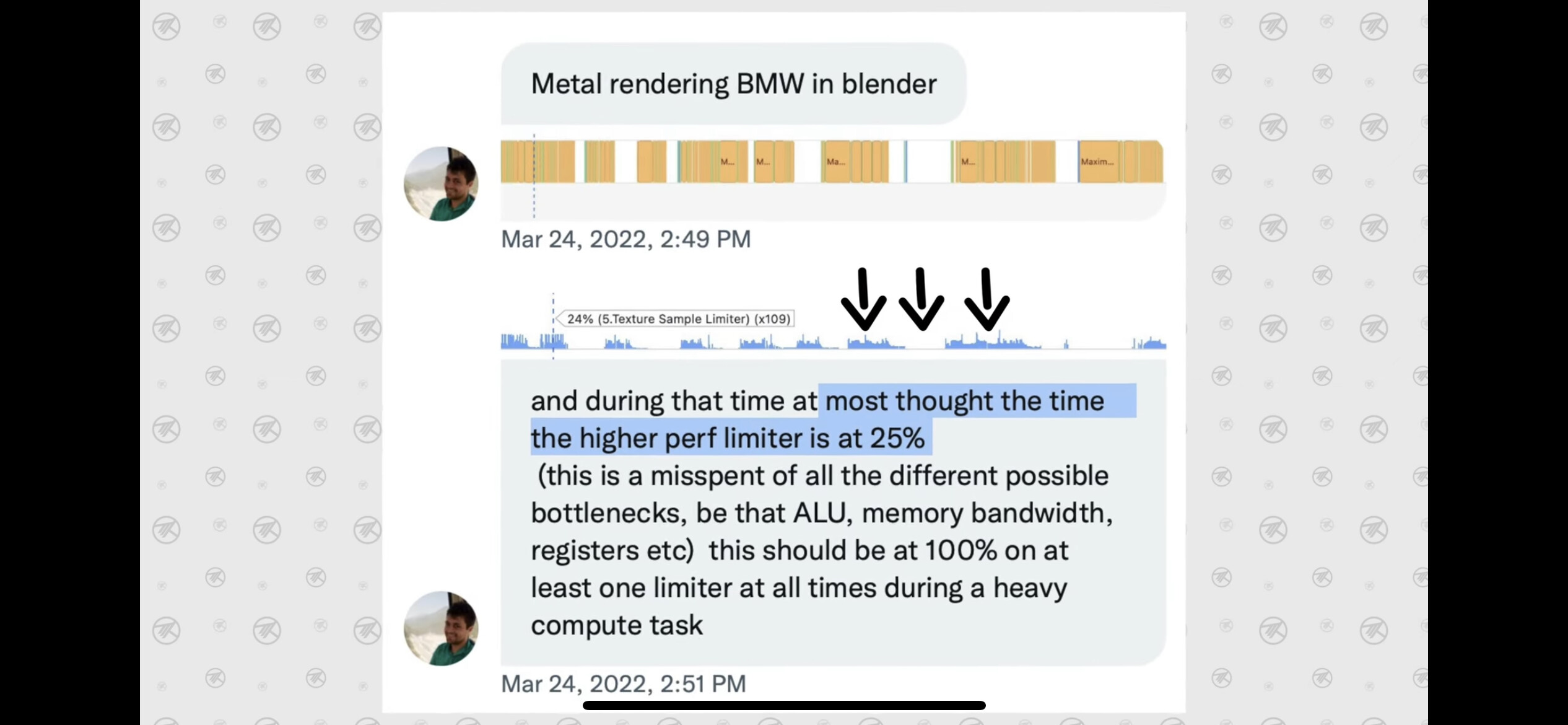
Considering they showed the graph I posted probably a bit.

Someone checked with Xcode and that makes it look like 25% of the performance is used when rendering the BMW.

Not sure what machine that was however. One of the ultras would make sense.

The more core the more difficulty it will have to “feed” all the cores.

Which means it might be only 50% on the M1 Max. That really would explain the Blender Dev comment of “we had a prototype that was 2x faster” because back then the Ultra was not even out.

Another thought I had was… it takes devs 4-5 years before they fully utilize the hardware of consoles, by that logic it might very well be another 2 years before we the Mac Apps that are “well” optimized and not just compiled for Apple Silicon.

BMW is a terrible test. It’s not providing enough workload to bring a modern machine to its limits.

1 Like

Thanks a lot for the explanation depth, and well, that makes a lot of sense.
Maybe the Apple team at Blender will be able to do some magic the proper way.

And actually, I wish GPUs were that way from the beginning, currently traditional architectures are a bit convoluted, for some effects that is.

TLDR EDIT: interesting link related to proper usage of the architecture https://developer.apple.com/documentation/metal/metal_sample_code_library/rendering_a_scene_with_deferred_lighting_in_objective-c

:warning: Long text ahead, but I think this TBDR has massive benefits

When I started doing any sort game dev and shaders (during the XBOX 360 and Microsoft XNA days) I didn’t know what I was doing at all… one of the first things to hit was that, for post processing effects, the GPU can’t read and write to the same pixel that is executing inside a pixel shader (beyond hardware blending used for transparency that is).

So for a simple “invert color” pixel shader post effect, which is: 1.0f - currentPixelValue (in a non HDR scenario), you would need to:

  1. Create, prepare and set a render target surface to render to.
  2. Render the 3D objects you wanted to render (this is what would have been the elements drawn to the screen originally in a non post process scenario).
  3. Create, prepare and set A SECOND render target to render to. Same resolution size and color formats as the first one.
  4. Draw a full screen quad (an actual quad mesh) to that render target 2 and reads from RenderTarget 1 (full screen quads that reads from a previous texture is the basis of all post processing) with the “1-color” invert pixel shader:
  • When said quad renders, it samples as its color Render Target 1 (a texture read operation) and then do the 1.0 minus color (an ultra simple math operation).
  1. Now RenderTarget 2 contains an inverted color result that can be used as the source for next post processing effects or draw to the user’s screen.
  2. Repeat for next frame (but RenderTargets can be kept and cleared instead of recreated if size and color depth don’t change).

Fast forward many years later, around the iPhone 5 era, I found it incredible to know that on said devices you could enable an OpenGL extension to allow a pixel shader to read what was already there drawn before, so the color invert post processing example all over again:

  1. Render the objects
  2. Run a full screen quad (without any sort of real setup, no need to tell or where/what to read and write) with the color invert logic
  3. …the end, repeat next frame.

(This is what the naive approach of anybody learning would try to do, see it not work, spend countless hours, in my case days as I didn’t know anything CS or computer graphics).

Not only that, one of the first rule of thumb (and what the books at the time would teach and provide work arounds for), is that setting and switching render targets is an expensive operation, so every time we switch to one we should try to stay there for as long as possible, i.e, want to invert colors and also desaturate? do them on the same invert color shader and not as a third pass with a separate shader.

Now, this is a limited simple example, there are caveats, effects like Gaussian Blur requires reading and averaging many neighboring pixels which you really can’t this way beyond 4 neighbors (to my knowledge). The “4” magic number is because, to my understanding, pixel shaders run in groups of 4, and you can’t really “read them” but just get some info, like rate of change of some data (i.e UVs) from the current one.

However, insane things can be done, because a pixel can not only read from what was there, but from MANY “what was there” multiple render targets (think of it as layers), making it possible to implement deferred rendering lighting and composite in a single pass:

That example has been around for years, I remember that scene from close to 10 years ago, at it seems to be kept updated as it now mentions Apple Silicon, but the explanation there is great for the curious.

The MaxTech’s alluded drawbacks and architecture mentioned have been around for at least a decade, more if we include design phase… it just hasn’t caught up for some reason, there are many WWDCs over the years where they explain or show examples of how to best utilize these.

Hopefully it will finally get ongoing… maybe UE5, Unity, EEVEE, etc can adapt their default provided rendering techniques to use this and all games from then on will start benefiting from all this.

Fair point, they do mention compute shaders too in there regarding these memory bottlenecks though, which is what CUDA/OpenCL/etc are based on and Cycles uses.

EDIT: regarding the bottlenecks, it’s actually amazing that using an architecture made for one thing treated as another is performing as it is currently performing, like the same guy mentions if it were the opposite way:

2 Likes

Sure seems some developers are interested in getting software to the Apple silicon, Corona just released an M1 native version too.

1 Like

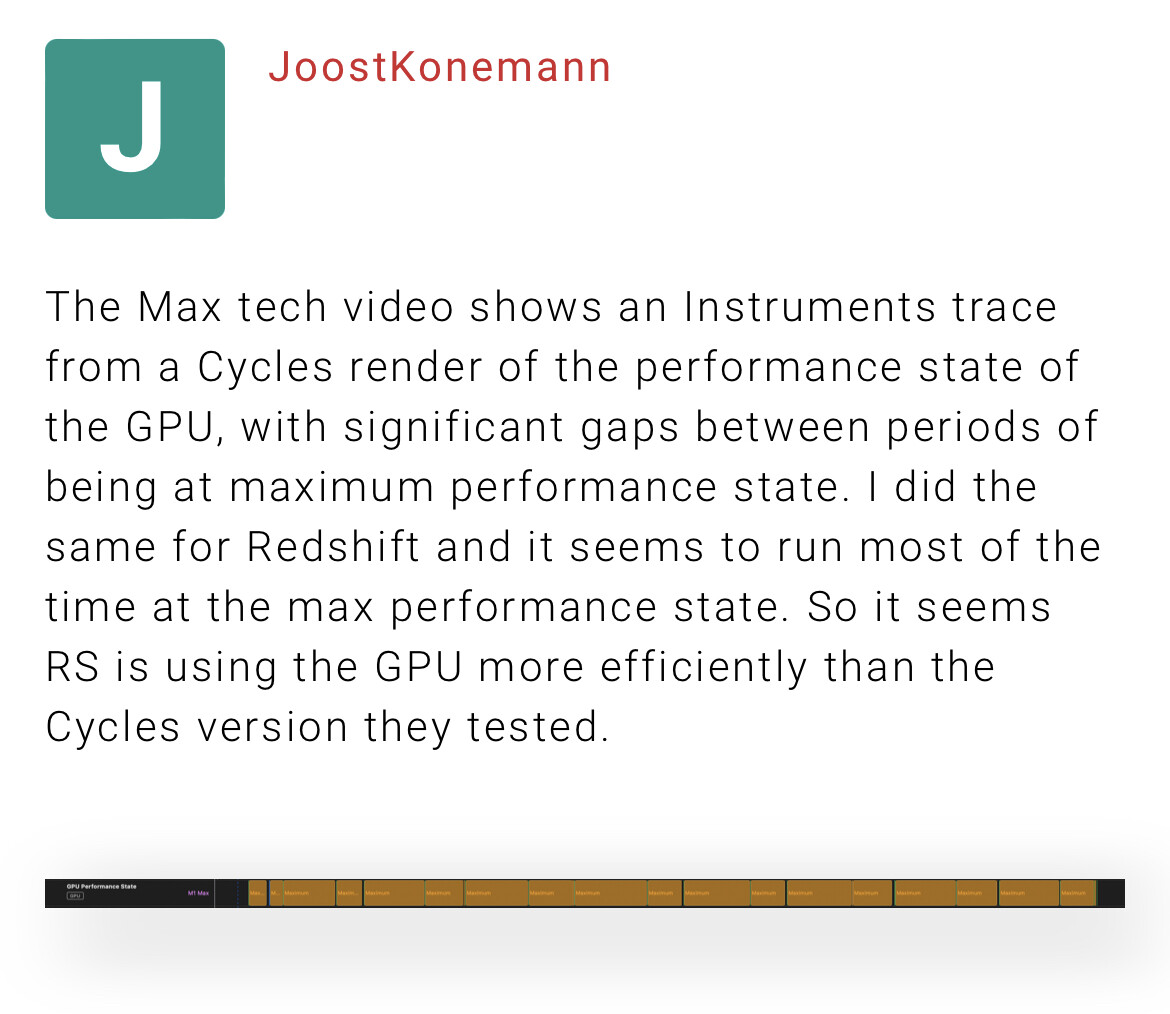
as to that discussion it sure seems redshift i f more optimized and has less idle states.

2 Likes