I have been learning to blockout and faces and figures using sculpting in Blender. This is the first time I have tried to refine my own project.
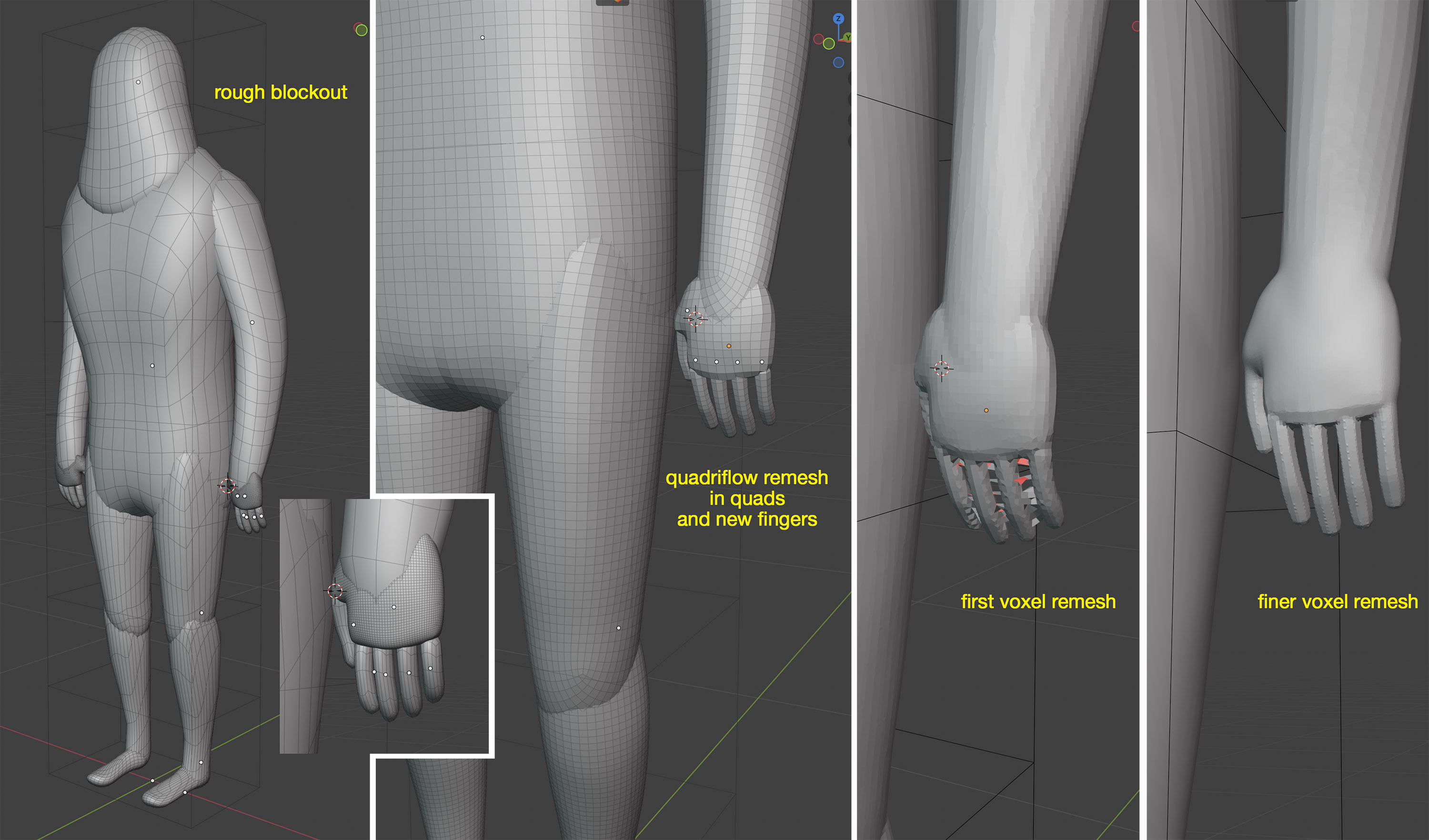
I have blocked out a stylised yeti character then Quadriflow remeshed the body and re-made the fingers to try and even out the polys for remeshing and sculpting. But I find it gets harder to maintain the mesh the finer the details get. Is this the limitation of voxel remeshing in Blender? (images below)
[!caution]
The bigger the voxel size, the more the small/thin mesh elements close to each other or other surfaces are going to be merged together like that, so is a normal issue as the voxel remesh does not have localized/adaptive voxel size like dyntopo sculpting method or manual subdivision modelling.
[!success] Solution
Decrease your voxel size, to be about the same size as the quads of your small finger blockouts to avoid merging together the fingers or other similar like that. Increase voxel adaptivity if the mesh gets unnecessarily dense in flat or less detailed curved surfaces to attempt lowering the mesh density.
[!note]
Decreasing and then Increasing the voxel size of the fingers does not avoid the first problem but it reproduces it instead.
[!tip]
You can work on the bigger blockouts (primary forms) first with voxel remeshing with a low res voxel size, and to increase that (res)olution at the end, duplicate your blockout and merge with the fingers or other small element/details that are part of the secondary forms and add and apply a subdivision modifier with one or two levels then remesh with higher voxel size.
Avoid using voxel remesh to purely add much more smaller details, like tertiary forms and so on, because that means you would have to remesh very high the sculpt and that usually means less performance for the blender viewport/toolset and your computer capabilities, instead use a combination of low/medium/medium high voxel remesh and then dyntopo for localized small secondary form details.
Then retopologize at the end to make it have clean topology and quads only and use multires sculpting for tertiary details instead.
The finer remesh is capturing the exact shape, like what you would see if the mesh was shaded flat, it doesn’t care for smooth shading which doesn’t actually affect the shape. If you don’t want this faceted look, make sure to subdivide the fingers and make them more rounded before the fine remesh.
Thanks @MichaelColina, @etn249, for the suggestions! I will try them all. I didn’t know about adaptive voxel settings. Will try incorporating a subd modifier too
Check FlyCat, YanSculpts, Marat Nurgaliyev, Grant Abbitt, and other blender sculpting and else related blender channels, they do tutorials or timelapses or both… and yes and some practice in the workflow as well .
Merge the fingers into the palm using a boolean modifier (the new Manifold solver is best for this), then enable Dyntopo and use the Density Brush to clean up the nasty topology around the merge area.
The downside of this method is that the entire mesh will be triangulated due to Dyntopo being enabled.
 .
.