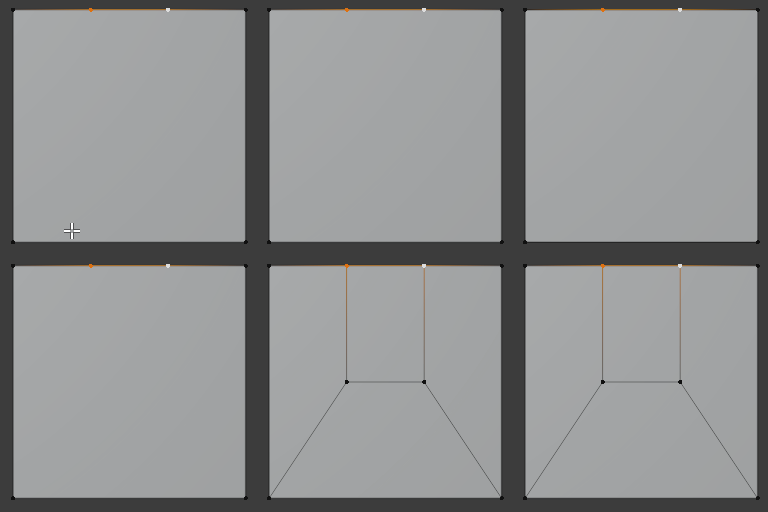
Quickly and easily terminate edge loops on flat surfaces.
The two main operators are:
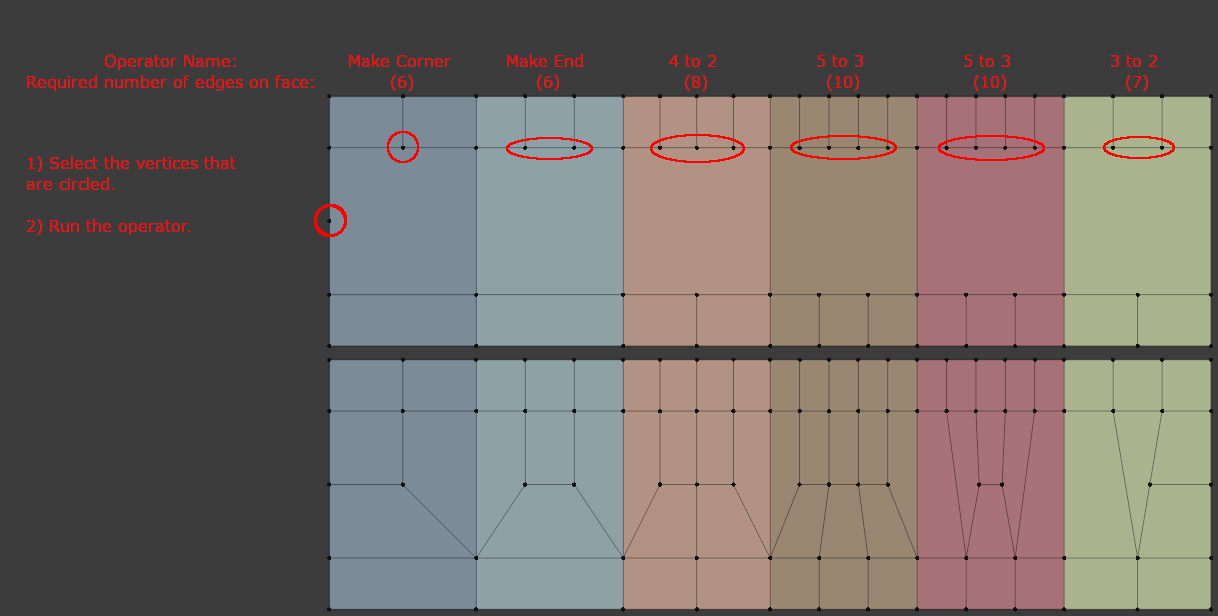
Make Corner
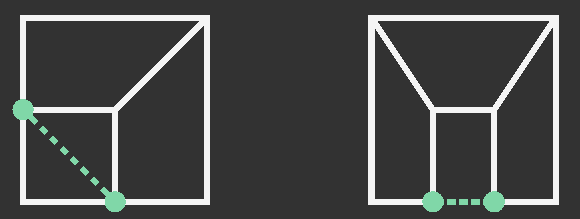
Select the two vertices that are on adjacent edges of the face and run the operator.
Make End
Select the two vertices or edge that share an edge (These are usually created by having two edge loops terminate at the shared edge)
In addition to the two main operators, there are three experimental operators that use the same idea:
Three to Two, Four to Two, and Five to Three. Five to Three has a secondary option that creates a different topology result.
To access the operators you can open a pie menu with alt+comma or optionally they can be found in the context menus. (Can be changed in the addon preferences.)
Or Add two buttons to the toolbar to quickly access the two main operators. (Enabled in the addon preferences)
Nice, thanks! It would be even cooler if it’d be possible to simply cut the corner or end by hovering over edges, so you wouldn’t need to create vertices inside edges first.
Hi @Jrome. As you may have noticed (but just in case you haven’t, I hope that you don’t mind that I inform you here), I have created a few Bug Reports on your Github Repository.
Hi, thank for this addon. I am getting this error when I try to activate it.
Traceback (most recent call last):
  File "C:\Users\kkostovas\Desktop\blender-2.83.10-windows64\2.83\scripts\modules\addon_utils.py", line 351, in enable
    mod = __import__(module_name)
  File "C:\Users\kkostovas\Desktop\blender-2.83.10-windows64\2.83\scripts\addons\Make_Corner_End\__init__.py", line 31, in <module>
    from . import (
  File "C:\Users\kkostovas\Desktop\blender-2.83.10-windows64\2.83\scripts\addons\Make_Corner_End\tools.py", line 8, in <module>
    from bpy.ops import _BPyOpsSubModOp
ImportError: cannot import name '_BPyOpsSubModOp' from 'bpy.ops' (C:\Users\kkostovas\Desktop\blender-2.83.10-windows64\2.83\scripts\modules\bpy\ops.py)
Jrome will without a doubt have the correct answer about your issue but when I read the __init__.py file, my guess is that the add-on is designed to work on Blender 2.91:
bl_info = {
“name” : “Make_Corner_End”,
“author” : “Jrome”,
“description” : “Make Corner: Select the vertices that terminates a loop on each adjacent edge for the face, or select an edge that connects the two vertices. \n Make End: Select the vertices or the edge between them that are created when two parellel edge loops terminate at the same side.”, “blender” : (2, 91, 0),
“version” : (0, 4, 0),
“location” : “”,
“warning” : “”,
“category” : “Mesh”
}
xan is correct. I just recently changed it to work with the release version of 2.91.
If you change the following lines in tools.py it should work (I just tested it with 2.83.10 LTS):
line 8: from bpy.ops import _BPyOpsSubModOp -> from bpy.ops import BPyOpsSubModOp
line 48: op_func = _BPyOpsSubModOp(module, func) -> op_func = BPyOpsSubModOp(module, func)
how hard will be to code this directly into blender ? along with edge flow and a possible future face constraint addon this will make direct straight forward modeling on par with Max.
they are now pretty much forgeting about subd modeling and they blindly think node workflow is solution for everything. They are doing this even before subd in blender reached its potential
Loving the option to change where the addon is displayed, leaving it up to the user rather than filling up their UI needlessly. Thanks!
Edit: I do agree that I’d love to be able to just select two edges and say ‘make end’. It’s kind of an inverse workflow, where you create the end first, then create the edges connected to it. Especially in Retopology, this is often useful.
Experimental:
Each operator can now be used after selecting two opposite edges (in edge selection mode) on a quad face, with the exception of make corner. Make corner requires the selection of two adjacent edges on the quad face.
Order of selection does matter.
Enable in the preferences.
Known issues:
Will error if there are less than or more than two edges selected on the quad face.
Fixes
Removed the use of:
line 8: from bpy.ops import _BPyOpsSubModOp -> from bpy.ops import BPyOpsSubModOp
line 48: op_func = _BPyOpsSubModOp(module, func) -> op_func = BPyOpsSubModOp(module, func)
It should be possible to use 2.83 LTS without any changes to the code.
Fixed a bug that caused some errors when the 3D_VIEW area was not the last area in the list of areas.