Make skirt rig react to leg movement?

My old character rig didn’t have a functional skirt rig, so the skirt was weighted to the thigh bones, so when I would make the character do an action like walking or crouch down, the skirt would react accordingly probably.
video below is the OLD rig:

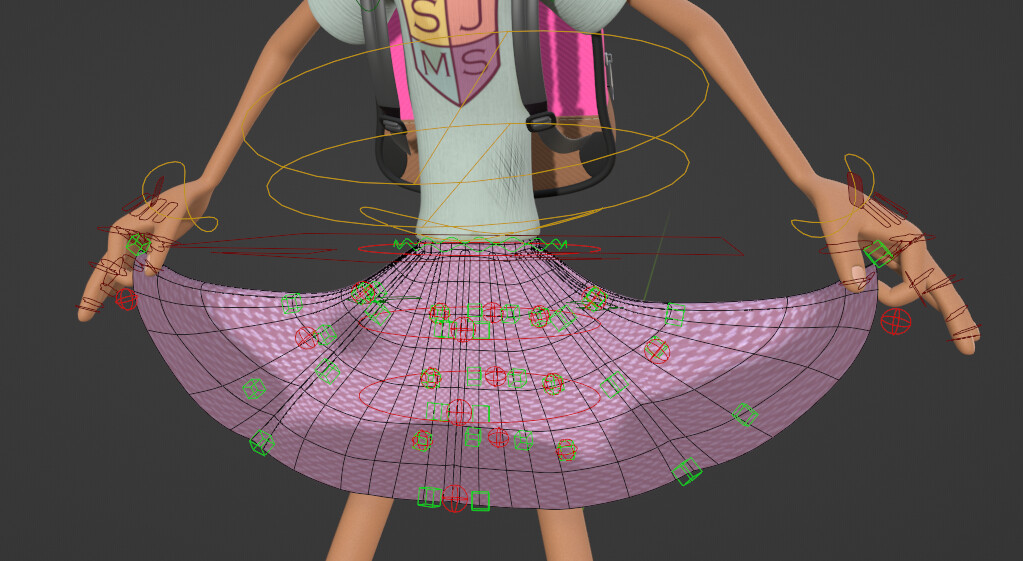
Recently I followed Pierrick Picaut’s tutorial on how to rig a skirt for your characters, the skirt rig I currently have is exactly the same as the one in the tutorial, with little deformation bones, mechanic bones and control bones, and overall it worked out okay. But the problem I’m having is that I lose the automatic movement of the unfinished rig, and I seriously do not want to animate the skirt movement manually.
video below is the NEW rig:


Also, I am aware that Pierrick Picaut made a video on Dynamic cloth rigging, and I even followed that one to see if I could fix the problem, but unfortunately it didn’t work out too well because the example in his video was of a coat, not a skirt, so it’s constructed differently probably.

Any ideas probably?

Although I’ve never attempted myself, the main technique of that Skirt tutorial approach, if I remember well, is playing with the Limit Distance Bone Constraint (Inside & Outside; as they can be combined on the same Owner Bone for more interesting results), in relation to the Leg, made at least for the last Skirt Bone at the bottom, for each column of Skirt Bone. Although the Clothes are different, I believe it is adaptable, but it might require some extra thought, because of the Looping Mesh around the Body, of a regular Skirt.

So, maybe, you just have to Re-Enable the Limit Distance Bone Constraints Setup?

You might find this addon to be of interest.

1 Like

You might want to check out Modeling Cloth Pro

It includes a Skirt tool…

I heard that Auto Rig Pro, which is an addon that I have (thank goodness for that 10th anniversary free offer probably) has a skirt rigging system that looks easy enough to use probably, but can it work with a custom made rig like on my character, or does it only work for the one that ARP generates?
[Blender] Auto-Rig Pro: New Skirt Rig!

sorry about the inactivity.

Uh? Anyway, a few days ago, I tried to add the skirt rig from Auto Rig Pro onto my custom character rig, I haven’t used the addon that much, so I must be doing something wrong here probably.

But I’m going to show you my process:
I added an “Empty” Armature rig

Added the “Kilt” in the Add Limbs dropdown menu, then I combined the newly added kilt rig to my custom rig by pressing CTRL/CMD + J


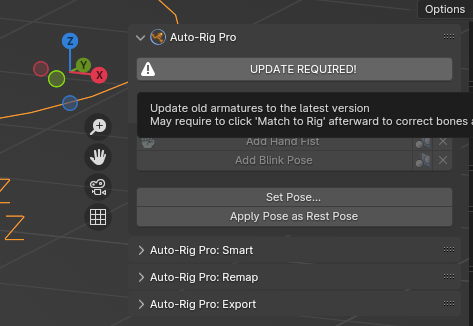
then it said I need to update the old armatures. So I did.
image
But when I do, the skirt rig is in a very tiny size, so I would have to scale them up in edit mode and apply the pose in pose mode…

When I get to the part where I add the collision with the thigh bones

And I notice that the collision isn’t precisely what I want it to be

Typically with Auto Rig Pro, if you were to use the default Human Rig and add a Kilt on that, there would be several sliders that allow you to control the movement of the Kilt so it doesn’t clip with the legs of your character.

But for some reason they don’t show up on my empty with a Kilt joined with my Custom Human Rig. Also, the secondary controls are missing as well, why is that?

I would prefer if the topic was split into a new one where I could get help on adding a working Skirt Rig from Auto Rig Pro onto a Custom Human Rig, without using the one that Addon generates for you…

Bump.
Please help me with this issue

I heard there are some addons that bring physics simulations to bones. Some of them are like wiggle bones (or wiggle bones 2), simplicage, and bone dynamics. If I don’t want to do manual animations for the skirt or heavy physics simulations, then these addons might be a good in-between. You’ll need to do research to see if those will suit your needs though.

i wanted some help on the Auto Rig Pro part though. It seems to be my best option, but there’s something that I’m doing wrong, but I don’t know what it is.

Also, may the topic please be split into a new one?

There’s no need to split the topic. Not every answer you receive on any question is always going to be exactly the solution you want; sometimes you’re going to get suggestions that go outside your initial parameters, as someone might have found a solution in the past that they believe might work well for your case.

If it doesn’t, then just don’t take their suggestion.

You might get better help if you ask in the Auto-Rig Pro Page…

A few days ago I had this idea where I would make a clone of my character with only the basic necessary parts for rigging, then I spawn in an ARP Human Rig and add the Kilt Limb on top of it, but not remove any of the bones from the custom rig, I would then remove all ARP Bones that are not needed, in other words, I just keep the skirt rig, that part was rather finnicky though. I then join the rigs together and see if it works.

It…kinda works probably?


This is a VERY hacky way to get it to work, but I’ll see if I can achieve a similar result on my main rig with all the parts attached without breaking anything.

1 Like

D’alright I can now confirm it works with the main rig.


I might have to take a closer look to make sure nothing breaks though, but I like the result so far, and everything is part of one armature.

Hello I saw your first rig and it might be just what I’m looking for, for my current rig skirt as I don’t need any kind of realistic cloth, I just need to make a skirt that moves altright with my thight bones, could you help me and show how you made it?

bro can you show me how to do it? Im having trouble with ARP skirt rigging too.

Can you specify what kind of issue you’re having with the ARP Skirt Rigging? That way it can be easier for me to help you out.