Manual vertex group assignment from Blender not isn't recognized as a rig in CSP, Please help T_T

Hey everyone,

I’ve been working on rigging hair models in Blender 4.4.3 to use as poseable references in Clip Studio Paint 5.0.4, exporting as FBX (also tested GLB, same result).

What works: I did Ctrl+P → Armature Deform with Automatic Weights, then exported it as FBX with ‘selected objects’ and ‘only deform bones’ checked and ‘add leaf bones’ and ‘animation’ unchecked. CSP recognizes the rig perfectly.

My current issue: Ctrl+P → Armature Deform with Empty Groups, then I manually assigned vertices to bones via Edit Mode vertex group assignment, and in Weight Paint I used Smooth in ‘Weights’ to even it out, but CSP imports it as a static object; it doesn’t recognize the rig.

What I’ve verified: The Armature Modifier is present on all meshes and bound to vertex groups.

All vertices are assigned; there are no ungrouped vertices (checked in Edit mode, then Select, Select by Trait, Ungrouped Vertices. None light up on any mesh).

Deform bones checked on all bones via Edit Mode.

Correct export settings (selected objects, only deform bones, no leaf bones, no animation).

Parent connection to the right armature is confirmed on all meshes.

Does anyone know what automatic weighting adds to the FBX data that manual assignment doesn’t? Is there a specific step I’m missing? I’m so extremely bummed right now…

For years I’ve wanted to learn how to rig, as finding someone long-term to rig for me has proven impossible. Besides, I prefer to learn myself, as I’ll have full control and won’t feel like a burden.

I’d be immensely grateful if someone with knowledge of Clip Studio Paint and Blender could help me on this one! Ask me anything.

Thank you in advance!

P.s. I’m very new here; if this is the wrong place to ask, please let me know where to post <3

Welcome! :vulcan_salute: Have you checked that the armature modifier has the correct rig selected in it? Also did you in weight painting mode normalize all weights in the mesh? I think some softwares cannot handle weights that are not normalized. And did you export the mesh and the armature selected together?

Good day!!

Yes, in the modifier the name of the armature I assigned is selected and present. I did try to normalize the weights by selecting the mesh, the bone and ‘normalize all’. But CSP only recognizes the 4 of 5 strands end bit of the hair, not the rest, it’s still 1 static object. And yes, I always select it last to make sure it comes along as I’m very paranoid ^^; But maybe I’m doing something wrong with the normalizing?

Ok, does the rig have all bones parented to some other bone? (Except for the root bone ofc.) I think some softwares require the bones to be completely hierarchical. :thinking:

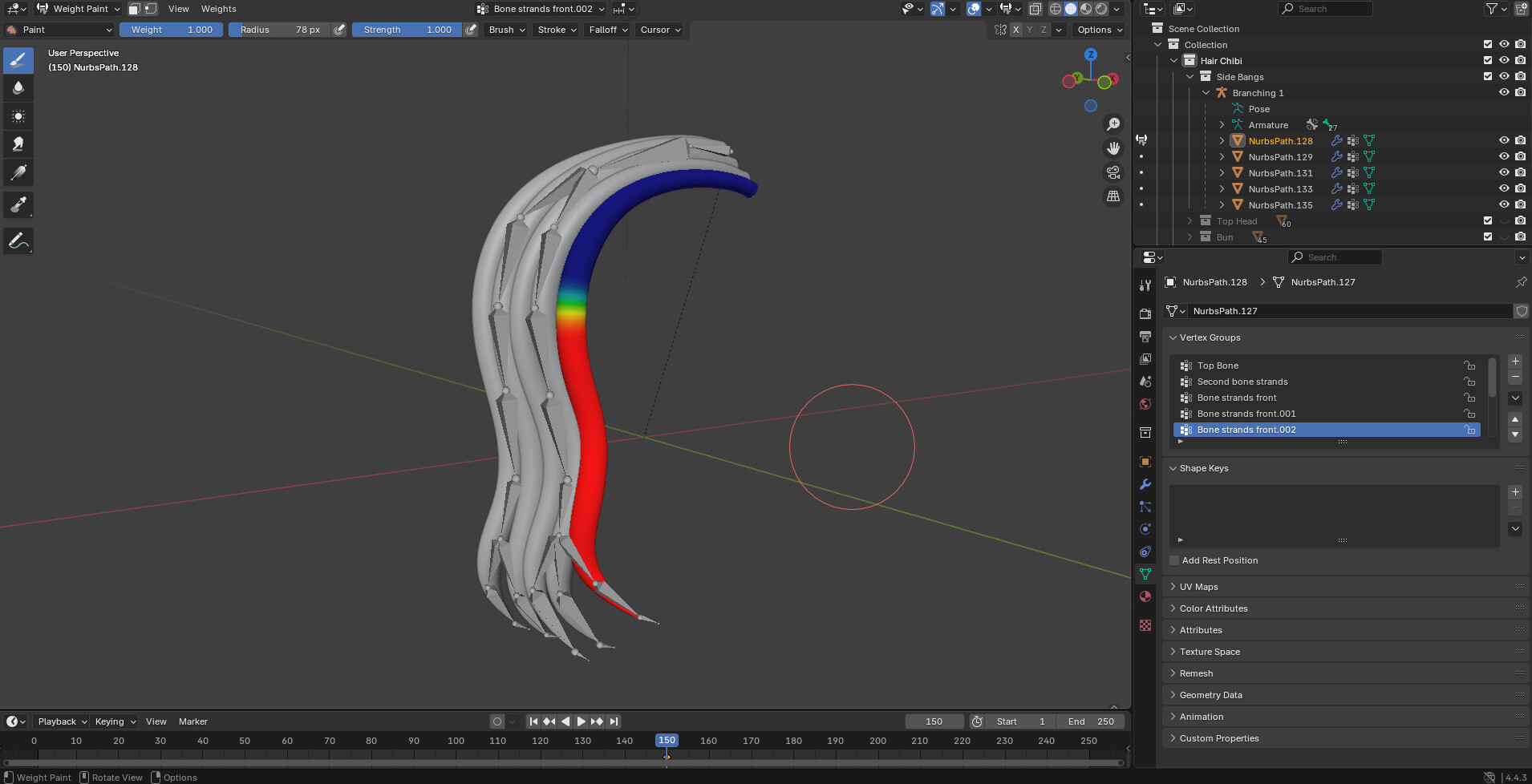
Im not sure what you mean but the way the armature is set up is as follows: Main bone which is indeed the top bone, connected to all 5 strands (separate meshes, not joined). Then a second bone parented to all 5 strands. Then it branches. A direct extrude from the second bone into two new strings. One is connected to two strands and the other to three strands. Then it goes down until it splits again at the ending and each strand has a string. So the one string attached to two strands splits into 2 strings. And the one string attached to 3 strands splits into 3 strings. I can try and post a screenshot tomorrow to show if that helps! English isn’t my native language so me explaining can be wacky :persevering_face:

Alright, I tried again the following:

‘Normalize’ weight on each bone.

‘Normalize all’ weight on each bone.

Both yield no result. Both functions literally destroy the entire weight assignment I did to each bone, making Clip Studio Paint even more confused.

I now uploaded two images, one of the mesh with the armature. And one that shows the assigned weight (to just one bone and one mesh).

What happens in Clip Studio Paint when I ‘normalize’? Nothing, because Blender literally removes all the weight except for the top (static) bone, so Clip Studio Paint reads it as a static object only.

What happens in Clip Studio Paint when I ‘normalize all’? This depends on which bone I select first. This one gets movement, whereas the rest do not, even when I ‘normalize all’ these bones as well after the (whatever) first bone I ‘normalize all.’ Clip Studio Paint only recognizes that one bone as a valid rig, and nothing more.

Things I’ve already done:

  • Select ALL objects (yes, also the armature) before exporting
  • CTRL+A and Scale (I CANNOT do ‘all transforms’; Clip Studio Paint hates this).
  • In settings: Check; selected objects and ‘Only deform bones.’ Uncheck animation and ‘add leaf bones.’

How did I rig? (maybe important to figure out the issue)

  • I select all meshes and parent them to the armature ‘with empty groups.’
  • I remove all the groups from the meshes that will not get any weight (think front meshes that won’t need the back bones). Because Clip Studio Paint hates empty bones.
  • I select the mesh and go to edit mode.
  • I press 2 to enable Face Edge mode.
  • I Shift+Alt+Click all rings that need weight, from the point the bones start all the way towards the end, using C to select the points, as this is very difficult with just Shift+Alt+Click.
  • I go to the vertex groups, check the right bone is selected, and assign a 1.0 weight.
  • I go to weight paint, checking I have the correct bone. And then in ‘Weights,’ I click ‘Smooth’ and adjust the operator until everything looks nice and smooth.
  • Rinse and repeat for all the bones.
  • When all is done. CTRL+A and Scale.

Ask me anything!

By comparing two text files, where one was automatic weights and one was manual weights, I found out what is wrong. But I can’t solve it.

When blender weighs automatically it adds a data string; indices with the weights, during exporting as FBX.

With manual weighing it does not, just the weights during export. And this CSP cannot read it.

Does anyone know how we add these missing data (indices) to the export via blender?

Blender’s default FBX exporter isn’t great. There’s lots of add-ons out there, “better fbx export” or the like, that may work better

Could you please tell me where to find these add-ons? I just checked ‘preferences’ and then ‘add-ons,’ but in the search it only finds one FBX, and that one’s built in. I’d love to try the other add-ons you’re mentioning.

Tried them, asked for a refund. They do not work. I’m so lost at the moment.

Will the data string still be there if you first parent with automatic weights and then adjust the weight manually after?
And if the string is still there, does any of the related values differ from the initial automated weights data and the manually modified weight data?

I also tested that, Clip studio paint will only react to the rig of that automatic weighing, and still sees the rest as static.

Yes the weight value was different; not the entire strand was painted and it was a lighter value (say 0.600). So I replicated this via manual painting, and csp still sees it as a static object. So something in the automatic weighing adds data csp needs. And I have no idea what or how to add it myself.

Maybe I am misunderstanding so just want to clarify for my own sake

My question was if you have tried doing automatic weights and then modified those automatic weights

And the values I was refering to wasn’t the weight values but rather whatever values you found in the generated data string

Could you please upload the text files you were comparing?

No I’ve not as I cannot rely on automatic weights. If I do and blender refuses to do one in the future with any mesh, I’m screwed since I won’t be able to have the mesh rigged. So I have to be able to do it manually without relying on automatic.

I’m not saying that you should rely on the generated automatic weights

I am just asking if you have tried doing the automatic weights and then modifying the automatic weights to how you need them to be

I am asking because you said you compared two text files (I assume extracted from the exported FBX files somehow) and you found a data string that was only present in the one where you used automatic weights

It would also be great, again, if you could share the text files you compared so that we can better understand what you are refering to

I exported the FBX’s and then right click and open in notepad. They’re on my other computer, I’ll upload them in a bit.