Yes similar questions have been asked in the past and answered but many years ago and Blender now may be more resource ‘hungry’.
I want to purchase a laptop with a tight budget.
Lots of new stuff now such as Snapdragon processors, AI Copilot, NPU whatever that is, etc
One reply to a similar question (a few years old) was
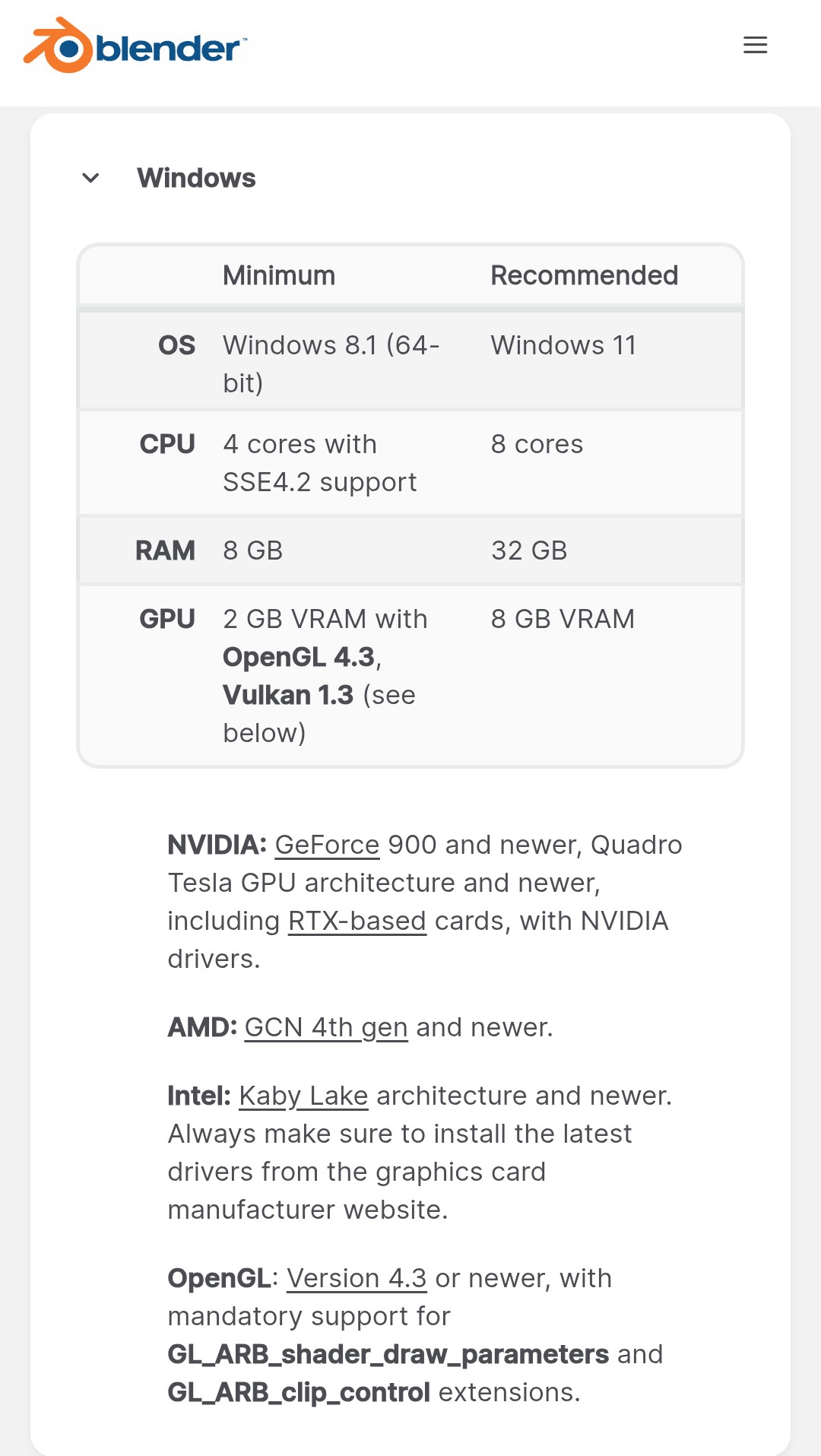
Minimum -
i5 or i7
16Gb RAM
Dedicated GPU - which I assume includes laptops with say nVidia RTX3050.
Is this still correct for the latest Blender version? I use Blender just as a hobby mainly creating objects for Microsoft Flight Simulator scenery.
Personally, I have a four year old Lenovo Legion 5R, it has 16gb ram and 4gb vram. It has worked ok for my already advanced level short film projects. But I’m still using Blender 4.2.2, because I’m in the middle of a massive project and I want to use the same version throughout it. I once tested 4.5, but using vulcan made it crash several times so I went back to 4.2.2. It could also be that I heard 4.5 was pretty buggy. I haven’t tested 5.0 yet.
I’m not an expert with hardware, but my intuition says that if you are using Blender just for a hobby, I believe that a gaming laptop around 1000€/$ meeting the requirements will be well enough. Especially if you are mainly creating just game assets that should be more optimized anyway. Because single objects can be done even with just minimum requirement computers. You would need a more powerful computer mainly if you are doing some big and complex scenes with lots of high resolution materials, or doing some very detailed sculpting with tens of millions of vertices etc. Or rendering long animations with Cycles, that’s where the GPU power will be most useful.
Thanks Jann,
AS I am retired now I really want to try and keep my budget lower than 1000 euros.
I am looking at a Lenovo LOQ-Essential Intel Core i5 with 16GB ram which is apparently expandable to 32GB, and Geforce RTX3050 with 6Gb Vram GPU laptop. The minimum specs don’t mention CPU speed only cores. The Intel Core i5 has 8 cores and speed up to 4.4 Ghz and monitor refresh rate of 144 Hz which seems to be ok?
I also still use Blender 4.2 as the Asobo exporter addon (for Microsoft Flight Simulator - I create scenery objects for) does not currently support later versions.
The absolute best bang for your buck when it comes to a budget workstation that actually has some power and real capability is often to get stuff slightly used and definitely desktop rather than laptop. If it were me (been building my own workstations for 20+ years), and I had a budget where I needed to stay well below one grand, I would try to find a used couple-year-old Ryzen gaming PC (or used parts to build with) and I would definitely, above all else, try to get a higher-end RTX that is a couple generations old, like RTX3080, or hell, even an RTX2070 Super, which would totally smoke that RTX3050 you are talking about. You need to understand that entry-level GPUs are woefully weak and pathetic in Blender or other 3D apps, AE, Davinci Resolve, etc. You are always much better off getting the xx70, xx70 Super, xx70Ti, xx80 variants of RTX GPUs instead of the newer entry level ones. Always. Good luck John.
Thanks. I already have a desktop which runs Blender as well as I would like. Intel i7 9700k, 16Gb ram and RTX 2060 6GB graphics. The laptop is just to use in a warmer place in my house and now I am considering an Asus TUF with Intel core i7 (10 cores) and RTX4050 graphics card which has been reduced from around $A2398 (1460 euros) to $A1798 (1095 euros). I doubt if I would ever develop 3d animated objects using manifold or cartoon like objects. Mainly simple geometric objects such as buildings. I guess spending that extra approx 300 euros might be worth it even though I will never use the full capabilities of Blender? Its still $A600 (365euro) more than the original one I mentioned.
For a while I was modeling on a budget netbook from 2013 with a 1GHz AMD APU and…uh…I can’t remember how much memory, but not much. For just modeling, it was fine. Granted, this was Blender v2.79b. Blender has gotten much heavier since then.
Currently I’m using an AIO (also from 2013, actually) with an I5, still no discrete GPU, and 16GB ram. I’m using Blender v3.6. It is perfectly fine for modeling.
Unfortunately Blender v4+ has dropped support for ‘ancient’ 4th Gen Intel CPUs because their graphics chips no longer support whatever more recent OpenGL version (can’t remember, don’t care anymore). Point is, buy something fairly new to play it safe.
Cycles rendering on CPU with Path Guiding (OpenPGL) is pretty impressive. As long as I’m not trying to render animations, I can get decent renders in just a couple of minutes.
So…if all you’re doing is modeling, you probably don’t need to worry too much about specs.
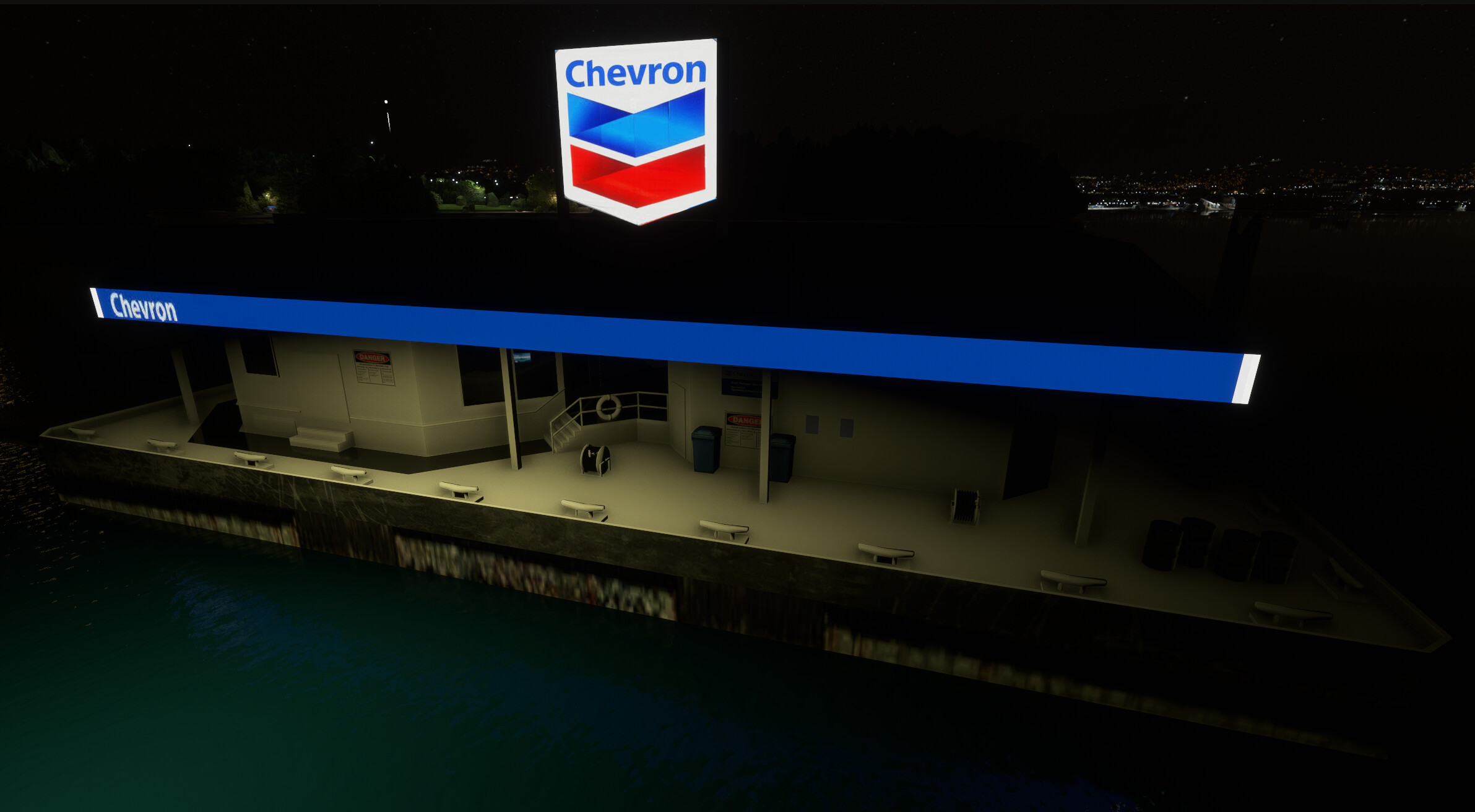
Thanks. I ‘found’ the Asus TUF F16 core5-210h with RTX 3050 (later model than the Lenovo and better built too) which I will get I think. I have included the later object I created to show the types of objects I create.
You definitely won’t have any issues with that type of modeling. Lots of high-poly sculpting, dense vegetation, etc. might start to cause lag, but not something like this.
Looks great, by the way!
Edit: Actually, maybe not even then (?). I’m not too familiar with discrete graphics performance in modern computers.
 But I’m still using Blender 4.2.2, because I’m in the middle of a massive project and I want to use the same version throughout it. I once tested 4.5, but using vulcan made it crash several times so I went back to 4.2.2. It could also be that I heard 4.5 was pretty buggy. I haven’t tested 5.0 yet.