Modeling a Head using Face Loops

This is a tutorial work in progress. With the concurrance of the moderator, I’ll post the finished project in Tutorials when it’s done.

Here’s what I’ve got so far:


My target audience: The new BlenderArtist who has spent a few weeks doing tutorials, knows the interface fairly well, knows the “obvious” tools, and gets the urge to stop working on Gus and do a realistic human face.

What I need to know from the new people:

How much do you need in writing to explain the images?
What are the “obvious” tools for you, and what tools do I need to explain?

Here’s the list of tools I’ve used, in no particular order:
Grab, Scale, Constrained Scale, Box Select, Brush Select, Add Mesh, Extrude, Erase, Use Background Image, Switch Select Mode, Mirror Modifier, Subsurf Modifier, Set Smooth, Recalculate Normals Outside, Hide and Unhide, Duplicate, Proportional Edit, Split Screen, Change View, Rotate View, Select/Deselect All… that’s all I can think of at the moment, undoubtedly the list will get refined as I answer questions.

What I need to know from the more experienced people:

Do you see any glaring deficiencies in the mesh?
As I write explanations, are there simpler or more straightforward ways to do things I could incorporate?

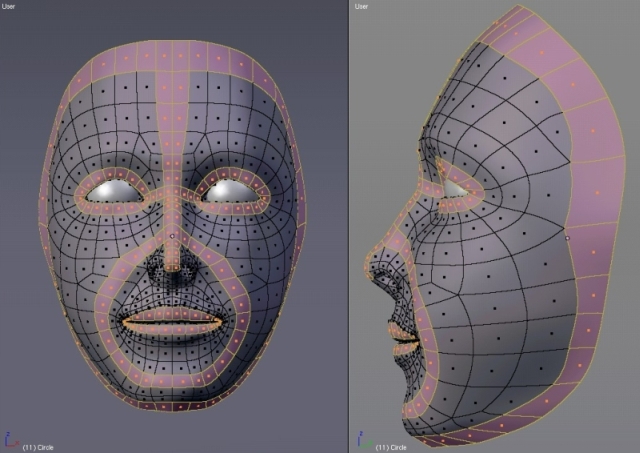
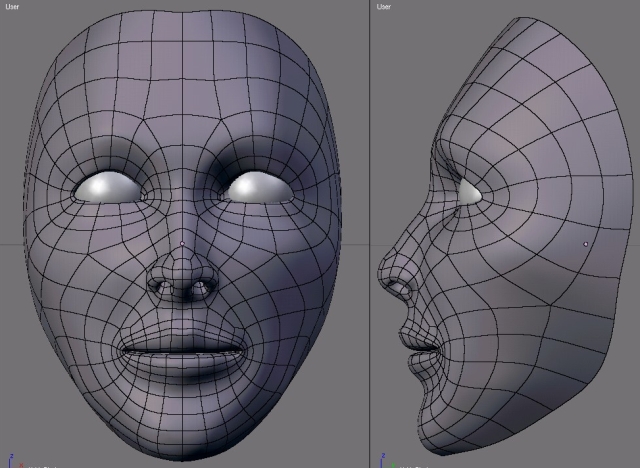
You’ll notice that its a stretch from the fifth image in the above post, to the complete face: here are the rest of the images. Starting with the completed loops, the three images in the middle show filling in some of the empty space between the loops, with more loops.


Just looking over these, I notice there’s not much about building the nose. Similarly to the mouth and eye openings, I used loops around the nostrils to start the nose construction. Should I leave that as an exercise for the student? :evilgrin:

in the 6th picture, I see a couple of “stars”(those verts with five edges attached to it:P)… other than that, looks like good tut-material

Yes, thanks. Filling in between loops seems to inevitably create stars. I’m still working out if it’s possible to avoid them as I do the fill-in, or if that will wind up being a “fix it in post production” sort of thing.

It´s look good! If you use a reference image, could i then see it?

Hi Orinoco,

I am not very experienced, but I found a few places that don’t seem correct to me.

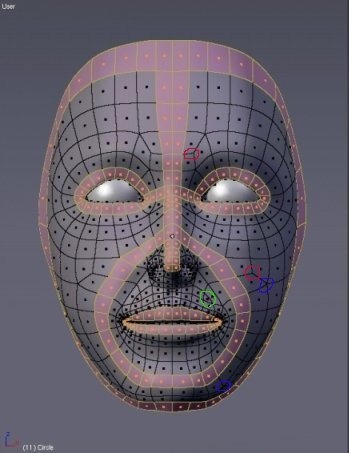
[See attached image]

Green - I think you should try to avoid that triangle, as it seems to be in a bad place if you were animating the face.

Red - Those 3-edged poles might cause problems during animation.

Blue - I read somewhere that it is a good idea to have the two 5-edged poles that form a circular loop scattered so they are not on the same edge loop.

Other than that, I think that the mesh looks very clean and the tutorial seems like it will be an excellent resource for the community. Thanks for going through all of the hard work to provide this!

JvIasterMind

Attachments


I used licenced images from 3d.sk to make the reference image I used to create this head. I’ve asked for permission to post the reference image. However, the tutorial is supposed to work with any reference image you happen to have. For the time being, you could use the Adrianna front and side views from BlenderArtists community journal #2 from December 2005. Click on “Articles” in the BlenderArtists header, the reference image links are at the bottom of the December Community Journal.

Orinoco: the places that JvIasterMind pointed out are the same ones that I’d worry about. You’ve got the one triangle above the mouth that’s definitely not necessary and those poles can cause some problems where they’re at.

For the triangle you can just delete one of the loops there, and then for the poles on the cheek, I’d say move them up to the cheek bone and try and get rid of one of them. From my experience I’ve found it’s best to keep poles where the skin is slightly tighter or stretched (such as the cheek bone) so that you don’t have to worry about deformation problems.

Here’s a paintover of the major loop changes I’d suggest:

JvIasterMind, mr_bomb, thanks for the responses. More work to do, I see. :smiley: Trust me, that’s a good thing…

mr_bomb, thank you for the paintover, it’s closer to what I was originally shooting for. I got impatient to finish.

I tested the triangle under the lip with a shape key going from neutral to a smile, but didn’t see any major problems with pinching :eek: . Maybe there was an effect, but if it was there, it was very subtle and hard to spot. I’ll save the renders and do a comparison after I remove the triangle.

Two more images today:

Fixed the topology


I think I caught everything that needed fixing. Take a look anyway, just in case.

And, another way of looking at loops.

I see one pole that might be slightly out of place in the nose. I think if you moved the pole marked by the green circle to the red circle instead (redirecting the flow along the blue arrow), it would be easier to define the shape of the nose (might be important on a more exaggerated face).

Other than that, the flow seems very good in the rest of the face.

JvIasterMind

Attachments


I think mr_bomb nailed edge loops with his video tutorial Modelling a Female Face found at the bottom of Community Journal #2 - December 2005. But it would be cool to have a text version too.

I’d really like to see a tutorial taking care of the rest of the body and possibly rigging. Hint Hint.

You’re right about mr_bomb’s tutorial, jrbrusseau, it is an excellent one. This tutorial is not just a text version of the Adrianna tutorial, though. I have a slightly different take on using loops, especially the first one, to get the overall shape correct.

In traditional sculpture, you start with large masses of clay and build them to the overall shape of the head, with very little detail, maybe nothing more than a light line showing the center of the face and the eyeline. If this large amorphous mass of clay is improperly shaped at the stage where there is no detail, the head just won’t look right, and the process of making a portrait bust becomes a huge struggle.

In Blender modeling, we generally substitute background reference photos for that large mass of clay, and add details to this, following the lines of the photographs. This seems to work well for people with a good sense of volume and spacial relationships, but I’ve seen a lot of work by people whose eye is not yet developed. They struggle with the interface, with the hot keys and with the artistic aspects as well.

So the intention here is to show, not so much how to make sure there are loops, but where the loops go. In my opinion, the most important loop in a head is the face loop, which is the equivalent of that amorphous large mass of clay. That’s why I put it first.

The face loop defines the overall height and width of the head, the hairline, the location of the ears, the shape of the forehead and the jaw, the cheekbone, the slope of the skull, the shape of the chin. If this single loop is “off”, all those aspects of the portrait will be “off.”

Unfortunately for the beginning artists among us, this loop is usually the last one they build and then wonder why their model doesn’t look right. I say, make it first and make sure it looks right, before moving on. When this loop is the only one in the 3D window, it is easy to move around it, look at it from different angles, and see any problems there might be. In fact, the problems are usually pretty obvious, and, since there are so few vertices involved, usually pretty easy to fix.

This “face loop”, combined with the “loop” running from the forehead down the bridge of the nose provide targets and anchors for all the other features of the face. Experienced artists can start where they like, and place these features by eye. Beginning artists, I believe, need more of a structure, to be shown what is important and what is fill-in. To get some guidance on where it is important to spend time in the initial stages of a work, to avoid tedious vertex pushing in the later stages and still not quite getting it right because some fundamental dimension or angle is off.

Finally, some notes on where this is going:

I’ve found this technique useful for modeling anything with a face. So far I’ve done a wolf, a bear, a camel and a giraffe (heads only), and they all came out well on the first try, by making loops in the sequence shown here. I am planning on doing a pelican and some kind of fish and lizard, just to visit other branches of the animal kingdom.

I have an intuition that this technique can be used in cases where decent reference photos (front view, side view, close to orthagonal, neutral expression) are not available, for modeling either sketches or photos taken from an angle (as most are.) I’m still working out the details on this, but it basically involves copying the five loops from the images shown above, then fitting them to an angled photograph.

So, while I am also persuing my interests in the rest of the body and rigging, it might be a while before you see any major tutorial work from me on those subjects. I’d recommend you have a look at shadowman99’s Female Sith, Wim’s Elissa, and toloban’s work on rigging shoulders and hips for ideas, inspiration and guidance.

Thanks, for those references on body modeling and rigging. Your tutorial sounds handy. I think your pictures will need more explanation.

Also, when are you going to show the other animal heads?