Multi-object scene texturing using UDIMs and Ucupaint

Hey, I’m slightly numb at multi-object (full scene) texturing, and in particular UDIM workflows.

I have two specific questions, one related to TD sizing and one related to leveraging the Ucupaint extension for this particular project.

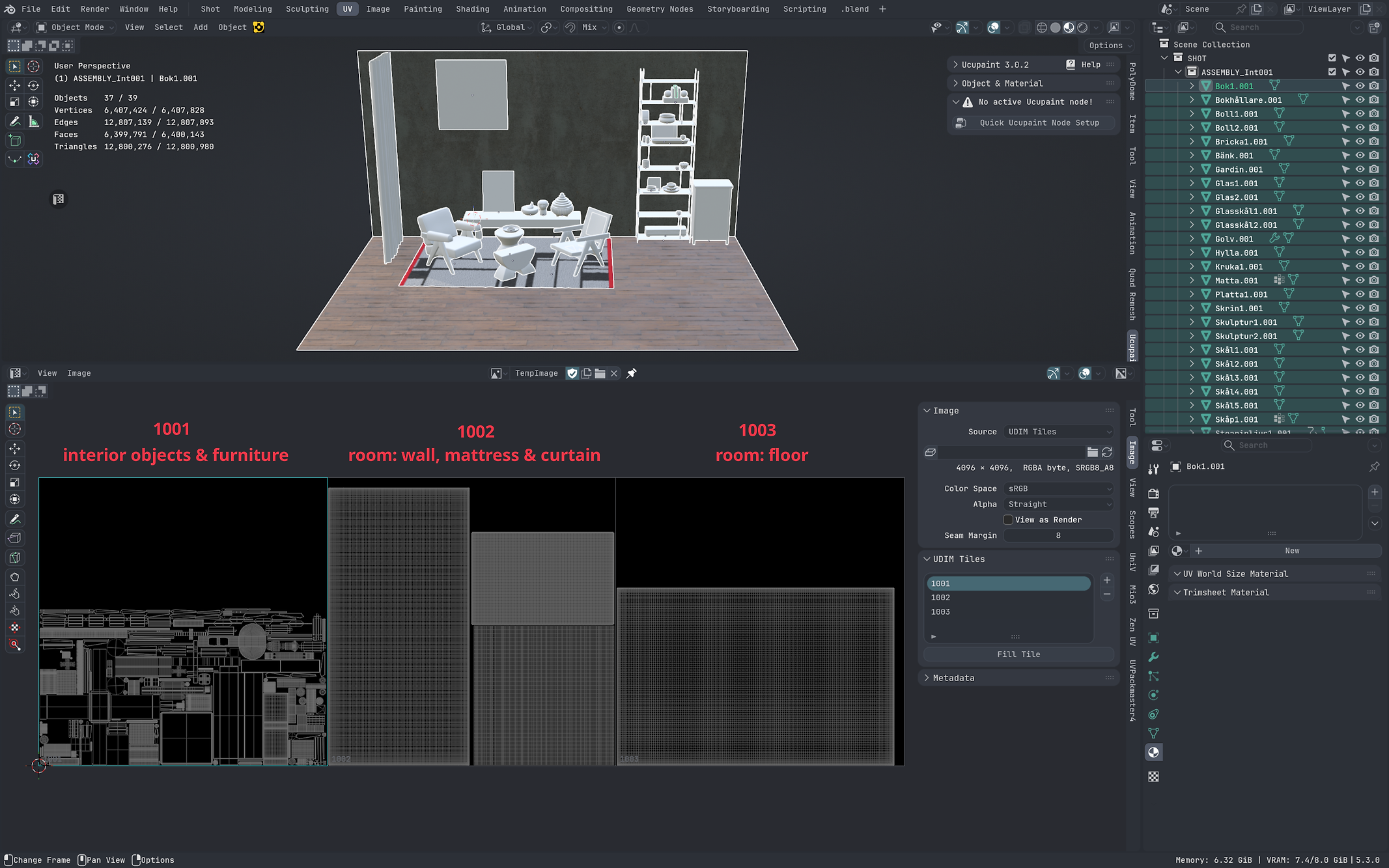
I’m working on an interior visualization project (see images). The scene has about thirty objects which I’ve unwrapped into a single shared UV map, on 3 UDIM tiles (same TD for all islands).

Q1. TD sizing

My plan was to make 4k textures for the UDIM tiles but I’m starting to think that the pixel area of interior objects e.g. furniture etc. (leftmost tile) would be too small. On the other hand, if I enlarge them and spread them out on more UDIM tiles, they become larger relative to the room objects e.g. Floor, Wall and Matress (second and third UDIM in the screenshot). How would you approach this consideration?

Q2. Ucupaint workflow

This is specific to Ucupaint. How would you recommend approaching material making here:

Would you create one shared material with a single Ucupaint nodegroup, then create layers for each object – or would you suggest a more viable strategy?

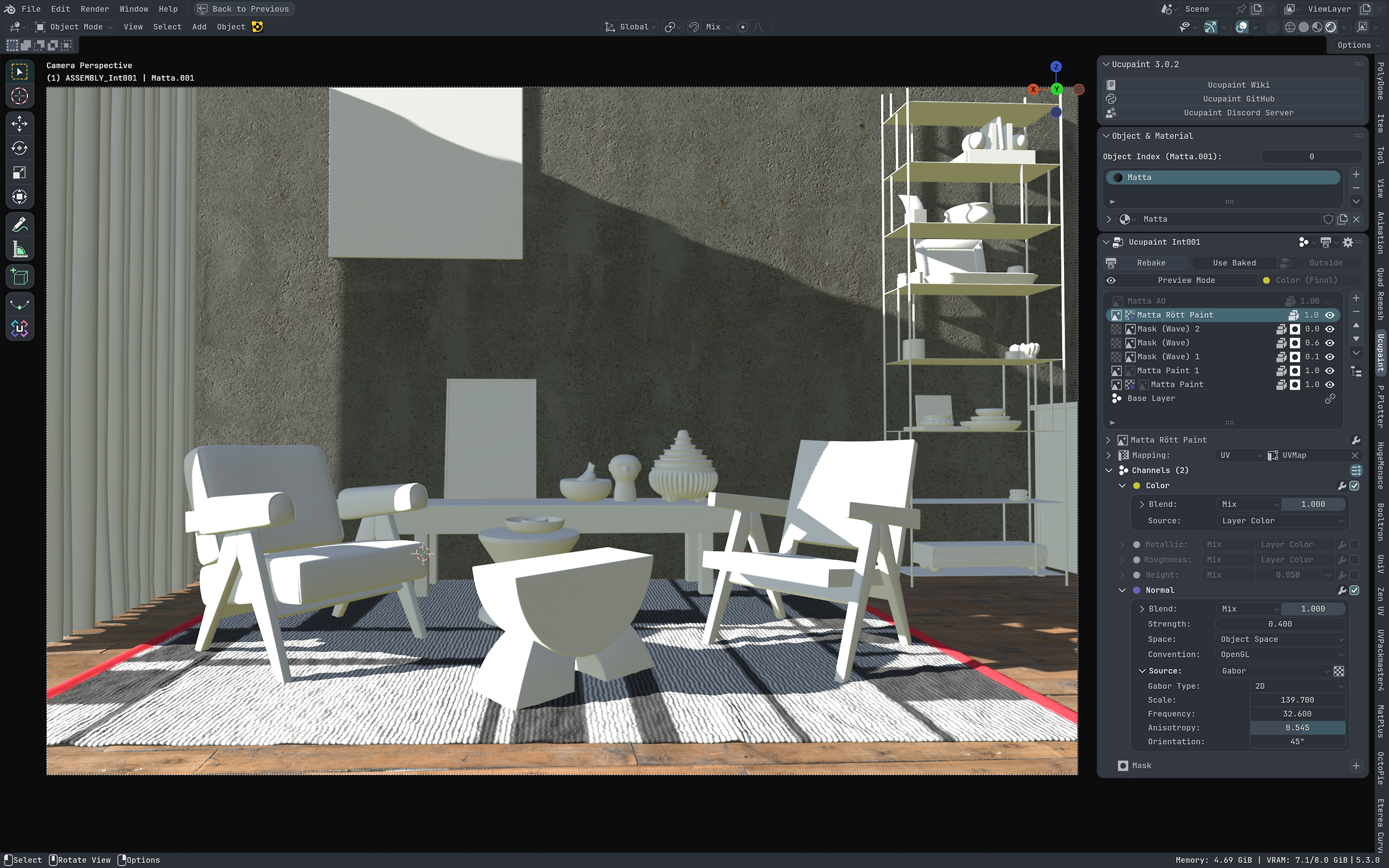
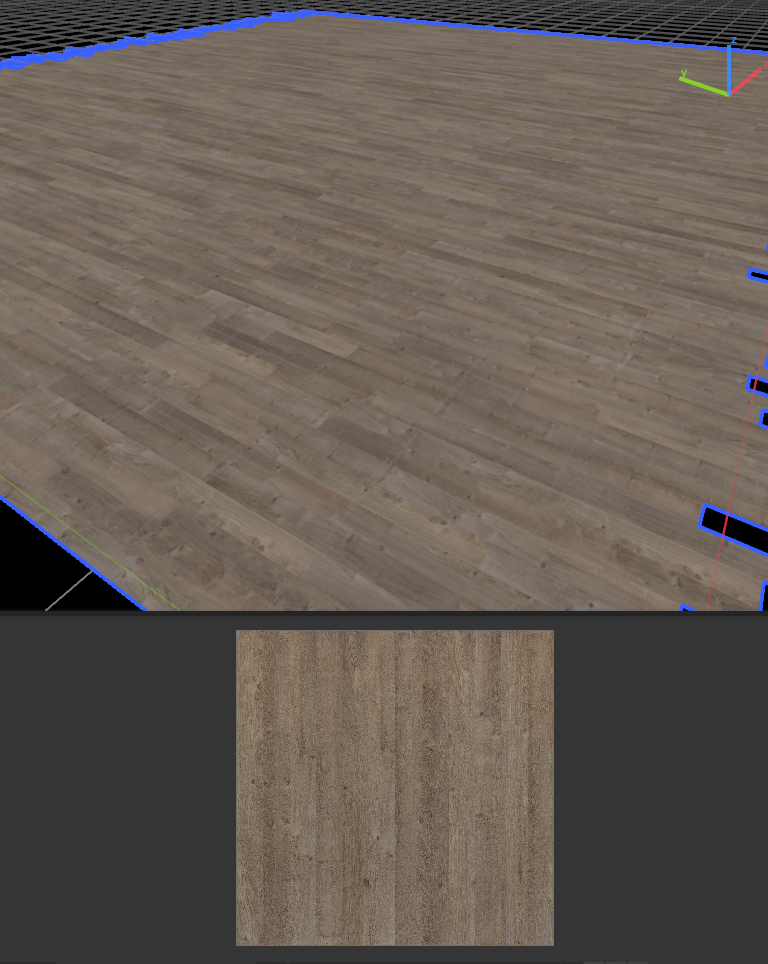
Reference photo

Current scene

Current UV layout

The TD question boils down to whether it’s inadvisable using different TD size tiers (will it look bad?) given the fact that the camera has more or less equal distance to all objects in a scene like this one.

I also consider maintaining uniform TD sizes but upping the res to 8k. That way, all objects will get uniform detail and look decent in larger renders. But that would probably kill my laptop (64 GB RAM / RTX 4070 but only 8 GB VRAM).

Of course, I should probably just stick to some decision - maybe 4k tiles / same TD sizes across the board + multiple materials instead of just one - and witness the results unfold. Still curious to if someone’s got some thoughtful takeaways from similar scenarios and projects.

It is an option to manage your scene in one material.

But the advantage to create assets, is to create them once, to reuse them in different scenes, contexts.
Textures can be reusable assets, too.
Tileable textures are supposed to be adaptable to size of areas, by repeating themselves.

You are not forced to use a different texel for each pixel of render.

UDIM is useful to provide high resolution textures, on subjects that are in need of a lot of variation.
But that is not necessary for repetitive patterns. For that, the repetition of UVspace is fundamental. It is the opposite of increasing amount of UDIM tiles to provide singularities.

Hello !

What is the point of all that ?
Generally you make textures atlases like that when you really have no choice, generally it’s when you need to export to a realtime engine, even though, if this is just your scene you are probably less limited by memory or textures limit.

I’m not super familiar with that, nor with UcuPaint, I think the simplest would be to texture each object separately, with their own UV, textures and so on…

Then if that’s really needed you bake that to a texture atlas using the UVs you already made, and if there is nothing that forces you to do so , leave it like that :slight_smile:

In scenes like this it makes absolutely no sense to use UDIMs in my opinion and especially not for the whole scene. You would just make everything very unnecessarily complicated. You might also want to deal with different objects differently and reuse textures as much as possible. Some fabric textures can be 50x50 cm and tile, some need to be 100x100cm and tile and some may be 5x5cm and tile. You have huge floor and you can save a whole lot of memory by randomizing floor board texture while reusing some and adding variation procedurally(or even by mixing image textures if you must, like for example you can have lower frequency detail - the big scale changes in hues and tones - in lower resolution). Also you might want to make assets separate for easier reuse and might want to use existing assets. It just makes so much more sense to deal with the objects separately and also make separate materials.

Even if you wanted to bake lighting information for whatever interactive usage, I would recommend using UDIMs only for lighting information and not for other map types like color, glossy or normal maps.

Why do you want to do this?

Also this is extremely wasteful UV layout.


Why would you have so much empty space in your maps? That’s a mistake for sure.

Excellent feedback, Martynas. I appreciate this kind of feedback!

The main reason I went with UDIMs was because I’d never used those before and thought I’d take the opportunity to learn to work with them.

I agree on your remarks about wasted UV space, but I don’t quite understand how to do it otherwise, given the choice I took, in which I decided to shoot for equal TD sizing for all objects / islands.

Given that decision (explained below), you can’t make the 1001 islands larger because the room objects (floor, wall, …) on 1002 and 1003 already have maximum TD.

Regarding the choice itself, I’m not sure it’s the right decision, but I reckoned all objects have equal distance away from the camera and therefore must to present the same amount of detail to prevent unnatural appearance. Yes, there’s a meter or two in difference from the camera, but to my eyes, there were no apparent front / hero object in the scene that justified having greater detail.

In case I forgot to mention, this is a non-realtime viz / illustration still image. I intend to hand-paint a lot of the textures. The Q2 question regarding Ucupaint, I think I’ve got the answer, that multiple mats + Ucupaint node groups is preferable over a single humongous monolith setup).

For Q1, the same-size TD choice is a good continuation point for this discussion, taking into consideration the specifics of the project including lots of hand-painted PBR maps.

Also, I don’t understand how UDIM would be more complicated than normal UVs. They seem to be the exact same thing as normal UVs only multiple tiles per UV. I was under the impression that the real value proposition of UDIMs was to potentially reduce complexity, for instance by heavily lowering the amount of required texture sets?

The way I look at it is UDIMs are awesome when you want to load huge textures consisting of multiple images. In archviz at least personally, I don’t want to load huge textures. I want to reuse as much as possible, tile, distribute and so on. Materials are new and clean and they repeat - that’s awesome. I don’t want to use unique textures for stuff, I want to reuse as much as possible. For example let’s look at floor boards. I can distribute 12 boards to look like 1000:

I want that. …but maybe it’s just me.

You can still paint on them if you want to…

paint

But you probably want to seprate the frequencies of the detail. You probably want high detail to be tiled and then you can add bigger variations with lower resolution maps maybe. Anyway… UDIMs and storing all the detail for every pixel will probably not be good enough for detail you might want. That should start to sound really inconvenient with one object and one material right about now.

Very interesting. I’ll definitely take your advise to heart on the merits of incorporating as much proceduralism as possible. As long as it doesn’t break the illusion of uniqueness and non-repetition.

I’m curious to hear more about your approach:

  • Do you often make use of decals in your workflow, when adding details? Would you do so for things like cracks and imperfections, i.e. “texture-like” details, apart from symbols and text?
  • From what you’ve been saying, my take away is that you’re basically using texture maps of different sizes depending on required detail for each map, while using the same UV map for all texture maps?

Personal takeaways:

I guess why I didn’t quite follow things at first, was because I always had portability in mind, potentially sharing scenes and objects as assets for game engines and elsewhere - even though I’m working on a still image render. And yes, I’m probably wrong by combining these end-purposes in the same workflow.

Furthermore, I think the general flaw in my thinking so far has been the cautiousness not to use varying texture map sizes, because I was afraid that it might result in broken consistency in the final result.. Perhaps I might have to change that mindset.

On UDIMs:

This one still confuses me on the notion of complicating things. Isn’t this just a matter of personal taste more than anything else? UDIMs translate down to tiles just like normal UVs do. UDIMs seem to provide increased organizational benefits: keeping everything in a single UV map allowing easier bird’s eye view of all objects together; making it easier to sort things in different size tiers; reducing the amount of standard texture maps apart from higher detail maps like the one you’re painting in a higher res.

Pardon my thinking aloud :D. I really appreciate your feedback and shared thoughts and thanks for coping with my gnarly writing. It’s much easier to talk about these things verbally.

Anything and everything I think. It depends on the situation. I don’t think it pays off to make rules about these things. Whatever works for the situation.

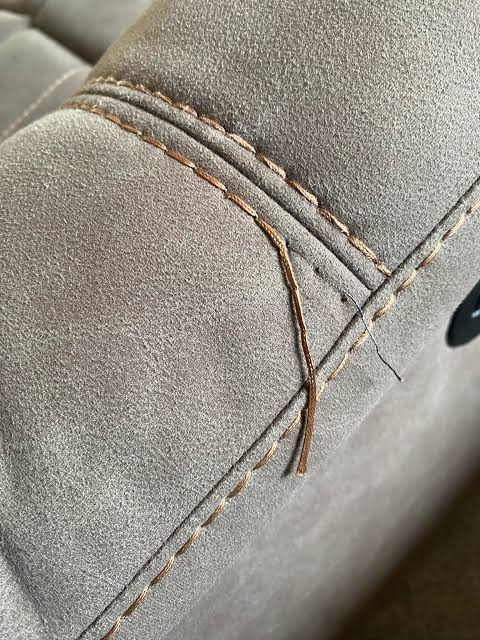
I think it’s important to use whatever is needed for the situation. Not necessarily the same UV map, as many UV maps as needed, if they are needed. Yeah, sometimes it’s useful to use multiple UV maps. I don’t know… for example a sofa or some soft furniture might have some fabric and it might have seams something like this:

I would prefer to do them with geometry to be honest, but if for some reason you chose to do them with textures, it might be convenient to make some sort of face loop around the edges of separate fabric pieces that it’s modeled with and then unwrap and straighten the loop into its own UV map and then just tile seams there while fabric texture would use another UV map. I have definitely done that a lot of times. It’s just an arbitrary example. Anything that you might need. And most of the time it’s not UDIMs. At least in archviz. Maybe somebody who uses them can advice more. I might not know all benefits and use cases. I have never had the need to use them. :man_shrugging:

Yeah, but if you want to reuse assets they should be separate and have their own materials and efficient UV maps. Also assets you will want to add to your scene come like that. Also if you make an asset it’s still a good idea to keep things separate, you might want to only take part of it and change something. I hate it when plant assets come with single texture - what if I want to change the pot to something else, which I most often do…

Well you shouldn’t ignore it, but you can see when it happens. Just keep an eye on that.

There are general good practices but they change a bit depending on the end result you’re after.
Beside that, indeed you might be more comfortable with one technique or another, so yeah taste comes into play too !

Personally, I never used UDIM yet, I think it’s very useful for AAA characters or vehicles, so you can fit more detail that you would by using just one set of textures. Also I suppose there are optimization mechanism that makes it so if you render only the face of a character, all the maps for the rest of the body don’t get loaded. But I’m not familiar with that tech. My point is, you can definitely leave without depending on what you do.

For a scene like yours I don’t think it’s a good idea to have everything tied to the same material, unless there is a very good reason. Generally it’s best to make objects autonomous so it’s easy to reuse them from one project to the other. If you use cycles and the new texture cache, it’s possible to have many objects with their own set of high density textures and let cycles handle the optimisation of picking the right size for each texture. But probably with a giant texture atlas like here this won’t work…

True, I don’t even know what I was thinking in terms of the portability / reuse mindset - with that in mind, all objects definitely need separate UVs and texture sets! :face_with_peeking_eye:

Just a final question before wrapping up: how much do you worry about texel density in general? I assume it varies depending on the project, but do you typically aim for a strict TD baseline across your assets, or just size your maps per object as needed?

If you wrote only “TD”, I wouldn’t know you are talking about texel density. That’s how much. :laughing: I worry about my rendered image not being bigger than the textures visible in - in other words I worry about texture resolution to be enough for my renders. I think that’s pretty natural. If the textures are bigger, everything is fine as long as they fit into my GPU memory and RAM. Now with Texture Cache in Blender this is quite awesome. It works for most situations and reduces memory usage.

I also worry about being able to get textures of sufficient resolution for my renders. That’s usually the bottleneck, because if there are no good quality textures of finishes I need to visualize I need to make them and that means work which naturally, I want to avoid at any cost :laughing: You don’t need everything to be uniform. Actually those few meter differences you mentioned are quite a lot and some things need to have higher resolution textures and that also depends on the situation - what views I want to choose to render. So some things need to have higher TD.

I don’t know… it feels kind of obvious. Look at your reference image, you can see that you are going to need decent resolution for the floor and the carpet, then the fancy coffee table, then the furniture… Accessories in the shelves are not that close usually unless you are after close up shots specifically.

I think maybe it makes sense to just get the textures as high resolution as you can and see if they still fit into your RAM and VRAM, if you have problems, then solve those problems. Maybe whole this thread is overthinking this whole thing. If you are making the textures yourself you probably want them as high resolution as possible and still practical for you to work with. You can always downscale them anyway…

I think it’s mixing good practices tied to particular industries. In video games texel density matters, and even more because you have a lot of assets to make and they need to be coherent. Performance is an issue and therefore you have a limited budget.
UDIM is more something you’ll find in AAA animation or VFX workflows. All those are good practices, but when it comes to render a single , relatively simple scene like that , in cycles, none of those are relevant.

Maybe the OP is looking into using more “professional” workflows, and they are interesting to look into. But most of the time they don’t improve the result, it’s just a mean to get to it. In other words it’s more a constraint that takes energy and if you don’t really need to use those techniques , as you do, it’s totally fine, that doesn’t make the result less “professional”…

Guys…what are you doing?

UDIM’s is ancient tech, 24 years old to be precise … and you have never used them?

No, it is not. It makes things a LOT easier.

Not in this particular situation, I agree with you on that - but in general? Absolutely.

How do you texture objects that have 10+ UV maps filled with stuff…you create 10+ materials?

We are not saying anything bad about it. This is just a specific context. It’s like CNC router is an amazing tool, I don’t use it to fix my punctured bicycle tire though. Different things. Would I like to use a CNC router? You bet I would. :laughing:

Yeah well constraint might not be the right word. I get your point, in some cases it’s appropriate and makes things simpler I agree !
Personally I do everything in blender, I also use Eevee a lot. Indeed my scenes uses generic materials that shares a set of tillable textures mixed with procedurals. I try to avoid UV for the most part and generally when I need those it’s very simple unwraps.
As a result, while I might not have the best materials ever, it works and I have a lot of details with a low memory footprint.

Also I don’t need to jump between software to make a texture change so yeah it’s a different workflow, that works well for me.

Now if I had to work with more software and more complex objects it’s very likely that UDIMs will come handy !