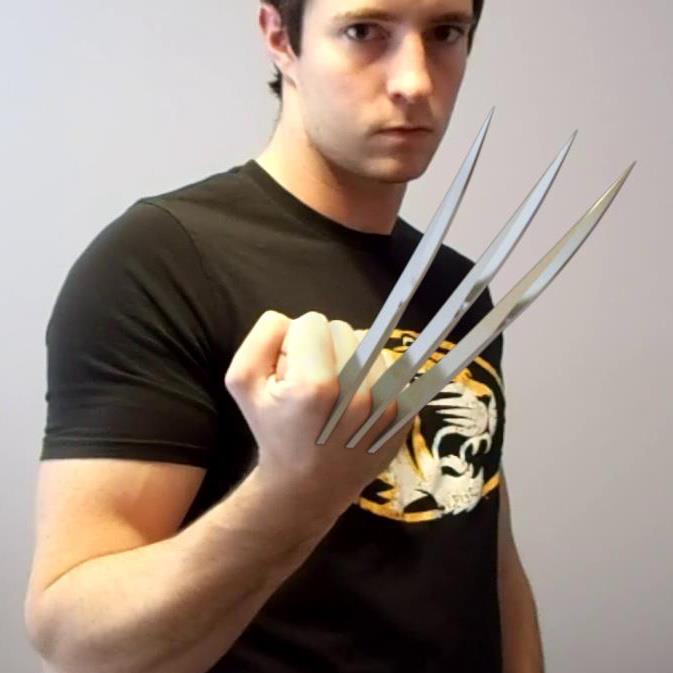
I’ve been working on a project mostly designed to give myself experience in object tracking and compositing with Blender, so I modeled some wolverine claws and tracked them to my hand.
Everything’s working out great, but I realized that I need to rig the claws to properly go into my hand and come out again. I don’t have much experience with rigging aside from parenting a mesh to a set of bones, so I was hoping someone here would have some advice on how to make a proper rig for this sort of thing. Any ideas?
afaik the blades need to emerge as a unit that does not change scale, so you have the issue of where they are “stored” within the forearm, which establishes the initial postion of the blades. The portions in the posted image that extend above the back of the hand behind the knuckles may present problems for this reason, as retracting from that position would require they move along more than one axis, both along the length of the arm and deeper into the arm’s volume. This could be done with “blade bones” to which the blades are directly linked (link to Bone when parenting). They could be part of an armature designed to match the motion of the forearm through the sequence.
But you’ll also have to do some sort of masking to hide the blades as they retract “into” the arm. There’s a number of possiblities here depending on your skill set. You could model a fairly complete 3D hand/arm to contain the blades, then animate it in a match move. This could also be the basis for compositing masks. If the sequence is very short, you could hand-rotoscope the masking. But in any case, the rigging doesn’t seem as complex as the masking requirements for a shot in motion.
Above all remember that you don’t actually have to have the blades retract into the arm fully, they just need to look like they are, so use whatever fakes make the work easier
Thanks for the reply.
I currently have a fairly crude hand model that I made, mostly for occluding the claws with the shape of my knuckles, but also for removing the tracking markers on my hand. Of course, it doesn’t run the length of my arm, so yeah I knew I would need some loose roto for that once it goes down past the hand, so that’s not a problem. The trick for me, as you said, is to get the claws rigged to go down into the hand along their local y axis as well as slightly on their local z axis.
I was thinking I could maybe make something like one bone for each claw, then parent those bones to a single control bone to control how far in or out they go…maybe even have some kind of constraint so they can only go so far forward or back. But I have no idea how to set that up, or if that would even work as I described it.
I’m not sure the contraints system is necessary. It would be simpler, and possibly even more effective, to animate the bones as separate units “by hand.” As I see it, a single “root” or “parent bone” is used to animate a match to the arm . This will allow placement of the rig and keyframing any necessary transforms of the rig as a whole, as well as dealing with arm flex. It would be the “forearm” bone for your rig, with perhaps the pivot point set to match the real elbow’s position in the frame. To help match the angle of the video arm & its foreshortening, you could make a very low-poly cylinder “reference arm” mesh that doesn’t render but could make matchong the real arm’s angle easier.
Then create three bones set (roughly) parallel for the blades, children of the forearm bone, that you can just translate in Y by dragging & keying them to move the blades. You can set up a standard motion for the blades going out & one for the blades going in, then use NLA strips whenever needed in the sequence.
The rigging is very straightforward. The masking seems to me to be the more difficult task, especially if you plan to show the skin splitting as it does for Wolverine.
Ok, so if I understand this right, I make a main bone parented to the tracked object (in this case, my hand), then create 3 bones, each parented to the main bone, and then individually animate those 3 bones to go in and out…correct? So is it easy to animate each bone ‘sliding’ backwards and forwards as they should? because the claws will be getting closer together as they slide into the hand.
Again, I have virtually no experience with rigging and armature animation, so it’s all just vague concepts to my mind. I wasn’t sure if it’d be best to build sort of a piston-type rig and that would do the job somehow or what.
Eh, I think the masking should be fairly easy in this case…As I said, I already have the hand model set up to occlude the claws, so when they go into the hand, they’ll disappear until they go below my wrist area or so (when I stopped modeling). From there, it’s a pretty simple task to roto them out…barring any unforseen catastrophes anyway.
The animation for the claw motion could be as simple as setting two keyframes for each “blade bone,” one for the start and the other for the end of the motion. I say “could be” because without seeing the actual setup I can only describe it in the simplest form. But any motion (aka “translation”) has as it’s most basic elements the start and the end Locations. Same is true for Rotations and Scaling as well, and all other kinds of animation. It’s likely you’ll have to do some adjustments to the motion in between the start & finish , but that’s always scene-dependent.
In any case, it’s always best to keep things as simple as possible. Set a keyframe for the start Location of the bone, move to the end frame, drag the bone into its end position, keyframe that, then review the motion. Rinse and repeats as needed until things move the way you want them to. This is all relative to whatever is tracking your video motion – using a parent bone to follow that tracked action makes keying the blade bones independent of the larger tracked motion, since they will follow the parent bone’s action even while moving through their own translations.
all right, thanks for the advice! I think I have enough information to give it a try now (hopefully before too long). when I finish the animation I’ll probably post it on the forum. Thanks again!