Its very Complex to make Fluid Simulation in new version (2.48),
I need one good tutorial for fluid simulation for the new version
Its exactly the same as 2.47
The real evils, indeed, of wow gold Emma’s situation were the power of having rather too much her own way, and a disposition to think a little wow gold too well of herself; these were the disadvantages which threatened alloy to her many enjoyments. The danger, however, was at wow power leveling present so unperceived, that they did not by any means rank as misfortunes with her. Sorrow came–a gentle sorrow–but not at all in the shape of any disagreeable consciousness.–Miss Taylor married. It was Miss Taylor’s loss which first brought grief. It was on the wow powerleveling wedding-day of this beloved friend that Emma first sat in mournful thought of any continuance. The wedding over, and the bride-people gone, her father and herself were left to dine together, with no prospect of a third to cheer a long evening. Her father composed himself to sleep after dinner, as usual, and she had then only to sit and think of what she had lost.weiwei1978123
its not the same as 2.47 because of control…
i also need a tutorial, mostly for control
Yeah. Ive noticed that there hasn’t been many fluid control tutorials.
fluid control isn’t hard. just play around with the settings for an hour and it’s easy!
Yes, must say I don’t know what is going on with the ‘Control’. Wish someone would do even a small PDF or webpage explaining this a bit more. I have some blender fluid simulations of various sorts here:
http://jamespowersjr.com/jp-sr/waterfx.html
I took the fountain one at the top of the list and tried to implement the ‘Control’ parameter. Have included screenshot to show what was added (the large isosphere). It appears to be sucking the water out of the fountain(?)
I would be much obliged for any explanation or tips on how the 'Control" exactly is meant to work. Also wondering about the ‘tracer particles’ setting in the domain settings. last tab. Will this effect how the mesh deforms, ie make more droplets or something?
Attachments
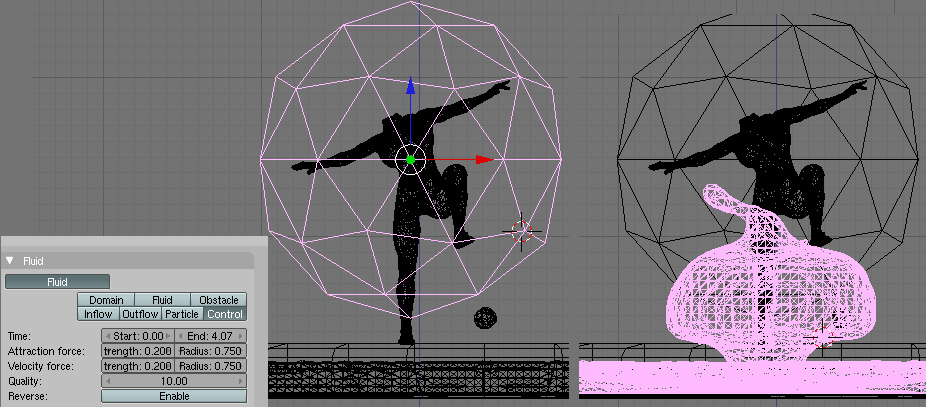
Just read that I shouldn’t be posting questions like this here, so I apologise .
Just to go on with the idea of tutorials, have more or less worked out the use the ‘Control’ parameter with help of people here.
But as far as the ‘tracer particles’ in the domain settings is concerned, and particles in fluid sims there seems to be no clear explanation. There is an illustration in the manual:
“An example of the effect of particles can be seen here - the image to the left was simulated without, and the right one with particles and subdivision enabled.”
It doesn’t say exactly what the particles are, like a mesh or just particles with the same surface setting as the water (?) They seem to be different sizes -?- so one would think it is a mesh but believe it is otherwise. Can’t find anymore on this and also no tutorials on fluid sims WITH particles.
Any Help or tips please!
duplicate - - - -
set up a basic drop into the box fluidsim. create a suzzy head as a fluidsim control INSIDE the water. next, animated the head to come out of the water with control still active. after some 200frames, turn OFF the control controlyness¹ with the “Active” IPO. helps? this should get you going.
¹home bake word, sorry, there’s none other that fits too well 
Thanks for writing radialronnie.
I seem to have worked out the ‘control’ parameter but am having a bit of trouble with the ‘particles’:
there is no active IPO for control objs(looking in fuildsim heading in the IPO editor)
He/she posted this in order to get instruction so that he could know what he was “playing” with. Some of us actually LIKE clear,concise and compact instruction.
At last I figured out a little bit of Fluid simulation,
the best way is to get some thing is to play with the fluid parameters,
and go through this link this will give you a total idea of simulation
Manual/Fluid Simulation - BlenderWiki
And this following link will give you a basic introduction
Well make up a tutorial for the rest of us on the control parameter 
Well, the main thing about the control parameter is it seems to use an awful lot of memory, and appears in my limited experience to work better in 64 bits. As far as a tutorial is concerned, this thread by Gimble explains it best:
Yes I have seen that. That is not a tutorial its a blend file with some BRIEF explanations of what is in the blend file. To understand it you have to download the blend then HOPEFULLY understand what the author’s intent was when he made up the file.
A tutorial has.
- Terminal learning objective. What you will know at the end by reading the tutorial
- Enabling learning objectives. What you need to already know in order to understand the procedure in the tutorial.
- Prequiste Links. Links to information or other tutorials about the Enabling Learning objectives.
- Text. Describing the procedure.
- Examples. Text that shows the procedure
6) SCREENSHOTS- LOTS AND LOTS OF THEM. - Example blends or links to them.
This is nothing against you Glendaloch. Its more of an outline in how to write a tutorial. Something I have meant to do for years and never gotten around to it. You just happen to be the victim
Hi Shaba 1,
Thanks for your guidens to make a tutorial
the thing is that you need to do things in a specific order…1-create the domain…2- create the fluid…3- create the control object
if you do first the control object, and then the fluid or the domain…it wont work…