How to make a proper cut of the face of the hole in the corner so it looks smoothly on topology and visually?
I tried to do something, but either I get something crooked visually or on topogy 
Thanks beforehand!



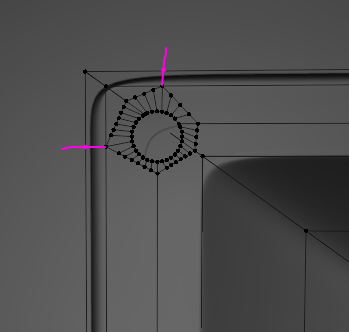
Since this modeling does not seem to be a well-topological model, I think we just need to add the supporting edge.
Hi, yes, that would help. However, it still looks awful to work with that: I need multiple holes like that and cutting each of them like this… It is usable way when the topology is not important, and sure, this is the case here bceause visually it is normal, but I probably had to emphasise that Im not looking for lemme fix that and forget` but to undertsnad how to work in such situations in the future, to know how to propertly do those holes in corners that even if you need 10 holes like that you still know how to do it well.
Shameful or not, I just recently realised that you have to add connections or support to other vertex etc or either the blender will do it for you, but very badly. But here just an edge or even cut, knife project or boolean wasn`t enough. You just have to know how other skillful guys would do that here on your place, right? :))
I think the Subdivision modifier is used for this modeling.
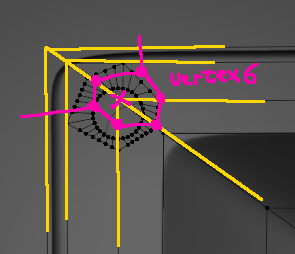
If you’re using Subdivision modifiers, you don’t need that much Vertex.

this def works and looks better, thanks!