Hi!
I would like to read your thoughts on this graphics card as to what it can or cannot do with Blender.
Also, how far into the future do you think this graphics card will hold up as per its performance and current price.
Thanks in advance!
Hi!
I would like to read your thoughts on this graphics card as to what it can or cannot do with Blender.
Also, how far into the future do you think this graphics card will hold up as per its performance and current price.
Thanks in advance!
Roughly speaking, it seems to be a cut down version of a 3090. In this specific case, the card has been trimmed down quite a bit (7168 cores), having less than the 3080 (8960 cores), but slightly more than a 3070 ti (6144 cores). As a result, performance wise it should land somewhere in the middle.
European Amazon has the card priced at around 1500-1600 euros. It would probably make more sense to add a few hundred more and get the 4090, with much higher performance and even more RAM. About the only interesting thing of this A4500 is the ability to use Nvlink, which in theory would allow to pool RAM of two cards. If you had two A4500, you would theoretically have access to unified 40 GB of RAM.
As for general use in Blender it should be no different to any other geforce product of the same vintage. To my knowledge there are no perks to viewport performance when using Pro grade hardware.
Thanks so much for your detailed details.
So the number of cores is critical for only rendering times? I currently have a 3060 8 GB with 3584 cores.
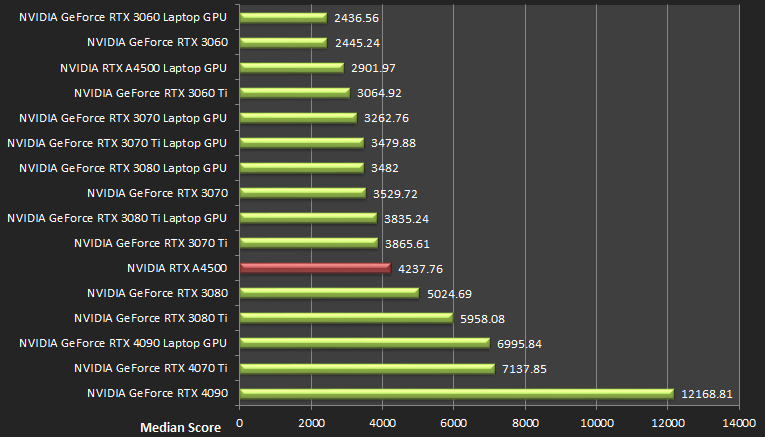
Number of cores is just one metric of GPU architecture. There are several, but this is a good indication of the compute power of the chip. The core count is mostly evident in rendering speed, but can also effect the viewport performance. A stronger card will give you more FPS in your Blender viewport and help render faster using Eevee. You can check the benchmark bellow. I would imagine the A4500 would be slightly above the 3070ti in all metrics.
Use Blender Cycles opendata benchmark or any other cycles benchmarks
Core numbers can get You only rough idea of performance, in blender they scale almost lineraly, but generation (with RT gen/TGP/frequency/caches/etc) takes huge role in final performance, so in then end You have to use benchmarks.
Quadro cards don’t have good performance/$ ratio in Blender. So its best to avoid them unless you have to have large amount of VRAM with nvlink.
FPS in Blender’s viewport is an interesting aspect to consider. Thanks! Watched a couple of quick vids on how to optimize … but still.
Thank you for that! I can grab the A4500 graphics card for about 975.00 CAD, but now I wonder when the RTX 40xx series will drop in price and try to slug it out 'til then.
Annoying.
It is hard to say when the 40 series may drop in price. I guess, it depends on which card you are aiming to get. If that is 4090, maybe they will lower it slightly once the 4090ti drops. As for the other cards, it may happen when the 30 series inventory dries up, or when the 50 series is released. Either way, I think you are looking at a year of waiting, at least. A 4500 at 975 CAD does not look like a bad deal, considering the ram amount. What does 3090 go for?
Hope those 50 series are all the rage come xmas 2023, ha! My go-to shop here in town says that 3090 is no longer available … sigh.
So as a complete Blender newb, I think I’ll just run with my 8 GB 3060 until I get frustrated.
My guess would be that the 50 series is revealed 2024, late summer/early fall. So a long way away. May I ask what are your frustrations with the 3060?
That seems like forever-away for me, ha!
I’ m spooked by my GPU 8 GB rendering ability of high poly scenes … I’ll be rendering my Architectural perspectives as soon as I can.
Perhaps I just read to much, ha!
There are ways to optimize the scene to get around the limitation. You can save a lot of memory on textures. Use higher resolution maps (3K or 4K) for big surfaces (walls, ground) and use 1K-2K textures for smaller details. You can also deploy texture packing. For example, use separate node color on Albedo texture and extract passes that can be used for roughness and bump. So that is a saving of two texture maps per material. Over the entire model this can really add up to big savings.
From a technical perspective, I have suggested to use Linux in another thread. Windows seems to “allocate” 20% of GPU memory, meaning your 8GB card is only realistically a 6.4 GB card. Linux does not have this issue. So a cheap upgrade for blender would be an additional SSD with a Linux installation. Pops OS is a good, beginner friendly option.
You can also use a render farm for your final shots. RenderST is a good option.
Seriously psvedas Povilas … thanks so much for your advice and for taking the time to reply too.
For me to deviate from the norm, beloved Windows, will be a stretch. But hey I’ll give it a try. 20% of 8GBs is serious savings.
Thought of using Render Farms too … unfortunately, I’m not one to easily become a dependent.
Thanks again  !
!
No problem, best of luck.
One more thing. There is an update coming to Blender, maybe to the 3.6 release this summer, that will handle geometry in a different way. It is supposed to reduce the memory cost dramatically. So, 8 GB of ram, may soon be quite enough even for complex scenes. Wait till 3.6 before you consider upgrading your gpu.
To be clear, the CPU also has a pretty big part to play on viewport performance/playback and it can be rather dependent on single core performance.
So sure a GPU matters, but unless it’s total old rubbish, there’s a good chance the CPU will be the bottleneck.
As for cycles rendering, Optix makes a huge difference on RTX based cards vs just normal CUDA rendering.
I had a look at all this when I updated my GPU from a 1070 Ti to a 3080 Ti.
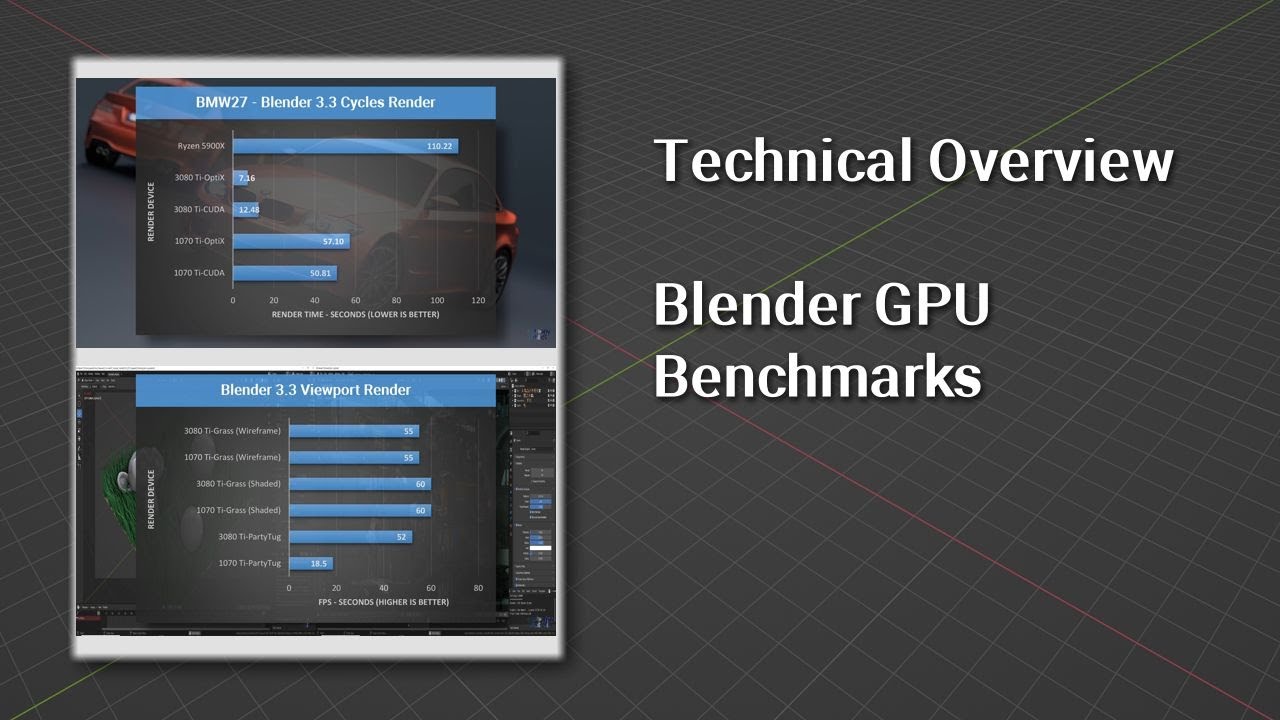
Of course if you run out of VRAM, then none of it matters, at which point likely better off just CPU rendering.
Excellent suggestion, thanks! I look forward to reading community comments on 3.6 handling of geometry and other yummy goodness!
Thanks for this in depth perspective!
Cost per second!
I picked up a MSI NVIDIA 4070 Ti (7680 cores, 12GB VRAM, Blender Benchmark Score: 7780.46 (avg for card: 7137.85)) from amazon for ~830 USD, and it crushes everything I throw at it. I upgraded from a 1060 Ti laptop GPU, though, so my scenes were optimized heavily.
Optimization wise, if you have a strong CPU, the decimate modifier can be your friend for reducing poly count, especially for hard-surface modeling. Geometry nodes and instancing can simplify repeated geometry. Under Cycles, rendering with fewer samples and using a denoiser can reduce render times. Lowering the max bounces helps a lot as well. Additionally, CUDA and OPTIX render times are often different. On my old machine, switching between them cut render times by a third in some cases. If you’re still running out of VRAM, utilizing procedural textures and lowering texture sizes or reducing the number of textures can help dramatically.