Hi Community,
It may be a stupid question
Now, if I want to have a DX type of normal, then how should I go about it?
If I bake the invert of a bump node, then I can say it is DX type already?
Otherwise, if I have a GL normal map already, how to convert it? Separate RGB channels, and then… Flip it somehow?
Or there may simply be a free converter tool?
Thanks!
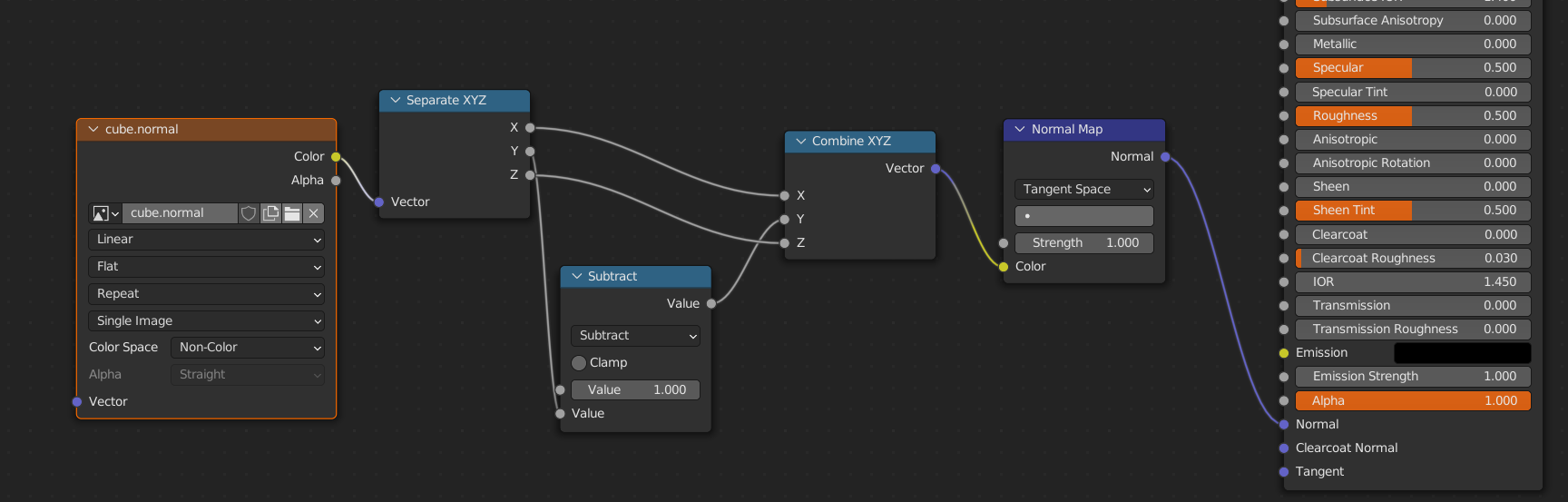
I’m not sure if understand your question correctly but natively Blender use openGL type normal maps. Convertion between GL and DX normal maps can be easily done with a few nodes:
Afaik the same can be achieved using separate/combineRGB nodes by reversing Green channel.
1 Like
RSEhlers
June 25, 2022, 11:44am
3
Yes, the difference is an inverted Green Channel of the normal map…
@gerciowski beat me to the answer…
1 Like
Thank you guys, @gerciowski and @RSEhlers !
Yes, I know Blender uses Open GL of course. But I may need DX type normal as well, hence the question.
I grant solution to Gerciowski, for faster reply, and Master Ehlers has a lot of solutions already
Happy blending!
1 Like