I’d like to get into photorealistic rendering for Blender. What is the best way to start?
-Yafaray?
-Luxrender?
-Blender 2.5 internal?
-Any other software?
I’d like to get into photorealistic rendering for Blender. What is the best way to start?
-Yafaray?
-Luxrender?
-Blender 2.5 internal?
-Any other software?
Find one with a big button that says “Photoreal Render”
Or you could just try them and see which one suites your needs.
Richard
It’s not really within my capacity to learn how to use every unbiased renderer out there in order to see which is best. Therefore I am appealing to the Blender community for advice based on their experience with various renderers and how said renderers interact with Blender.
1st- Yafray in my opinion. This is because it can render photo realistic pretty easily. Its also fairly easy to use though it may seem intimidating at first. It renders much faster than the internal with reflection settings and works faster with HDR (Compare Lux, etc.- which are a different type of engine- therefore longer render times, but relevant when comparing speed). There are caveats but otherwise it can do things like caustics.
Its like the open source version of Mental Ray… It doesn’t do passes like the internal. That being said, a lot of course depends on how you use the tools though…
2nd- Blender internal is good because you can use the passes- is waay faster in the approximate ambient occlusion area and looks pretty good with a good light setup. Integrated vector blur, ID masks, and UV re-mapping means you can get a good photo realistic look- just might take more time to set correctly- and naturally your work will only look good if you’re a great designer- 2 cents 
I prefer yafaray now, partly because I’m new and to get a photo real look I need to tweak and re-render a lot and it’s fastest. Lux I tried and it was painfully slow but their gallery page looks great.
On thing I’ve found is that photo realism has a lot to do with lighting and shadows and how you set your scene up, I’ve seen some very realistic renders done in blender because the light rigging was well done. You can start by reading about 3 point lighting etc to kick you off.
Yafaray handles global illumination though which especially for architecture scenes can really add a lot to the ambience, much more than just AO can give. For caustics in glass you will also need a 3rd party ray tracer like this.
In the end “it’s not the brush, it’s the artist”  (a good brush helps though
  )
)
It depends what you want to do with it. If you want to animate, use V-Ray, or Yafaray if you don’t want to spend. If you want to make high quality stills, and you have time and RAM, use Luxrender or Indigo. If you want to get esoteric use Renderman.
I haven’t used the 2.5 internal much but I dare say it gives a high quality, fast, versatile workflow and output.
Like someone said, try them to find out which one best suits your needs and workflow. There is no ‘best’ renderer for Blender(many would say the internal is), but there are many opinions, and yours is one of them…
Thanks for the replies. I’ll clarify exactly what I want to do, maybe that will narrow down the possibilities.
I own a workstation with a decent CPU, GPU, and amt. of RAM. My goal is to produce photorealistic ‘industrial design’ type product renders that look like product photos taken in a studio. The “products” in question will most likely involve colored glass, which I’d like to cast caustics and any other realistic effects. The renders will be ideally printed as posters.
If possible I’d also like to take advantage of Blender’s smoke sim and volumetric textures in my renders, but I’m guessing those features may not be compatible with unbiased renderers.
I’m planning on sticking with Blender 2.49b for this project, but I may be enticed to upgrade by the rendering/materials improvements which are allegedly being worked on for 2.5. (although this doesn’t really matter if I’m using an external renderer).
A suggestion: do some research for images that have qualities you’d like to see in your renders – in other words, define “photo-realistic” in concrete terms that appeal to you, because there is no one standard for that term, even among actual photographs there is huge variety in how similar subjects can be interpreted with lighting, exposure, focal effects, all the tools of the photographer’s trade.
With a clearer visual definition in hand, look at examples of what various renderers can do, hopefully with similar subject matter, or at least materials and lighting, and see if you can find a preliminary near-match to your new definition. Perhaps post examples here for more suggestions as well.
Sorry for your confusion Chipmasque, when I say “photorealistic renders” what I mean is I need a physically based renderer that produces global illumination, reflection & refractions, caustics, color bleeding, and so on.
For example Yafaray, Luxrender, Octane, V-Ray, etc.
The output from the aforementioned renderers looks great for my purposes - what I’m asking Blender users on this forum for is their advice based on their experience with external renderers and Blender (since Blender Internal can’t produce global illumination).
Edit - Seems like Yafaray is the most popular choice so far. I just noticed it supports volumetrics, which is a huge plus.
I’m not confused at all, and you seem less so, with that laundry-list of features you’d like to see in a renderer – that’s a definition of sorts as well, though whether or not it all adds up to “photo-realistic” is a matter of how the features are used, as well as materials and lighting considerations.
Good luck on your endeavors, and be sure to post some examples.
Maybe I worded my reply wrong, what I meant to say is that I’m not trying to get into a discussion of what is or isn’t photorealistic - I’m only asking for opinions about how various external rendering software works in conjunction with Blender. I’ll surely post my experimentation on this forum, if that’s what you mean by “examples.” As soon as I’m done with Blending Life, of course :evilgrin:
From reading more about your needs, Yafaray, definately.
From what I can tell, it’s the most popular third party renderer for blender. But this is a guess based off the number of posts I see, not any real statistics
Hi, zardoz. A while ago I tested freeware Kerkythea , which implements MLT (metropolis light transport) algorithm (expect looong renders), same as Luxrender and Indigo, with nice results.
Hi, IMHO the best way to go for unbiased render engines. New generation of them are using GPU, so render times are much much shorter.
Octane render is very promising, especially if u have newer nvidia card.
Cant wait for Lux with GPU integrator.
If I go for photorealism result, often i’m using Lux wich has long render times, but it’s easyer to setup then Yafaray.
Tommy5, didn’t Lux just release their CPU/GPU renderer a day or two ago? Have you tried it yet?
I think that’s where I’m headed, because I ended up getting an unnecessarily good graphics card and I need an excuse to work it out.
What has been released up to now are just proof of concept or test applications.
The feature set of SmallLuxGPU is extremely limited compared to LuxRender, but it already allows to create pretty decent results if you only need basic shaders. The underlying framework will then be used by LuxRender proper to enable GPU rendering in the full featured renderer (which is currently gaining more advanced volumetric materials).
The framework should also be useable by Yafaray or Blender when it becomes mature enough.
Hi zardoz, i was not aware of that, thanks! Going to lux forums right now…
Some information about LuxRender effort for integrating OpenGL support is available at http://www.luxrender.net/wiki/index.php?title=Luxrender_and_OpenCL and at http://www.luxrender.net/wiki/index.php?title=LuxRays
As JeanPhi as wrote, only a “proof of concept” is curently available (called SmallLuxGPU) with a very limited support for materials/light sources/etc.
However Chiaroscuro has already developed an mini-exporter for Blender 2.5 and people are obtaining good results even with a such limited amount of features:
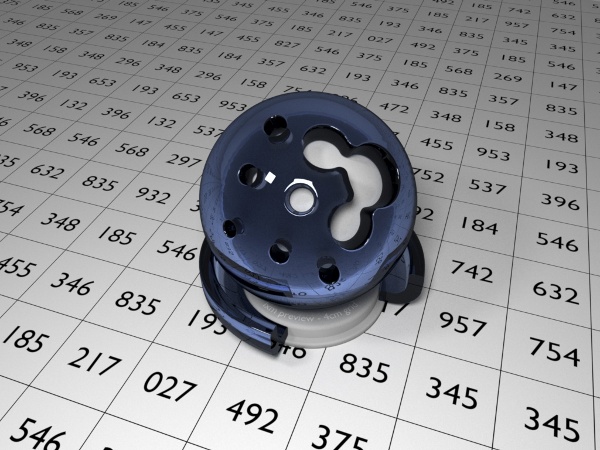
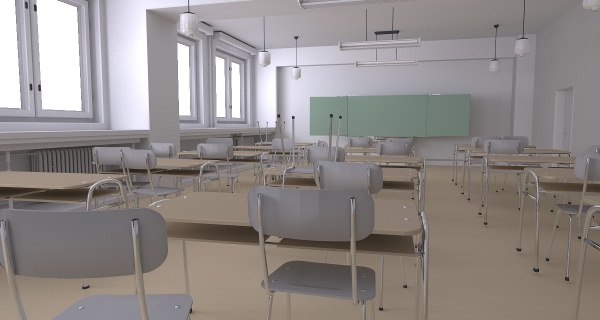
SmallLuxGPU can render a scene like this one interactively (i.e. you can move around, etc.)
Both SmallLuxGPU v1.4beta1 and Blender 2.5 exporter are available on LuxRender “GPU acceleration” forum (note: registration required): http://www.luxrender.net/forum/viewforum.php?f=34
Looks cool, Is it still Linux-only?
