Hey fellow Blender enthusiasts,
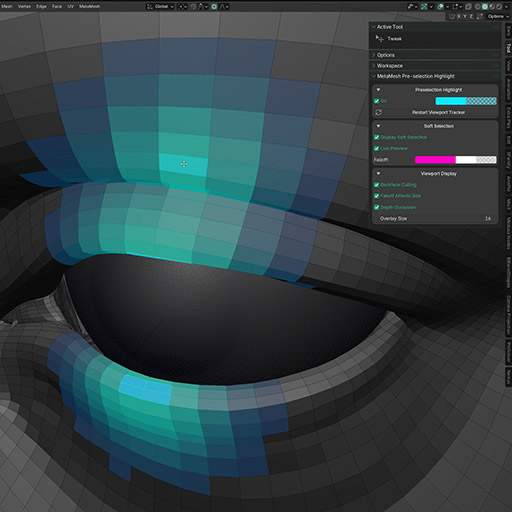
I have created a free Add-on that let’s you preview the component selection for vertices/edges/faces, along with proportional edit. It also allows to change the proportional size via a hotkey ( pretty much like Maya’s ) By double tapping the assigned hotkey you can also activate/deactivate proportional. Install it as an extension, and check the add-on preferences to see the options. You can customize colors for vertex / edge / face mode. Have the soft selection live or only on selected components, etc.
Grab it for free on my gumroad:
4 Likes
Awesome. Could this be added to the blender extensions site?
1 Like
Hey that’s pretty good from the description (didn’t test yet), would you like attempting adding this to the blender extensions platform?
Yeah I have noidea how that works but should be pretty straight forward to do, i will check it out
I think the main concern with such an add-on would be performance. That’s why nothing like this existed as far.  It’s not that it’s hard to make, it’s that it doesn’t make sense…
  An add-on unavoidably will have to use bmesh for collecting all the data, so… CPU(single thread as far as I understand as well ). …on every redraw… This is a sure way to completely ruin performance even for relatively not that dense meshes unfortunately. What kind of meshes do you usually want to use proportional editing for?.. If you had a mesh with a million faces, that will just freeze completely to the point you need to restart Blender. Pretty big deal breaker and a pretty good reason not to make such an add-on, if you ask me…
I think at least an option to automatically disable it for meshes over some user set poly count would make sense, since now data loss is one accidental tab press away.
Easy ,give it a try, if is not working for u, dont use it  is free after all so feel fre to try it. If is too slow maybe i can try and optimize it. Maybe won’t be useful for u but for other people may be
2 Likes
I did try it to see how you dealt with the performance issue and found out that you haven’t. It does just freeze Blender and you have to restart. I am very worried about exactly the same issue in my own add-on at the moment. I am a bit more lucky though, since I don’t absolutely need to recalculate on every redraw… I don’t really think it’s solvable for this though.
Performance is something that I am trying to improve, but as you said, is not so easy or not so available. Sorry I read your previous message quickly while I was gone and missed half the stuff that you wrote the automatically disable is not a bad idea. I am currently testing an updated version on 100k and works quite ok. I haven’t tried on 1 million but i can tell already that it would be an issue for sure but even if is not solvable for now, if these things get enough exposure maybe they can be fixed/implemented in blender directly by the developers
1 Like