I had thought to add this to one of my past listings, but it is new to all in this current form and want to share. I am re-working all of the Scenes of the book in progress, hoping to get better results from the printer. I also learned a lot since I last worked on this project, and added details that improve the scenes.
This is a composite, with the Night side on the Back (left side), then Day Transition in the middle, followed by Late afternoon on the actual cover side.
Challenging composition, that required three different scenes in one file, each with their own appropriate lighting, rim lights, etc. I got some very useful help from Claude, who wrote an addon, which allows me to quickly switch between each of the Scene Views, then renders all three, to their own folders by passes.
These became the source material for my compositing in Affinity Paint 2, with Masks to cross fade between each of the layers for the final coomposition.
About half of the pages are now done, but this Cover scene took the most time and is the most complex. Glad to be at this stage on this Scene.
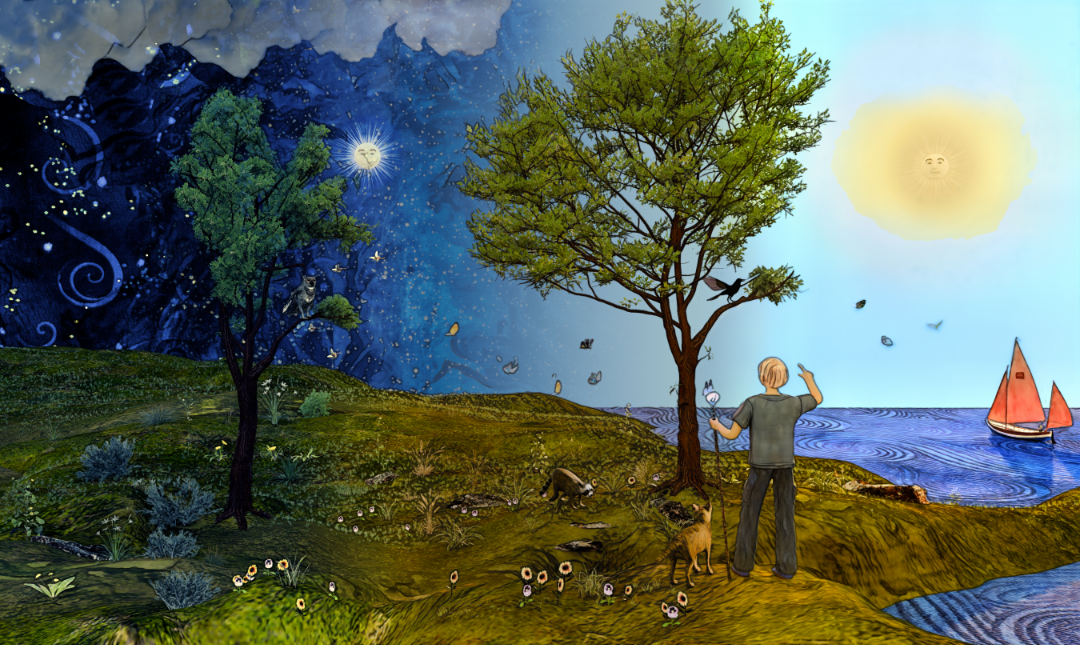
For those who wonder, my first attempts were “hand-drawn,” years ago, but keeping a character ‘consistent’ was never my forte, tending to draw fresh each time. Over the years I found that by using Blender, as a tool/assistant, I could then maintain the Boy’s character throughout the process by sculpting the character, and creating all of the other elements to fill my vision. The boat on the cover appears several times in the book, is a ‘replica’ of my brother Mark’s own, complete with his logo on the sails. Growing up, I really did try to make a set of wings from a discarded refrigerator cardboard box, besides building model airplanes and attaching a sail to my bicycle, or catching the Santa Ana winds in a sheet tied to my hands and feet, so the story explores that series of memories.
Looks good, i d love to see it again when the whole book its finished
also that addon you are talking about sounds good
Yes, the Addon that Claude and I created, for this page, was crucial. It allowed me to “click” on which of the three scenes I wanted to focus on, enabling the correct associated lighting, and hidding objects that weren’t meant to be in that view, (the Moon in the Day scene). It made the complexity manageable.
Another render in the project. This is the bedtime “dreaming” scene, of planned flight adventures, for the following day to come. Elements of flying all around. I made wooden models, paper airplane, kite on the ground, and studied old photos and drawings, all in my effort to achieve flight. The room is more imagined than my childhood room, but it is re-imagined through memory and fantasy.
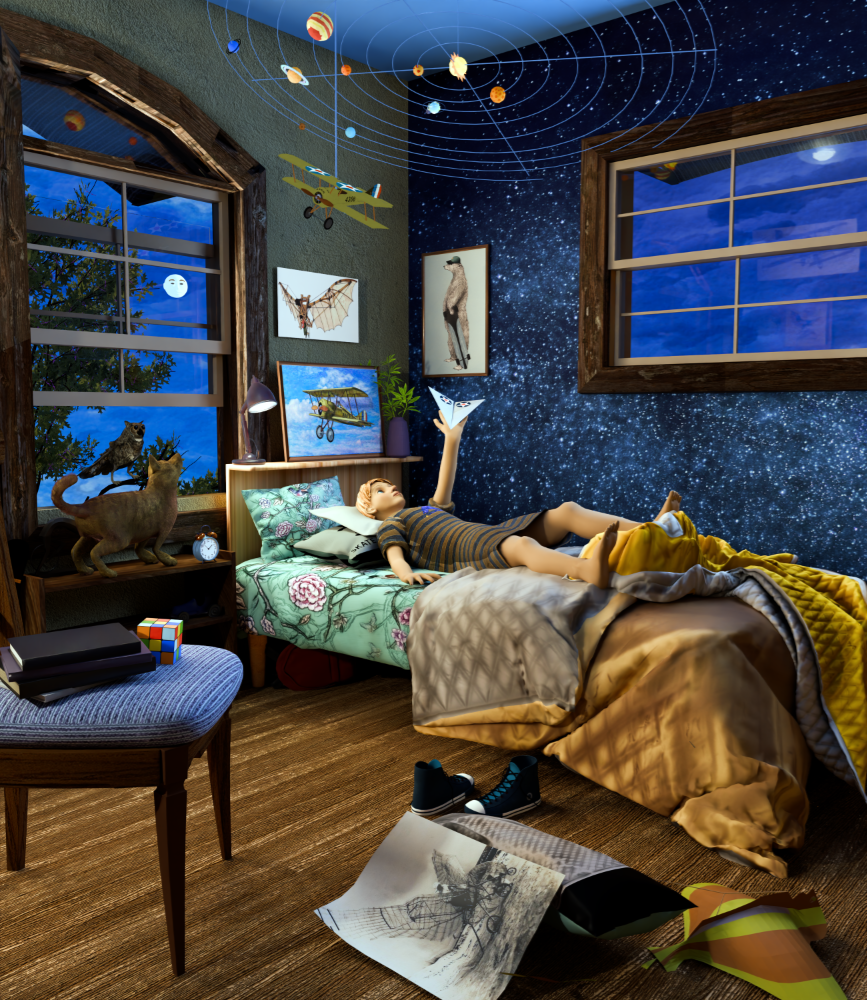
try also the kuwahara filter. you will get a more painterly effect that i think suits more for a book. except if you want the look like this
Achil_Pretes, Thank you for the recommendation, I had heard of Kuwahara filter, but have not explored it yet. I am hoping to achieve more of the illustrated look, as my original efforts were watercolors, colored pencils, and ink lines, but I am not good at “repeating” the look of a character as I draw, which made Blender a good choice.
Just as a follow-up to my own inquiry, about using the Kuwahara filter. It took me asking Claude, “Why isn’t this working,” since I was fairly sure i had it wired correctly. Indeed I did, but the size of the image that I was trying it on required that I change the size by a factor of 4x, at which time, it showed the results that I expected. Thank you for sharing, and now I know why it had not worked for me prior to this effort.
Just thought to share further “refinement” of this page, as it has been a bit of a test case, for ‘default’ parameters, that will be applied to each of the other pages as I go along, so the whole book will have a coherent sense of authorship by one artist, as all of the individual choices have been made by me, step-by-step.
The lines now include a mild “Wobble,” of a more hand-drawn illustration, and they are now subject to thick & thin variation. All of these aspects are visible on screen (except the Wobble, which only show in the final render), in “real-time,” which is amazing development, only possible with Blender 5.2 version and this AVersion Line Addon. I have done a lot of custom tuning of the output for my purposes, but, this is a demonstration that the tools allow this to be possible.
The subtle aspects of the line variation contribute to the overall look, but don’t show up easily in the full color version, thus my inclusion of the white paper version for a closer review by those who are interested.
Here is another page in the children’s book, that I have been working on, revising the image creation, using Blender 5.2.2 and a Line Art Addon tool that recently became available, only with this version of Blender. World of difference, for me as an artist, as it allows me to edit the Line Art layer, in “real-time,” on-screen, an aspect that I have waited for, for years, great development. This image is the first “successful” leap off of the low wall edge, with my newly reinforced “wings.” This a fanciful re-creation of some of my attempts as a young boy to “fly.” Note that the line has thick and thin aspects and a bit of “wobble” to mimick my own ink line drawings and watercolor studies drawn in preparation for the book production. I shifted to Blender, recognizing that my skills were not likely to maintain the exact same character, drawing, after drawing.
Working in “reverse page order,” here is another page, as “I” prepare to launch myself from the raised wall area with my newly reinforced wings. I have worked out a “recipe” of how the final versions are composited, using the layers created, so that they feel to be all of the “same hand,” when viewed together in the eventual book. I am also including the LineArt version for your viewing knowledge, as it is an overlay on top of the “stack.” Note that the Lines have “wobble” and variation, just like my ink line drawings do.
i hoped you manage how to use it. i think it will give you even better results. except if you are not going for that look
although after you have wired it on the compositor. to see it in the viewport you have to select it. if you try it and you like it tell me ![]()
Thank you for your response. I had to set the size to 24, given the size of the 300dpi pages that I am generating, and then it worked just fine. I layer the stack in Affinity Paint 2, and set the Kuwahara Layer to 50% Soft Light combined with a Watercolor Layer set to 50% also but set to Lighter Color, on top of the Original Color render, with the AVersion Line Art Layer on top at 60% Darken. So, the Kuwahara, is definitely in the Mix. I do also have a Curves adjustment of the Scene, not for the Sky, but lightening all of the Non-Sky elements. Slowly developed my recipe, and have been applying it to each of the pages, working my way through each page selectively, about half the way thru. Right now, re-doing the Cover to match the other pages already done.


