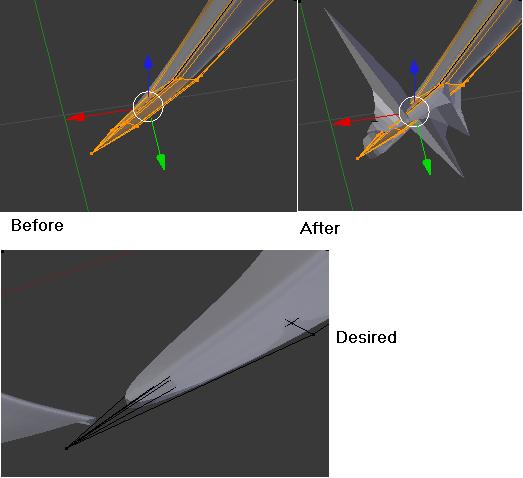
I’m new to these forums and Blender in general. I’ve been working on a 3D logo from a design I had drawn up a few years back. I applied a solidify modifier to it (currently in 3 pieces/objects). One of the objects is displaying issues. It’s a curve that comes to a point. There are several vertices near the tip that appear to be modified along their own, seemingly random, normals. I’m hoping to find some tips to help me out.
Not sure why you would need solidify on a solid object but…
You can try to select everything and recalculate the normals, but the solidify modifier can be a little picky about things like normals and point order and shape I have noticed. It may be an issue of just deleting a few verts and refining the design or starting over, or one vertex, it’s hard to tell without being able to mess with the model a bit.
On the other hand you could try 2D curves to get the overall shape and use the extrusion methods there, convert to a poly and taper the ends, or just use subdivision modelling methods with the thickness inherent in the object, and just using extrusion rotation and so on to get the shape you desire. There are really many ways of going about this, but to be able to truly help out with this, we would have to see the blend.
They aren’t solid. I created them from planes and raised them up like a relief sculpture so there are no backfaces. I’ll try recalculating the normals as well as deleting and recreating the point of that curve. If I keep having the issue I’ll post the blend for you to check out.
So I went in and deleted the tips that were going crazy and extruded new ends then the modifier behaved a little better. I noticed the number of verts overlapped greatly the higher I set the parameters because they are being extruded along different normals to keep the general shape. Anyway, it turned out pretty good and now I can refine in meshmixer and sculptris. I want to combine these 3 objects into one for printing, however Meshmixer is crashing on me when I attempt a drag n drop. Here is how it looks now.
You can join the objects with CTR+J, but they won’t be one solid mesh. You have to model the connecting parts, and then maybe cut them when it’s printed.