Don’t give up.  2.80 is easier than you think and than it is on the first glance. After some time and few jobs with 2.80 I can’t see how I could switch back to 2.79.
1 Like
 I’ve just thoroughly read the 2.8 Release Notes and all subsections, particularly the keyboard shortcut changes. That helped, I can recommend studying it to seasoned Blender users who feel a bit lost in 2.8, like me.
Why can’t the quick favorites menu be saved within the Startup file?
1 Like
you have to save the user prefs to force blender to remember the quick favorites. But I agree it would be very handy to have different favorites depending on which startup template you use. Or even have different sets of QFs to choose from independently. I’d love that.
Perhaps even have the option to tie them to the current workspace?
1 Like
That would be even better. The quick favorites are one of my favorite new additions to blender, just pressing q while hovering over an option to add it to Q menu would also be nice. Maybe it is not a top priority, better to iron out the bugs first, but I hope this will be fleshed out in the long run.
1 Like
Thanks! This was driving me nuts.
Still wonder how this can be exported. This quick favorites is somehow hardcoded. I cant figure out where the data is stored. I dont see anything in the keymaps, so must be in the userpref file than
I’m using 2.80 a little at work and generally it’s fine, but some changes have made old workflows clunkier than before, while others (quick favourites and multi-edit, especially) have made big improvements.
There still a ton of tiny little things that keep changing that are driving me mad though. For instance, now the ‘Recents’ section of the file browser (by far the most useful section) is folded up by default, while the uttery useless system bookmarks section is open by default  Get rid of system bookmarks and just add them by default to bookmarks on a new install. Add downloads folder too
Merge vertices/remove doubles has been moved further into nested menus, but at least I can put it on quick favourites now. I really wish the devs would add the ability to add items from the operator search directly to the quick favourites though - this seems insanely obvious, as the search hides a lot of functions not exposed on menus at all.
I still get annoyed by the mode selection pie menu and switching modes in general, although this also bugged me in 2.79. I just wish there was a shortcut to go back to object mode… maybe there is and I never learned it  Maybe I could add it myself
Anyway, I remember getting irritated by many things today, but most of it is probably just stuff I’m not used to, or that was bad in 2.79 and is still bad. I think I need to make more effort to submit reports, requests on RCS and even learning to contribute myself.
1 Like
+1 This would be nice. Maybe it’s not trivial to make happen though?  Devs?
Devs?
Maybe I get this wrong, but why aren’t you just deactivate the mode pie? Than you can use the tab key to switch between edit and object mode.
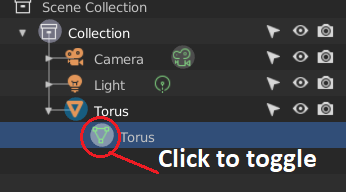
You can also switch by clicking the icon of the data-entry which appears under the object entry in the outliner, when you expand it. Click > edit mode, click again > object mode. It toggles.
I just meant that I often need to go back to object mode for some reason, and there isn’t a toggle for it like there is with edit mode, and it would be nice to have [Mode X]<->[Object] like there is with [Mode X]<->[Edit]. I can probably just set up my own shortcut though.