I’ve been working on lightsabers recently, and I got bored with making the usual-style hilts. So, I decided to be a bit creative. I looked up the hilt of a rapier, and found a great image for it. Below is the image of the hilt. Are there any suggestions to improve it?
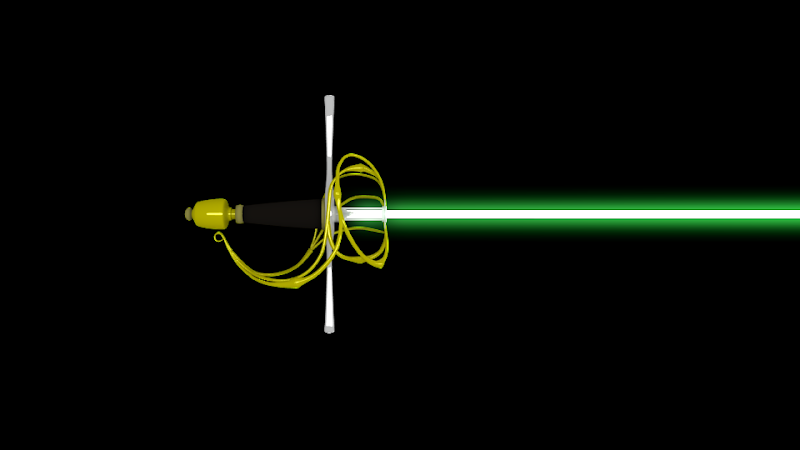
Perfect modelling, now for the textures.
Maybe the handle could be a bit longer.
I strongly approve of the handguard! Well done, my man!
Hmm, what an awesome idea :D!
I’ve downloaded the image you posted and made some marks with Windows Paint (the most awesome image editor there is :D). In my comments, you’ll see colors written in capitals. These are the colors that I’ve used to mark that specific comment on your image.

-Me no like black: Black has alot of potential. Goth people LOVE black! A render doesn’t really. We can now see your blade, but anything like reflections will get us posting ‘where does that reflection come from’?
-(BLUE)why can’t we see the entire blade? The tip of the sword must feel very discriminated… Get it in your scene!
-(RED)Your yellow (= gold?) parts of the handle seem a bit odd. They have like these wide ‘spikes’. Are those supposed to be there?
-(GREY) The point of view: this is an orthographic side-view render. We can’t be sure about what it looks like in 3D.
Your big vertical part (the defender? Forgive my English for sucking :P) seems flat here, but logical sense would tell me that it’s actually round, to protect the hand of the guy who wields the blade.
-(YELLOW) Looking at some reference pictures, I noticed that your handle is bland. All rapiers/swords (or at least MANY of them) Have some kind of pattern to increase the grip you have on it. Look up some reference, add some grip :)!
Materials:
-(WHITE) Your gold, or whatever material it is, looks like yellow plastic. Try looking at some reference images of gold, and then try to mimic that in blender, or try a texture with a specular map :). Trust me, it can be a real bitch ;).
-(GREY) The long vertical part seems like it’s reflecting. What is it reflecting? or is it just a wood texture?
That’s all i have for now 
Happy Blending!
Acro
You need to make the yellow plastic of the hilt look like metal. Add mirror, and carefully tweak the diffuse and mirror colors to get a nice polished brass/gold look.
Also, you need a little tech greeble somewhere to make it look more integrated, because at the moment it looks like to tacked a lightsabre blade onto the end of a rapier hilt. Gorgeous modelling, mind you!
Here is a picture of a more 3d view of the complete (even the “discriminated” tip :rolleyes: :D) lightsaber
I don’t know quite which color of background you would prefer. What do you suggest?
It is a reflection. I put a couple of planes there and gave them emitting values so that it wasn’t just a flat-looking hilt. You can still see them in the picture below.
BTW… I would like to make the blade more intense in color. When I try it in the compositing, it lightens the whole scene, despite the attempts at excluding the hilt. Plus it’s more brilliant the closer I get to it, and the less blade I have in it. Again, any suggestions?
Attachments

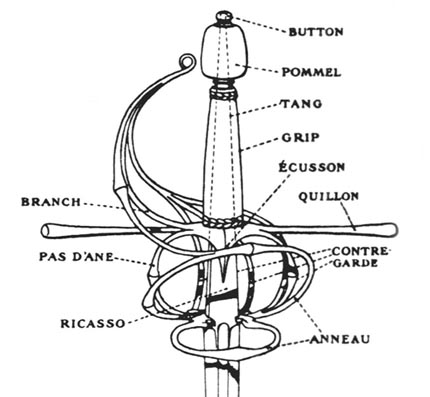
Here’s the original image:
wow, Three dimensions, Awesome! 
Still I think the handle brass/gold material could use some tweaking. Use a specular map perhaps?
Could be me, but now the blade just seems long, very long. I would make it a little shorter.
Your blade seems kinda sharp. Use nodes to blur the white part of the blade. You can do this by using Object ndex (see below ;))
You want to do compositing on specific objects? Use Index!
Look at this tutorial by Blendercookie, which is ironically enough about making a lightsaber ;). Look at how he uses Object Index to apply effects only on the blade.
http://www.blendercookie.com/2010/03/09/rendering-a-light-saber/
Hope this helps :). Nice improvements!
Happy Blending!
Acro