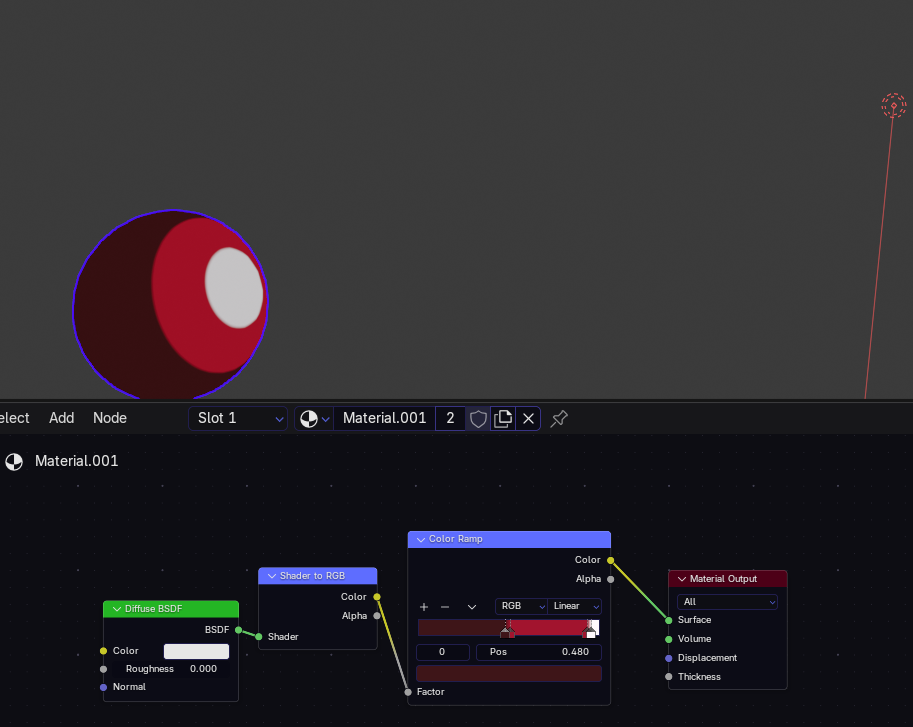
Hey, so I made this very simple toon shader right here
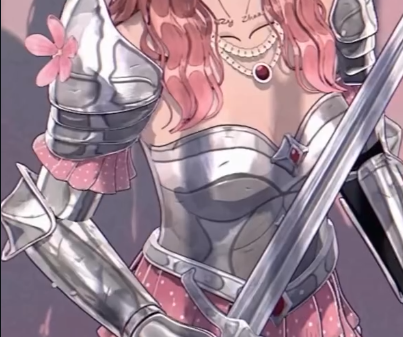
And I was wondering, how do some people manage to have metallic reflections and stuff on their toon model?
I was more thinking about how Hoyoverse and other studios like that do it but couldn’t find the right image but as you see, the shader used here is very toon-like and they somehow manage to have reflection.
Can anyone tell me how this effect is done? Thank you!
Okidoki
November 4, 2026, 6:21pm
2
Hmm… maybe have a look here:
[Fake-Metallics-blender-nation-banner]
How to get a toony look for metallic reflections using textures with various mapping methods.
[Faking Toon Metallic Reflections in Blender 2.9]
In this video:
Limits of Eevee reflections (screen space or baking)
Fake reflections using Reflection mapping.
Fake reflections using Matcaps.
Fake reflections using UVs + layer weight.
The demo file used is available on Gumroad($0):
Blog post for this video:
(Some of) The Nodes:
[image]
My…
..or try the awesome forum search function (top right;
thorn
November 4, 2026, 11:14pm
3
Simple answer: those are not reflections.
Look up (search engine time) Environment Map.
joseph
November 4, 2026, 11:27pm
4
A lot of the time, especially in games, it’s matcaps- entirely fake reflections based on view angle
Okidoki
November 5, 2026, 8:03am
5
Well.. toon shader implies → not-real.. so i guess it’s about “the metallic look”..
( and any “3D render” is not really real anyway
 –icon) for more..

