I ended up doing it myself in a secondary addon as to not interfere with any changes you make in the future. In my own addon as of, Preliminary batch recolor support · tryptech/Brawl-Rendering-Toolkit@30b1b88 (github.com), in case anyone wants to copy the implementation
Option to hide render button is a must. It takes too much space.
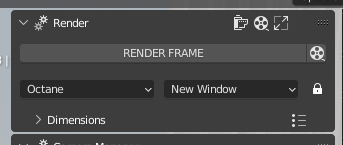
Look for “row.scale_y” in .py file and change the values that are above 1 back to 1
1 Like
Getting this error when trying to install in Blender 3.5.1:

Traceback (most recent call last):
File “D:\Programs\BlenderLauncher\stable\blender-3.5.1+stable.e1ccd9d4a1d3\3.5\scripts\modules\addon_utils.py”, line 333, in enable
mod = import(module_name)
ModuleNotFoundError: No module named ‘render_button_v0’
Unzip the compressed file and install it yourself 
Blender 3.5.1 works fine (v0.3.9)
%USERPROFILE%\AppData\Roaming\Blender Foundation\Blender\3.5\scripts\addons\
I’m getting an error when I try to select and render multiple cameras:
Python: Traceback (most recent call last):
- File “C:\Users\me\AppData\Roaming\Blender Foundation\Blender\3.6\scripts\addons\render_button.py”, line 1222, in execute*
- img = bpy.data.images[‘Render Result’]*
KeyError: ‘bpy_prop_collection[key]: key “Render Result” not found’
Your BIG RENDER BUTTON has been a staple in my addons since 2.83 Thank you for making it. I am currently using Blender 4.1 and when I click the reel icon to switch to “ANIMATION” it will not switch. Maybe it’s an API change. Is there a way you can fix this please?
2 Likes
I was going to ask if the script is compatible with Blender 4.1, so I hope you don’t mind me bumping the thread. That way I’ll get a notice if any new posts follow.
I’m not really a coder, but I modified the script with the help of Claude (Opus) and went through all of the lines that were no longer compatible with the Blender 4.0 API and updated the script. I can’t guarantee this works 100%, but I can already see that a few of the things that hadn’t been working for me in a while are working again. Enjoy! Oh, and don’t expect me to fix anything complicated, but feel free to complain about stuff here, hah!
render_button_v4.py (170.0 KB)
6 Likes
I’ve been using this add-on for ages to help render UI images for Brawl Modding on Gamebanana. It’s handy enough to where I want this to be a standard feature in mainline Blender.
Recently I’ve encountered a quirk where any camera markers on the 0th frame or earlier of the dope sheet get deleted when that camera gets rendered. I’ve been using Blender 4.1.1.
This does not happen to the camera marker once the add-on is disabled and oddly enough the marker would still function if you keyframe “render-activity” for the associated camera when this marker removal would occur. Do you think you can tackle this with Opus’ help?
Will it work with Blender 4.3?
Also, is the BIG RENDER button script maintained in github?
This is a DEFACTO addon on my arsenal. Should be considered “main” addon on the extensions platform.
Please let me know. Thanks.
The file attached above works. (render_button_v4.py (170.0 KB))
However, this Addon malfunctions slightly for rendering size settings overall.
There is a malfunction between the default settings and the corresponding Addon settings.
However, there is no problem with the operation.
2 Likes
This is a great addon, i use it all the time. A big great thanks to Hokuss for making it and for everyone who maintained it over the years.
I would really want to extend the functionality to allow one to save custom layer states and custom world settings per camera the same way you can currently save custom resolution.
It being licensed open source, I took the liberty to take it on and publish it on GitHub. Hopefully I will be able to maintain it for the foreseeable future.
If anyone has any comments, suggestions, improvements or found bugs, please feel free to share them with me.
our_render_button_v0.5.0.beta.zip (56.0 KB)
1 Like
That’s good news.
Hello, first of all, I would like to thank everyone for their efforts in improving this plugin. I used this plugin without any problems up to version 5.0, but now it doesn’t work. I’ve tried the versions above as well, but unfortunately it doesn’t work… Did I miss something, or is compatibility with Blender 5.0 completely over?
1 Like
It’s on Blender’s Extensions (Blender 5.1) now. It’s called “My Big Button”.
1 Like