I have added indicator so that you know from Blender UI that profiler is active and can stop profiling from it:
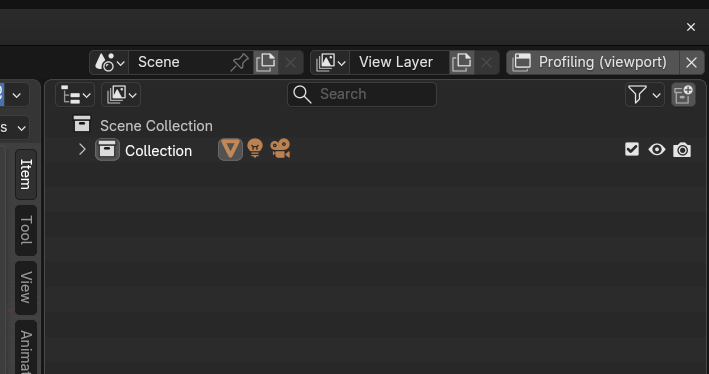
Also, the warning message now can be closed:
I have added indicator so that you know from Blender UI that profiler is active and can stop profiling from it:
Also, the warning message now can be closed:
Add-on have got approved at Blender Extensions Platform:
Good…really good.
Yesterday night it was useful to detect a super uselessly heavy texture that was 4096x4096 when it was enough to be 1024x1024…when you have a very large project and you append/link many objects, it’s quite easy to go offtrack with the scene size in terms of geometry or textures.
Thank you very much for this addon.
Add-on is now avaliable on superhive:
Just to understand…will it be differences from the extension to superhive one?
Nope
Why I should post at least 10 characters?
Using your addon I’ve found something I can’t say if it’s an issue of the addon or something else.
Contest.
I’m trying to optimize a complex scene full of objects (local and linked).
Watching at your report I’ve seen something that put me on suspicious mode and I’ve made a simple scene to better understand how Blender manages the memory related to image files.
I’ve created 2 simple scenes: one with a cube and one with a modified cube (just extruded one face to recognize it later).
Both have a material with the same 8000x8000 texture applied to each material of each object.
Then, I’ve linked those 2 scenes and , using your profiler, I’ve seen that the texture map is not counted both viewport and rendering reports…but this is not the only strange things…
After I’ve appended several times the 2 objects (of the 2 scenes) and check the reports.
Now the viewport and render reports report the big file many times increasing the memory usage while the memory usage displayed by Blender on rendering phase is always the same.
So, some questions:
Thanks in advance.
I have missed that, because in my cases there are counted. I suppose it is because Library Overrides, not simple link. I can look at this.
Blender should load texture file only once if it from the same datablock.
For memory usage on GPU I use nvidia-smi
