Hello, so,
I am manually weight painting this simple dino rig and I finished the head and neck bone weights. It was working perfectly fine.
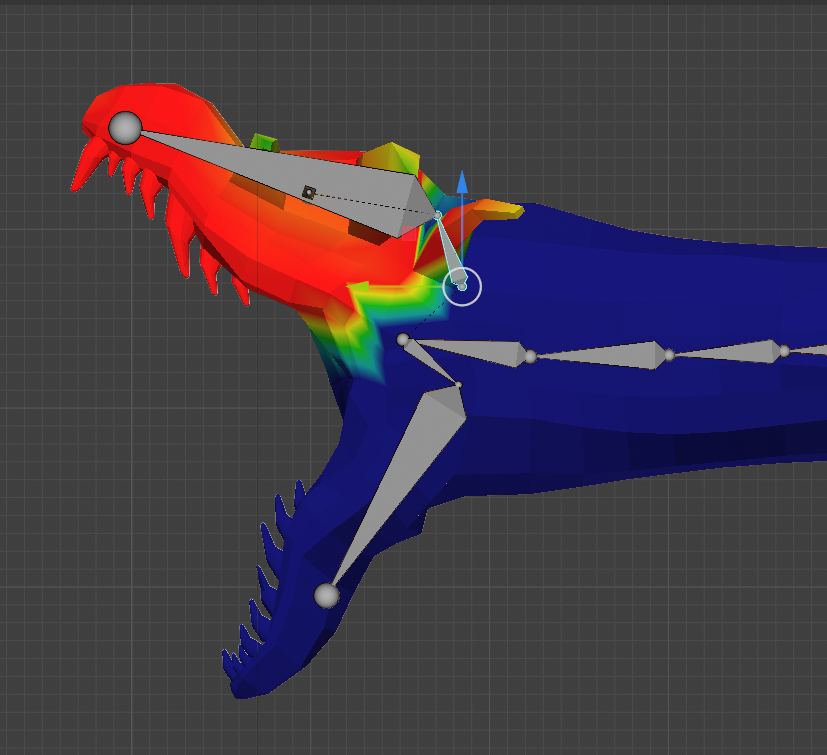
So I moved onto the other bones. Got one done and went back to check on the head bones. And for some reason, they started deforming like this. (there shouldn’t be a dent in its snout and the bottom jaw is also deforming weirdly)
Of course I panicked and attempted to undo the issue. But to my dismay, even after undoing it to the point where it should’ve been working fine, it wasn’t.
I genuinely don’t know what to do. All transforms are applied, face orientation is fine, I don’t know what else could be causing this. It feels like the rig just decided to start bending differently on its own. I didn’t touch the head weights at all
Hi and welcome, What your vertex groups looks like? select the vertex group for Head and neck and see if it display properly. Also try Parent with automatic weights.
Watch this tutorial;
Are you using auto normalise? If so then you probably painted some other weights on the head area by accident, it happens also to me all the time if I’m not paying enough attention  You can check the weights that each vertex has if you go to edit mode, select a vertex, and in the menu that opens in the viewport with n you can find a tab that shows all the vertex groups (weights) that the vertex is part of, and with what value.
If you really want to not touch a certain weight any more by accident then you should click the lock icon next to the vertex group name in the vertex group list to lock it. This is especially true with auto normalise.
Ofc, you could also paint with auto normalise turned off, but I don’t recommend doing it. Auto normalise will subtract weights automatically from other deforming vertex groups or add to them so that each vertex always has a weight sum of 1. This will prevent overlapping full weights etc. I do know that some people like to paint without auto normalise, but personally I don’t see much point in painting with false visual information. And also locking vertex groups won’t help you if you have turned auto normalise off…
It would appear I had auto normalize off. Thank you so so much, I tried adjusting the weight with it on and it works way better 
I will make sure to lock the vertex groups now and pray I don’t run into anymore problems. This is my first time weight painting because my automatic weights refused to work.
Some guy in the blender community discord told me to “just check the weights, its easy” and I thought I would lose it lol. This is way more helpful, thank you again 
Hello, I got a solution to my problem now! I wasn’t using auto normalize so it was acting all weird. Still thank you tho! I appreciate it (fyi, all my vertex groups were displaying properly and automatic weights werent working lol)