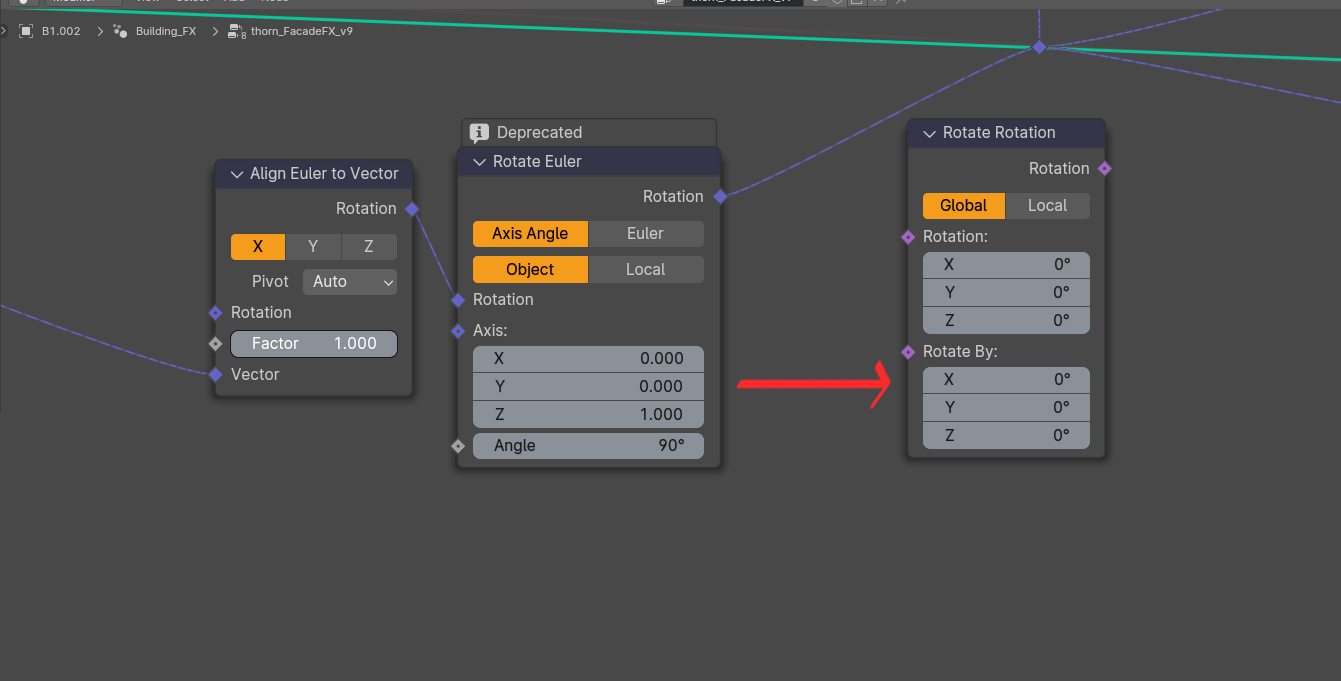
The new node has fewer mode settings, as well as different inputs… and I’ve no idea what values I’m supposed to use to recreate the output result of the old nodes. Everything I’ve tried has been a NO, that’s not the result I get with the old node setup.
I looked at the release notes for assistance, and found this …valuable… information:
" The Rotate Rotation node replaces the Rotate Euler node as a faster and clearer way to modifier rotations"
Deprecated nodes were treating vectors as rotations and rotations as vectors.
Now, there is a clear distinction. Socket is not the same color and there are conversion nodes Euler to Rotation, Rotation to Euler, Quaternion to Rotation, Rotation to Quaternion, Axis Angle to Rotation, Rotation to Axis Angle.
You may need to use them. That depends on wanted inputs and outputs.
Align Euler to Vector node is also deprecated node.
Now, there is an Align Rotation to Vector node.
The OP’s question is vague. He is showing two examples of different cases without showing the whole nodetree, in none.
We don’t know what is the input.
We don’t know what is the expected result.
So, I answered the same way.
According to first screencapture, conversion nodes may not be necessary.
Maybe, Rotate Rotation node is not necessary and an Align Rotation to Vector node may suffice. I don’t know what is connected to Combine XYZ node.
I don’t know what is expected result in Viewport for Instances on Points node.
According to second screencapture, it should be obvious that an Axis Angle to Rotation node is needed.
In both cases, issue may not be related to Rotate Rotation node but to something else out of screencapture.
But I thought that my suggestion to try to complete his node trees with other new rotation nodes may suffice to solve his problems.
If it does not ; I suppose he will reformulate his issues more precisely.
Honestly - based on the screenshots and the new node’s description of “this replaces that”, I thought I’d provided more than enough info to illustrate the ask.
I didn’t post the whole node setup, because - well, it’s a lot.
I’m aware they also added something like 6-10 more “rotate a thing” nodes + matrix nodes, but the release note didn’t give me the impression that I’d need to chain up a bunch of other new things to get the result I currently have.
I didn’t see that Euler to Vector is also deprecated; i guess they didn’t mention this, or perhaps it’s a 4.2 change…
In any case, I guess i’ll just start from Ground Zero with geonodes (again), and try to figure out what all these things do and how they’re supposed to be used. Yay.
I’m also trying to understand all these new changes… The names for the new nodes don’t really give a clue of what’s happening.
I need to look into the source code and digest that first.
By the name, I think of it as a further rotation, taking the end results of previous rotations, and allowing you to apply further rotations more simply.
The name alone makes me think it could be my long sought holy grail, a way to apply/reset rotations from within geonodes.
…but does it actually work like that? I dunno, but now my curiosity is piqued.
edit: Once again, I love the terse technically correct non-answers the Blender Foundation provides…
Global: Rotate a rotation in [Global Space]
Local: Rotate a rotation in [Local Space]
The deprecated node had OBJECT, not Global. How does one go with OBJECT? If I don’t need object any longer, why? So… yeah. This whole “faster and clearer way to modifier rotations”… isn’t.
And on a completely unrelated note (but it’s my thread, so i think i’m allowed) - why doesn’t this work?
Random output is an integer. Subdivide level wants an integer. But the connection just fails. I also referred to the manual on this. We know how that went.
Regarding the naming. See the purple rotation just as a separate datatype. “Rotate Rotation” is then just another name under the same naming convention you had so far. Like “Rotate Euler”
I sort of understand the answer (in theory), but in practical terms I don’t. How is it changing? IE, why is it not just a static random value? What is making it not be a stable value?
What Debuk said. A subdivide is a simple function, and only accepts simple inputs. If you want it to apply different levels of subdivisions to different generated objects, you’ll probably have to rig up some kind of loop where the random number can be outputted to a specific number per.
Or to put it simply, the subdivision node wants a single number, while you’re providing it a range.
Think of it like this: right now, you’re saying “okay, this could be a number between 1 to 5,” and the subdivide mesh node is asking “okay, so which number is it.” You’ll need to find a way so that your random value can be assigned a real number, so that it can say “this object is 2, this object is 3, this object 2 again,” and so on and so on.