In recent version, there is a mess in scene selector. I was used to have all scenes in alphabetical order, but now it is somewhat messed up. Can I switch somewhere that I want scenes in alphabetical order?

Ohh… i did not used different scenes that much so i did not noticed 
Undestood  … As I have made my search, it has something to do with recent searches … but I don’t know where to turn this behavior off for that scene selector … it’s only creating a mess from my point of view.
perhaps at preferences → interface → display → search settings
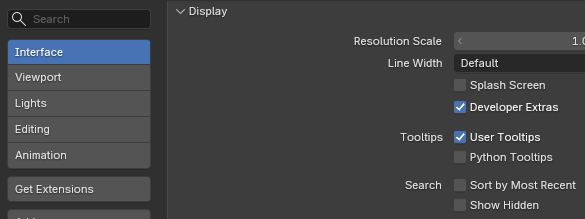
for alphabetical listing, the “sort by most recent” could be unselected [v5.1.2].
happy  ing!
ing!
1 Like
Yes, that’s the proper setting. Thank you!
1 Like
Nice… one can learn something about blender every day 
2 Likes