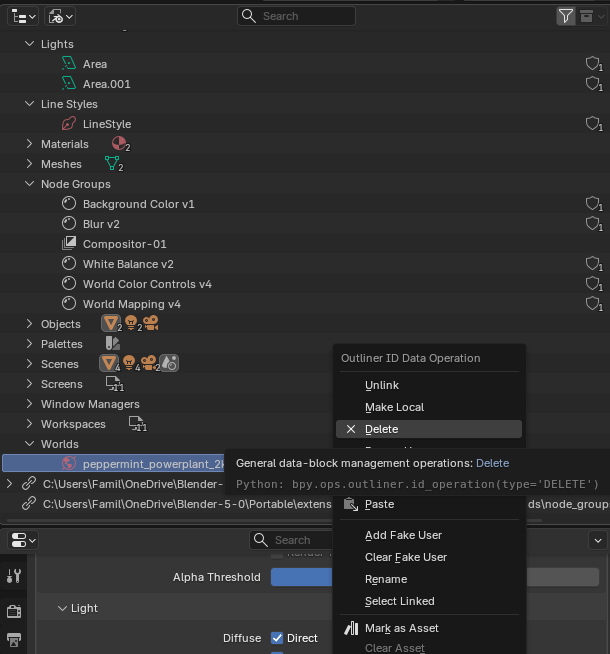
Hey there,
I have a blend file and want to get rid of all stored compositor setups - whenever I delete one, it still lingers in the dropdown. Same goes for compositor setups - how can I get rid of all of them for good?
Hey there,
I have a blend file and want to get rid of all stored compositor setups - whenever I delete one, it still lingers in the dropdown. Same goes for compositor setups - how can I get rid of all of them for good?
Perhaps doing it in the python console is the way to go..
compositor_nodegroups = [n for n in bpy.data.node_groups if n.type=="COMPOSITING"]

for cng in compositor_nodegroups:
    bpy.data.node_groups.remove(cng)
YES! They’re gone! And the world shaders? Is there some Python to chase those away as well? 
@RSEhlers suggestion is simpler than using python.
But just for completion, the python script is almost identical for cleaning the Worlds:
world_nodegroups = [n for n in bpy.data.worlds]

for w in world_nodegroups:
    bpy.data.worlds.remove(w)
Is there a reason to do [n for n in bpy.data.worlds] instead of something like list(bpy.data.worlds) or bpy.data.worlds[:]?
Edit: Oh, probably to add conditions if needed…  makes sense.
It’s just a matter of preference.
There are plenty of ways to turn the collection into a list, some more readable than others, some with more options; But in the end they all work. 
Alright, done. Thanks a lot, guys! I didn’t think to use the outline set to Blend file @RSEhlers - the more idiot proof way, perfectly suitable for me