I am absolutely not familiar with Mac environment, but I’m very glad you submitted that fix!
So I implemented the addon with your solution. I confirm it’s still working on Windows, but as I don’t have a Mac to test it, could you confirm to me that all is working for you, once again? (I updated the github link).
I tried replacing that line, but it is located inside the class AssignAlphaToBrush, which is called via the operator col.operator("texture.assign_alpha_to_brush"... . I don’t see exactly how I can get rid of that operator and still load the image from the template_icon_view?
Trying to figure out the single preview for you. Little tricky cause your preview is the selected pic in the selected folder, when the other preview is the selected brush in Blender.
SMALL FIX UPDATE:
I just realized that the addon was also appearing in Vertex Paint and Texture Paint modes. And if you were to select an alpha from there it would be assigned to the Sculpt Mode, while you are not in that mode. So I fixed this by taking into account what mode is active, so now you can use the addon for these two modes as well.
But that raises another problem: the 3 modes are now using the same folders. Which is not very appropriate because for Sculpting you will mostly need b&w alphas, but for Texture Paint, you might need colored textures for example. I believe they shouldn’t belong to the same folders. So I will probably split the library paths in the near future so each mode can access its own textures from different folders…
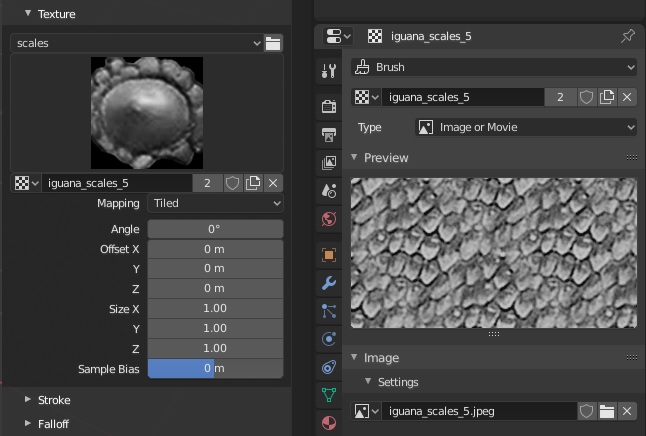
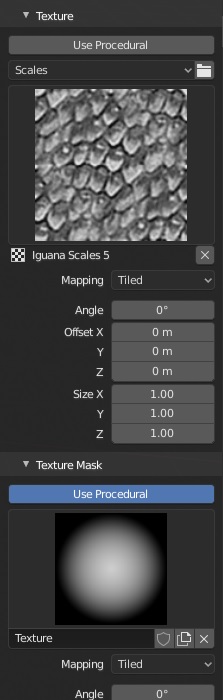
On the left of the screenshot, were you able to remove the original panel template_ID_preview from default Blender and leave only the template_icon_view from the addon?
I was asking because you managed to keep all the buttons (fake user, unlink data-block, etc.) and I thought these were hard coded and inseparable from the original preview panel… that’s nice.
But I fail to understand why the 2 previews differ in your screenshot. When I assign the texture, it correctly displays under Texture Properties tab preview. Or is this a result of the changes you made?
Yeah and no. Look at the screenshot again. The big preview is what the preview I removed shows. It’s shows the picture that’s assigned to the brush texture. You can switch between different brushes and the preview shows the picture assigned to the brush texture. Your preview is the last picture you select. That means you can switch between different brushes and your preview will continue to show the last selected picture, until you select a different picture.
Here are my impressions:
In my opinion the UI should be simplified as much as possible to avoid extra steps and visual clutter. I think the addon should almost be forgotten by the user, it’s simply meant to provide a simple way to change brushes. So in light of this:
Is the Refresh button really needed? I have the impression the addon is doing a pretty well job at refreshing itself…
Does creating a folder from Blender’s UI really necessary? Even if you create a folder you’d still have to go in the OS explorer to fill it. So why not let the user entirely manage his library from outside Blender and leave the UI as read-only?
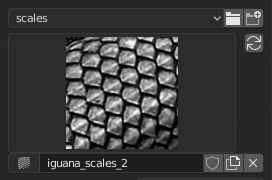
The alphas preview panel fitted in the small side corner is not very appealing. I really liked your previous screenshot where you completely replaced the original preview panel. Would it be possible to revert to that? As long as the addon is active, it’s not needed to have both previews as it is loading the textures under the hood, but for the user it appears the same. And since you’re redrawing the original texture settings on unregister, it should be fine.
A: No it’s not needed ,but if you add new textures you will have to change the category and then back to refresh.
Q: Does creating a folder from Blender’s UI really necessary?
A: Not really
Q 3:
A: I still don’t think you understand the issue with just the one preview from the addon and how the preview can cause confusion. That was trying to solve it by displaying the icon from the brush texture and selecting the brush texture from the side.
Try this and see if you see the issue with the preview.
1: Assign texture “Image 1” to a sculpt “brush 1”. Preview is “Image 1” which is correct for “brush 1”. Preview seems to be OK here.
2: Change to “brush 2” and assign texture “Image 2”. Preview is “Image 2” which is correct for “brush 2”. Preview seems to be OK here too.
3: Change back to “brush 1”. Preview is now showing “Image 2” when the actual texture for “brush 1” is “Image 1”. Preview is wrong here. See where this could cause confusion for the user?
That’s not bothering me. I believe that the user practice is not to constantly add new alphas in the folders on the fly, but more like constituting a collection once and leaving it at it, only having casual updates.
Okay, now I get it. Indeed I prefer this version, but that problem will surely confuse people.
One solution could be to transfer the texture to each changing brush. Another one could be to unlink the texture each time the user changes the brush. But the template_icon_view will still display an image even when unlinked. Unless there is a way to also reset the template to a ‘NONE’ icon, it seems unresolvable.
In that case, I’d rather leave one preview above the other. Not very elegant, but more in spirit with how Blender organises the UI…
I figured out the issue with preview. I’ll upload another version later with fix.
Edit:
I wonder if the texture settings below is even needed, since we are not creating a texture and then assigning a image and the texture is created based on selected image? Maybe only need just a button to remove texture from brush? Maybe display texture name?
I thought it would be nice to let users still have both options. Otherwise we are effectively changing the way to use textures. As it will require the textures to already be in your folders before using them as opposed to being able to add them from your drive.
If we are going that route, we should put a warning to users that if they activate the addon, they will lose the default ability to load from their drive.
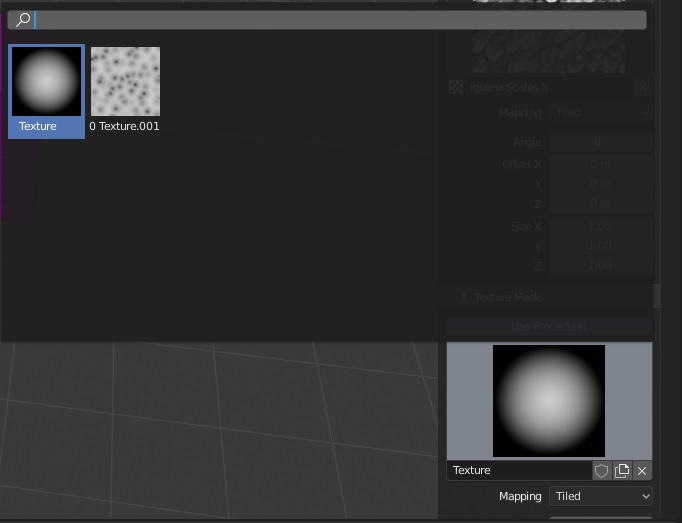
Doesn’t look bad! Can I test it? I would like to see how that procedural comes up.
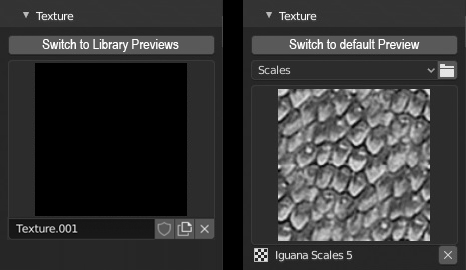
Also I’m still bothered by the fact that we are removing the ability to not be able to keep using the default way of adding textures. So I was thinking maybe some kind of ‘switch’ button, that would draw the library preview and when switched, would redraw the default preview. That way we can keep the default process, and we won’t need to worry about the procedurals as we will be able to access them as usual.
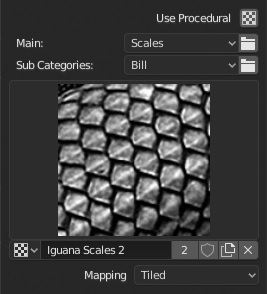
Thought I’d have something for you to try ,but I keep tweaking it. Got so much going on, I’m starting to get confused. What do you think about this? I saw where someone mentioned not being able to use sub categories.