Hi!
my first post here 
Does anyone know how to create a second uv channel in blender?
So i have 1 for the texture it self and 1 for light baking (in udk engine)
Greets Murr
Hi!
my first post here
Does anyone know how to create a second uv channel in blender?
So i have 1 for the texture it self and 1 for light baking (in udk engine)
Greets Murr
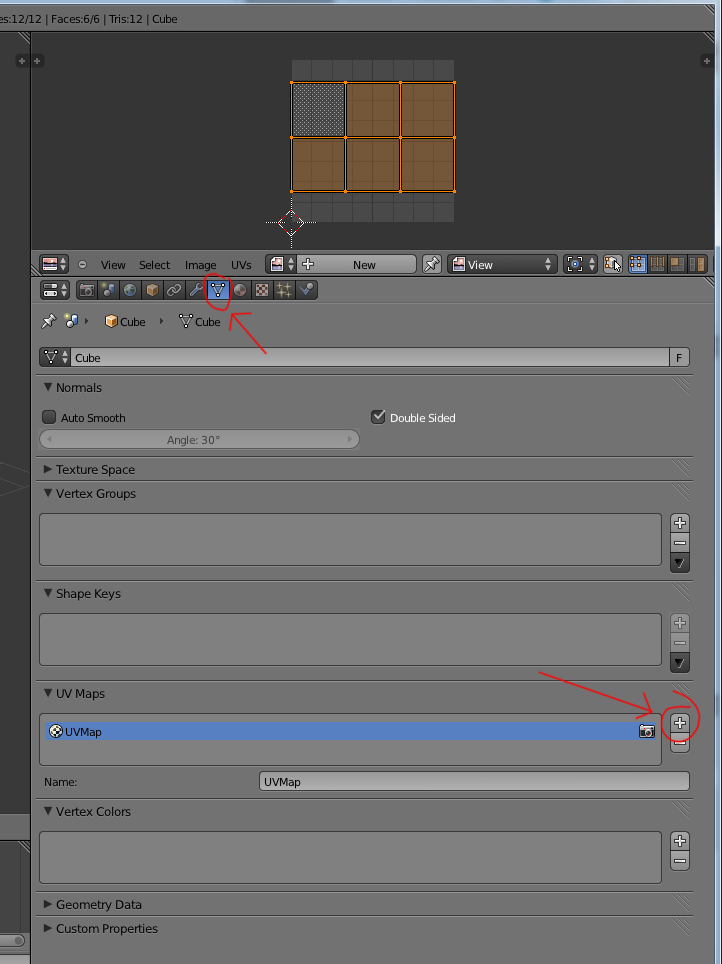
In the properties window under the Object Data tab you can add additional uv sets using the relevant + symbol
ah nice! thanks alot!
How I might access this second UV channel when constructing materials in Cycles? Mapping node does not allow me to specify which UV channel to use. :-<
Sad less than sign. Lonely. Wants to be a greater than sign.
Use Input Attribute node; copy UV name into it
Brilliant! Thank you!
Ooookay… now I get the Attribute node. I don’t have to guess what context it wants, I tell it what attribute I want to use… Right? Hahahahahahahaha but that’s awesome! Audio software poops on me when I try that. And it’s how I want to work.
Rad.
Thanks again!
I just read your post and I have to say that if I understand the intent, I don’t get the extent… I suppose that the properties window referred to is relative to the uv map window, but I could not find any object data tab in it! I tried uv mapping but nothing … I am using 2.64.2 r51318
Is this for BI or does it works under Cycles? As I am trying to uv map under Cycles?
Thanks in advance for any suggestion
Yves Bodson
In the properties window
Each window is a window type. You select the type of window in the dropdown list in the left corner of the window. By default you have a Properties type window on the right hand side of the blender interface with lots and lots of buttons and options.
under the Object Data tab
At the top of this window are a number of buttons. Hover your mouse over each one and you get a tooltip telling you what that button means. One button looks like a triangle and its tooltip says ‘Object Data’, this is the button you need to press to show the object data of the selected object.
you can add additional uv sets using the relevant + symbol
In these object data settings there is a section called UV Maps. On the right hand side there is a + and - button to add or remove uv maps. Press the + button to add a uv map, name it in the box below. Repeat to add additional uv maps.
Is this for BI or does it works under Cycles? As I am trying to uv map under Cycles?
Whichever one you use is irrelevent
 Thanks !! I found the solution here
Sorry for the resurrection of this one but hot damn I love the search button. Thanks!