Alt + LMB and Shift + Alt + LMB shortcuts for selecting edge loop don’t work at all. However, it works via the dropdown menu: Select → Select Loops → Edge Loops. Note: Emulate 3-button mouse is disabled, it doesn’t work in neither 2.x nor 3.x versions and also it is not like there is a conflict with the system shortcuts.
Could you please show us an example of where it doesn’t work?
We can’t help if there isn’t something to analyze!
I tried to select edge loops of the sphere along its meridians and it doesn’t happen:
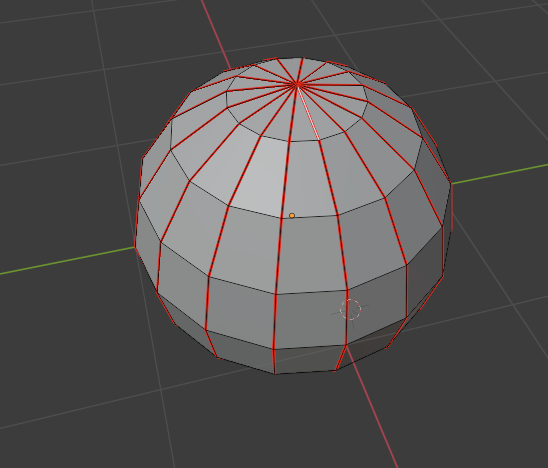
Hmm…It works just fine here, so there must be something you might have done by accident that stops it from working for you…did you expect it to go all the way around the sphere or does it just not work…
Why did you include,
Did you have it enabled at one time?
If you start from a new file FILE > NEW > GENERAL
does it still fail to work…
Or if you select, FILE > DEFAULTS > LOAD FACTORY SETTINGS does it not work?
That option was enabled before and when I had learned that has the same shortcut then I disabled that.
Yes, it doesn’t work yet.
The same here, it doesn’t work.
Try this…
Add a Loop Cut on the meridian of the sphere, and set it in the default center… ( It should stop one face short of the poles, as standard behavior)
Deselect it…
Now try Alt+ Left click and see if you can re-select it…
Did you mean to do it such way (I added a new meridian by means of the Loop Cut and centered it between the adjacent ones)?

In any case it doesn’ work too.
Are you using blender in a Linux distribution that uses Gnome desktop?
Yep…I was hoping that that would get it… I am assuming that at one time it did work…
Have you installed any add-ons since that time?
I know that some will conflict and cause things to just not function anymore…
You could use the Is key free add-on ( included in Blender) and run it for Alt+L Click and see if there is something else trying to use it…
That is about the only thing I can think of…as I haven’t heard of any other reports of this…
I have only the default addons, I didn’t install any third-party ones. Also, where can I install Is Key Free addon from since I have not that included?
I have LinuxMint 21.1 with Cinnamon 5.6.8 DE.

Ok, then you need to be sure your system is not capturing those shortcuts for something. If the shortcuts are used by the system for anything else, they will not work in Blender.
This link talks about Gnome, but I guess you can find out if your desktop is not doing the same somehow.
https://www.oreilly.com/library/view/blender-for-dummies/9780470584460/ch016-sec005.html#:~:text=You%20can%20fix%20this%20issue,Alt%2Bright-click%20combination.
1 Like
Thanks for stepping in…I have NO knowledge of Linux…at all!
1 Like
Yes, I had the same problem a while ago when I used Ubuntu and it was annoying me. Since I changed to Kubuntu and its KDE desktop I got rid of the problems. I have also Linux Mint on my PC, but now I’m under my Kubuntu session.
I would like to test if I have the same behavior on Mint.
1 Like
YES, I just tested Linux Mint here and had the same problem. I did not look at the shortcuts, though.
So to solve your problem, you need to dig into your system settings and not in Blender.
PS: I found out that ALT SHIFT left click is used by Mint to drag windows and snap them on the corners of your screen.
PS 2: The solution to your problem is in your “windows” settings, under the tab “behavior” you need to change your special key to move and resize windows from ALT to SUPER (or another key you prefer, but since SUPER is pretty useless…)
2 Likes
Linux Mint User here.
I had the same problem… unable to loop select with Alt+Shift+LMB
Go to Linux System Settings for this issue. In the panel that pops up navigate to the icon in ‘Preferences’ called ‘Windows’.
Click the ‘Behaviour’ tab at the top of the new popup.
Under ‘Moving and Resizing Windows’ you’ll see a heading that says, ‘Special key to move and resize windows’. In the drop down, select Disabled.
Hope that helps. It fixed it for me.