Setting snapping from Python

Hi,
I am trying this kind of thing:

context.scene.tool_settings.snap_target = 'CLOSEST'
context.scene.tool_settings.snap_elements_base = {'GRID'}
context.scene.tool_settings.snap_elements_individual = {'FACE_PROJECT'}
context.scene.tool_settings.use_snap_translate = True

…but the elements_base and elements_individual don’t get set as expected. The one overrides the other, so that only one of them is set.

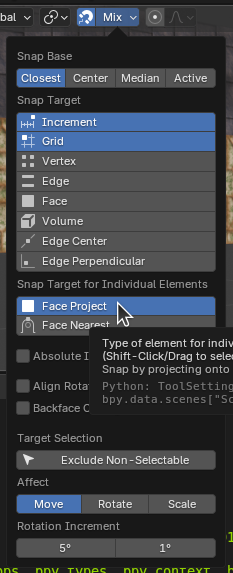
This is manually done, but I’d like to do this in code:

It’s weird, but how do I hold SHIFT down in code? :smile:

You can set properties you want from UI and then check Info editor to see how they set internally - https://docs.blender.org/manual/en/latest/editors/info_editor.html

Thanks. That’s what I did to get those lines of code!

But I can’t get (say) Increment AND Face Project selected from code.

What do you mean?

Yes. Now take those output lines and put them in a script and see what happens. (Or just paste them into the python terminal.)

You won’t get the multiple selections in that snapping ui. Only the last one set actually takes.

I am writing an Operator (in a side panel) that must setup a particular snapping ‘profile’. So I want it to choose (from top to bottom) Closest, Grid, Face Project, Move. So I need to call those ...scene.tool_settings.snap.. commands to do it. The problem is that only Closest and Face Project are actually set.

Oh, I see what you mean. It looks like those two properties are using the same memory under the hood leading to this overriding effect when set from Python API. If it is so I’m not sure if there’s anything we can do right now, besides accessing Blender internals in some hacky way.

I think this can be considered a bug and you can report it to Blender (https://projects.blender.org/blender/blender/issues). Then maybe it will get fixed in the next version or they also might suggest some workaround for now.
bpy.context.scene.tool_settings.snap_elements_base = {"INCREMENT"}
bpy.context.scene.tool_settings.snap_elements_individual = {"FACE_PROJECT"}
bpy.context.scene.tool_settings.snap_elements_base
{'INCREMENT'}
bpy.context.scene.tool_settings.snap_elements_individual
# {'FACE_PROJECT'}
bpy.context.scene.tool_settings.snap_elements_base
# set()

Ok cool. Thanks. I shall do so.

Issue posted here: https://projects.blender.org/blender/blender/issues/139004

Solution posted by Andrej (here)

Just noticed that there is also https://docs.blender.org/api/current/bpy.types.ToolSettings.html#bpy.types.ToolSettings.snap_elements

That contains all enum items and allows setting them all at once, so nothing is reset:

>>> C.scene.tool_settings.snap_elements = {"GRID", "FACE_PROJECT"}
>>> C.scene.tool_settings.snap_elements
{'GRID', 'FACE_PROJECT'}