Hi, I just got the add-on from Gumroad as it would be useful in my current project.
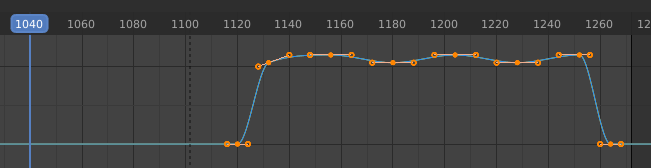
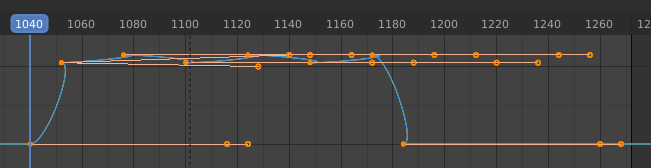
Well, unfortunately, I have a major issue - or am I doing something wrong? Using the graph editor, doing a box selection, the plug-in only moves the keyframes, not the handles. The same happens, when using the dope sheet. There it looks fine as you can’t see the bezier handles, but using the graph editor, you can see, that the handles do not move along. Tried in 2.83 and 2.82.
Thanks.
Hm, I moved some more keyframes around and encountered some strange behaviour. With a rig, after duplicating a range of keyframes and trying to align that set, some unselected keyframes moved as well. Also, playing with a simple scene with two cubes and shifting a couple of keyframes back and forth within the graph editor, like 4 to 5 times to the left and to the right, at some point the handles get messed up unfortunately. Don’t know, if you can replicate this behaviour and if it is possible to fix. Thanks
Another thing: I was expecting the add-on would only shift the selected keys, but atm it also shifts the later keyframes as well, even if they are not selected.
I still got the weird issue with a character rig. Attached some screenshots. I don’t know, what causes this.
1: selected set of keyframes
2+3: just shifting them via the add-on works fine
4: duplicated the set of keyframes
5: trying to shift the duplicated set to the slider, but some keys from the left get affected as well, causing them and the set being shifted to the right - very odd rig_issue.zip (584.1 KB)
Tried it two more times. The first time I had the shifting of the later keys issue again and thought it was related to rotation keyframes. Tried it again and then it worked. Have to save the file right away, when it happens again.
Sending you now the character rig via e-mail as it is a commercial rig. That issue as shown in the zipped screenshots keeps occuring. Thanks.
I tried to clarify this problem but could not solve it.
This is a fatal problem that cannot guarantee the reliability of operation.
We have refunded the buyer who made the payment.
Sorry for not meeting expectations …
(It seems that the property “select_control_point” which gets the selection point of the keyframe sometimes gets the non-selection point.
I don’t know the law of getting non-selection)
Thanks for trying to solve the issue and the refund for now. I still like the idea of the add-on and it’s fast and intuitive workflow. Maybe you find a solution / a work around in the future. Thanks for your continuous contribution to the Blender community!