Hi,
What would be the simplest and more efficient way to snap the pivot of 1 mesh to another object’s pivot? If that’s possible?

Cheers,
Jacques
Hi,
What would be the simplest and more efficient way to snap the pivot of 1 mesh to another object’s pivot? If that’s possible?
Cheers,
Jacques
Select the “1” mesh, shift+select “another” object. Enable ‘Affect Only Origins’ in the Options in the right side of the header, do a Object -> Snap -> Selection to Active (don’t forget do disable ‘Affect Only Origins’ after).
not understood 
Great. Thanks a lot Stan, will give it a try!
Cheers,
Jacques
Does This help?
I used to do this before
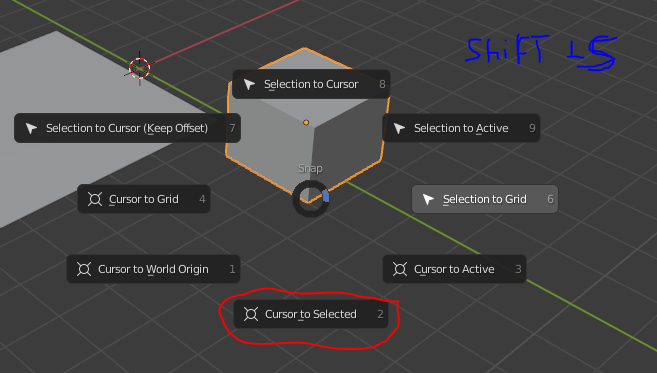

thank u 
That way is still as quick to be honest. So many ways of approaching things.
Ye, but since a few versions now, with the Affect Only Origins you can simply move, rotate, scale, or snap the origin alone as if it were a regular object. The only thing not available to it (at least, as of 2.91) is editing values directly in the Transform panel, which is a sad limitation.
Thank you colkai! I couldn’t go wrong with this kind of explanation  Quite useful!!
Cheers,
Jacques.
Thank you! So many options… That’s cool I guess I’ll pick up the one that suits me best.
Cheers,
Jacques.
I admit, an oft overlooked option is using locations only setting and scaling items to bring them closer together or further apart. The objects themselves are not scaled, but the relative position is. So for example, select a bunch of objects, set to locations only. scale z and they all end up at the same level, based on the origin point of the object of course.