I’m still fairly new at blender and have been learning about rigging meshes. At times though I have two rigs I’m messing around with and only way I know how to get a t-pose rig to an a-pose position of another avatar is to manually move it. Is there a way like in Maya when you hold the v key to snap the bones is there an equivalent to this in blender?
Ahm you may elaborate more on what you currently need, not enough info there. :spin:
You can reset your bones to the original state (rest pose you made in edit mode) by using Alt+R and Alt+G (You can reset scalling by using Alt+S), which will reset the rotations and positions on the bone, in the pose mode.
Snapping bones is just like snapping any other object, and the shortcut is Shift+Tab, and the snap mode Shift+Ctrl+Tab. The icon is a little magnet in the bottow of your view.
You can also select any object or element, press Shift+S, select Cursor to Selected, and that can move the 3D cursor to that point, now you can select the object you want to snap, Shift+S again and select Selection to Cursor. That is a useful tool that blender has.
It’s 2022 and almost 2023,
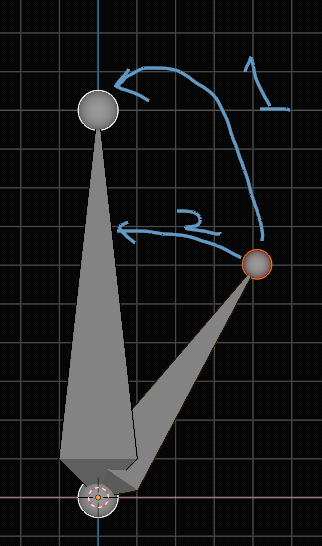
But, in this picture, if you wanna do 1, just activate snapping to vertex mode and if you wanna do number 2 (align bone) just press CTRL + ALT + A, the active bone is the one your bones aligned to