Hi!
I’m recently baking a lot of procedural Cycles materials from highpoly meshes to lowpoly ones to create PBR game assets.
I have a very hard time doing this in one element of an asset I’m working on lately.
Take a look at this:
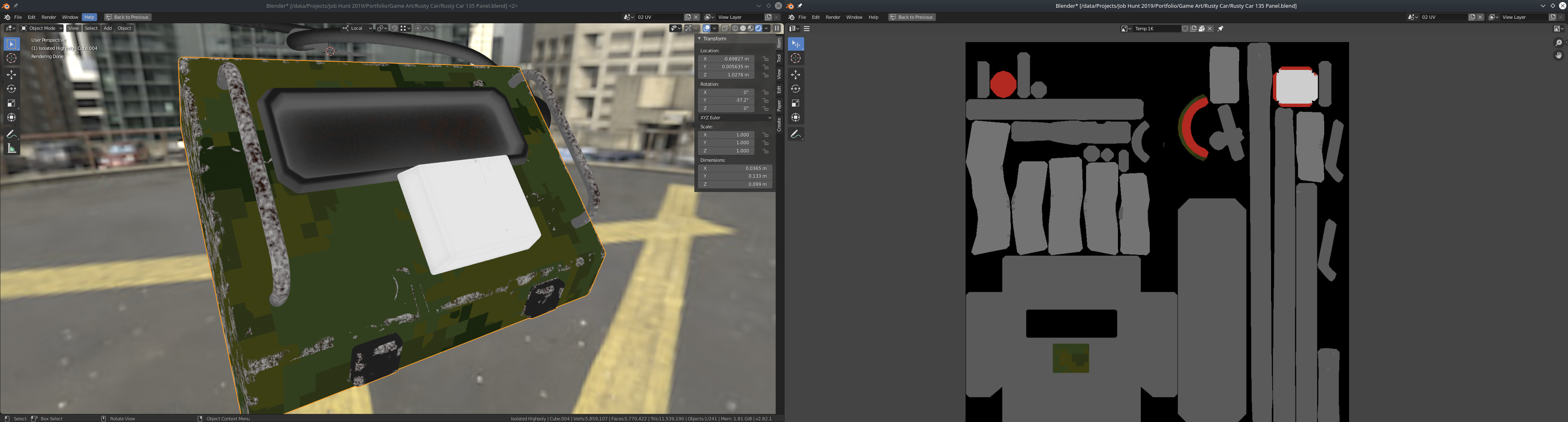
On the left there’s Cycles rendered preview of my highpoly model’s Base Color.
On the right, there’s a Base Color texture baked from it.
As you can see the majority of the texture is gray, except for one small piece masked out with a texture (created with dynamic paint).
The problem is - this is the result of rendering the very same Node Graph, just in different ways.
This is rendered with Blender 2.82 Alpha (hash: be1e9ae).
Am I missing something? This really makes me pull my hair, I’m trying to bake this fro the last 3 day with no success, and I have already baked many materials, some more complex than this, though here it’s a few different meshes baked together.
usually I just do one mesh at a time, but for this - it didn’t make sense
I wanted to prepare a demo file for this thread to show you the problem.
So I’ve copied and pasted the objects involved to a new file (the main file contains a lot more stuff I don’t want to publish just yet).
After pasting the objects (lowpoly, highpoly, cage) I did a test bake just to make sure.
And it came out exactly like the preview.
What the actual banana?
So my advice to self and others:
Try baking in a clean, new Blender project.