Hi,
I’m following David Ward’s’Creating an advanced face rig part 1’ tutorial and i’m encountering a problem that seems to be very basic. I cannot copy a shapekey.
David warns against forgetting to have former shapekeys not set to 0.000 when adding a new one otherwise the new one will get some of the shape of those former shapekeys.
As a consequence to copy a shape key you just have to let the shape key you want to copy at 1.000 then add one. Seems simple but it doesn’t work. The new shapekey is as neutral as if it had been created with all other shape keys set to 0.000.
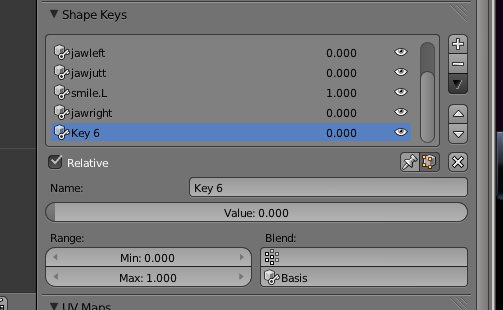
I’ve created Key6 (that I wanted to be a copy of smile.L) by pressing the ‘+’ button with smile.L set at 1.000 and all other shapekeys set at 0.000. Unfortunately, it doesn’t work…
Do you understand what’s wrong ? Has the way to copy shape key changed since David made his tutorial in march 2011 (I’m using 2.63) ?
Thanks !
Hope I was clear.