Sound Reaktor: The ultimate extension for audio-reactive animation in Blender

I want to introduce Sound Reaktor, an add-on that analyzes audio frequencies and bakes them directly into keyframes.

I’ve been working on it for almost a year now, and it’s been available on Superhive for the past two months. I decided to take it slow, polishing the details along the way to reach my goal: creating the ultimate add-on for sound-reactive animation in Blender.

At this point, I’m pretty happy with how far it’s come, especially considering it started as a small experiment to see if I could create sound-reactive animations using FFT.

That’s actually the core feature of Sound Reaktor: it doesn’t rely on Blender’s native “bake sound to F-curves” feature, but instead uses NumPy/SciPy to analyze the audio.

The current version, 2.0.1, comes with six different analysis methods: FFT (smooth), Onset (beat detection), RMS (volume), Spectral Centroid (brightness), Spectral Flatness (tonality), and Rolloff Frequency.

A few more details about the add-on:

  • it supports WAV, MP3, OGG, FLAC, OPUS, M4A, and AAC as input formats.

  • It’s compatible with Blender from 4.2 to 5.1 (as an add-on), on Windows, macOS, and Linux.

  • It makes animating Location, Rotation, and Scale super easy.

  • Most importantly: it can animate any property via the full data path. Whether it’s geonodes inputs, lights, shader values, modifier parameters, or camera settings. Anything that Blender can keyframe can be animated with Sound Reaktor.

  • It comes with 9 presets covering common frequency ranges like kick drums, snare, vocals, etc. On top of that, it also lets you set custom ranges with complete freedom.

  • It lets you apply high-pass and low-pass filters before analyzing the audio.

  • It comes with a bunch of parameters to tweak the animation: sensitivity, the option to smooth transitions with smoothing, a noise filter to reduce jitter, and many more.

And much more, like a preview of the analysis, caching so you don’t have to redo it when making changes, it’s fast (considering it creates a keyframe per frame), a metadata system that tracks which property you’ve animated and with what settings, automatically adding an audio strip to the Video Sequencer, and plenty of other features I’m probably forgetting right now.

The most important thing is that it’s fun and delivers really satisfying and accurate results if you’re into sound-reactive animation. There’s still a few features on the roadmap that haven’t been implemented yet, but they’ll come.

Here are some examples of animations I’ve made with Sound Reaktor:
Any questions I can answer about the addon: doubts, technicals, curiosities, or even support for those who already have it, I’ll be happy to help with. :grinning:

The link on Superhive is: https://superhivemarket.com/products/sound-reaktor

Cheers!

2 Likes

Sound Reaktor 2.2 Update.

This new version focuses on improving the UX and fixing bugs (which are not many).

The UI redesign reflects the workflow I, as a user of the addon, have found more comfortable and logical, as well as feedback from several other users.

The new system for custom animation mode, which avoids having to copy and paste the datapath of the property to animate, makes everything faster and smoother, especially when working in multi-monitor setups which I assume most of us use nowadays.

Although I believe the goal of creating the best audio-reactive animation system for Blender has already been achieved :partying_face:, particularly given the limited competition in this area, I’m continuing to work towards making Sound Reaktor the definitive addon in this field.
Not to mention, it is tremendously fun and satisfying to work with! I’m having a great time adapting motion graphics tutorials as excellent as those by Ducky 3D (I’m not sure if you’re on the forum, but if you read this: thank you for your work!).

Changelog:

  • Add: Send to Sound Reaktor context menu entry for Custom mode.
  • Add: Bipolar toggle for Location and Rotation modes to enable symmetric oscillation around base position.
  • Fix: Disable Bipolar toggle when Accumulative is active.
  • Fix: Stale keyframes on axis change. Clear all axes before re-baking Location, Rotation and Scale.
  • Fix: Reset object to base values before baking to ensure correct starting position for Location, Rotation and Scale.
  • Add: Refactor UI into native sub-panels, remove manual expand toggles, add poll check to preview operator.
  • Fix: minor bugfixes and tooltips rewrites.

Sound Reaktor Pro v2.4.2 UPDATE.

I’m very happy to present version 2.4.2 (I love this version number) of Sound Reaktor. The changelog is quite extensive! Here it is in case you’re interested in checking the technical details: Sound Reaktor Pro v2.4.2 Changelog

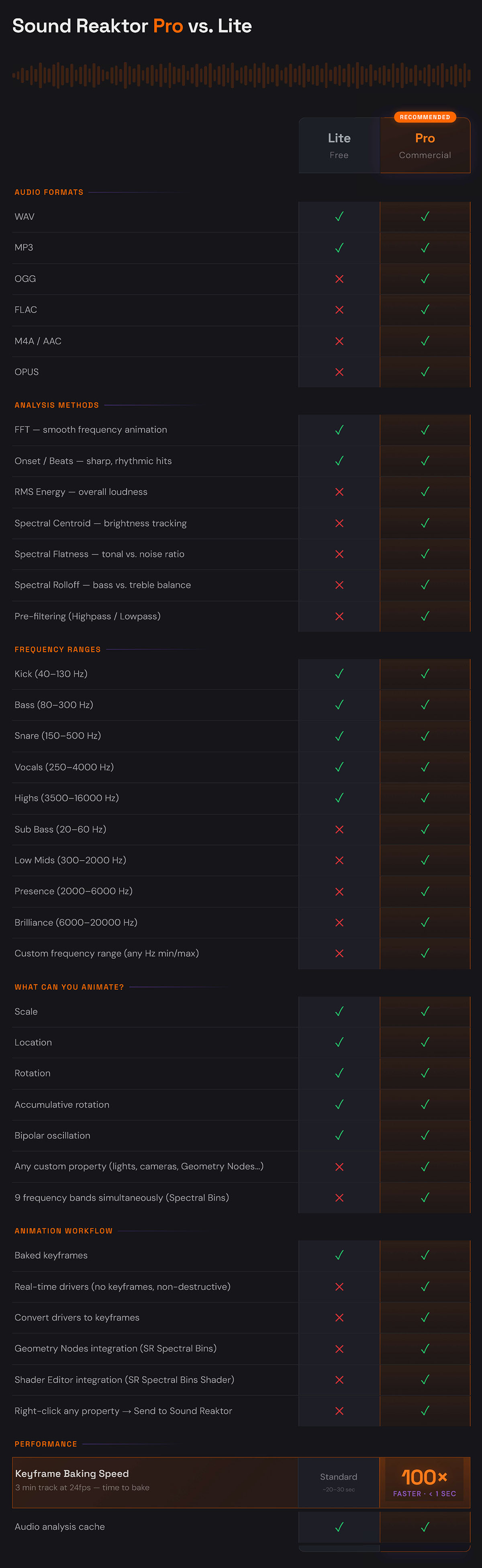
The addon is now also available on Gumroad, and I have created a free version called “Sound Reaktor Lite”. As a result, the full version has been renamed “Sound Reaktor Pro”. The Lite version includes the two most important audio analysis algorithms: FFT and Onset. It allows animating the position, rotation, and scale of any object using keyframes. The detailed differences between the two versions can be seen in the following table.

Summary of the most interesting changes (Pro version):

  1. Audio analysis and keyframe generation are now 50 to 200x times faster.
  2. In addition to keyframe mode, there is now a new drivers mode that enables a faster and more fluid workflow. Among other things, using drivers mode allows multiple properties across one or more objects to be animated, and if the audio is replaced, all those properties will automatically update with the new sound.
  3. In drivers mode, there is a new “Animate Property” called “Spectral Bins”. It creates a node group in Geometry Nodes and another in the Shader Editor, with nine outputs corresponding to all frequency presets of the addon in FFT mode. Combined with math nodes, it’s possible to create very interesting setups. I’m recording a detailed tutorial on this.
  4. The FFT and RMS modes have been thoroughly revised, since the normalization previously applied essentially ignored the pre-filters. This is no longer the case, and as a bonus, there are now two normalization modes to choose from: “per band peak” and “global”.
  5. Under the hood: around 30 fixes addressing bugs or improving UX.

In short, I am very happy with this update, not only as the author but also as a user of the addon. I think the significant speed increase and the drivers mode greatly improve the UX.

1 Like

WOW…this looks very interesting. I’m going to have to check this out.

I have been deeply getting in to audio lately, learning Audacity, Ardour, Hydrogen Drum Machine, and various VSTi plugins.
As a ex-dj from long ago(late 70’s-80’s), I got back in it, from vinyl to digital, that’s been fun…what a difference! I’m using Mixxx just on pc for now(controller sometime later).
Have music/theory also. Pulling out my stored away yamaha keyboard this weekend.
So have been looking for a way to merge my 3D skills with my music knowledge. Animated Art has been on mind for awhile.
Your work has inspired me to continue this path.
When I have sometime, I’ll have to check out your addon.
Thanks again :+1:

1 Like

Man, your journey sounds super interesting! It’s really nice to meet you. :metal:

I started this plugin as a personal project about a year ago, mostly out of sheer envy :joy:. After working on a couple of sound-reactive animation projects with TouchDesigner, which is awesome for that and especially in realtime, I got curious to see if I could pull off something even remotely similar in Blender.

I started out with FFT and gradually kept adding more analysis methods and all sorts of features to make synchronized sound animation in Blender easier and more fun. The craziest part? There was literally nothing out there even close to Sound Reaktor (and still isn’t!). If you’re into this stuff, it’s a really fun and satisfying addon because you can get cool results so easily.

And of course, if you ever have any questions, suggestions, or whatever, I’m always around and happy to help however I can!

Thank you very much. This is worth more than a thousand sales, fr.

Cheers!

2 Likes

Hello,
Just gave Sound Rector Free a try…pretty cool. Just played around with default cube for now, checked all the options, lots of settings. Tried with some different genres tracks, Grigoré - At The Edge Of The World, Aleksandir - Deeptrak, Grouch - Ride the Snake (Evil Oil Man Remix) and a few other tracks. Seems to work with different genres pretty well! I was hoping for that. I’ve tried other in the past, gave up on them Did have the granular control this has.
I did run in to one issue, when I changed to a new track (with replace existing audio checked), the track loaded fine, hit play in animation, but I had no audio. The cube was being animated on all axis’s but no audio. Closed blender, reopened, reloaded track, loaded into addon again, hit play, got audio. Retried 2 more times on the issue I posted, happened again…so this is reproducible, Blender4.5…win 10…SoundBlaster Z SE. Need more info, let me know!
Plan to buy next month(just paid $45 on ardour).
I’m running the 2.2.3v, went to gumroad (have account there) to get the 2.4.2v, could not fine it but reread the post above…it’s only for the Pro version. No worries…wanted to try the “Bipolar” animate property.
So if I am understanding this correctly, any “object” rotations…zooming…lighting Fx…etc have to be key framed like in the example videos?
If so, looks like I’ll have to learn key frame animation! :sweat_smile: Have been using blender for many years but never learned animating. Finaly have a reason to do so.
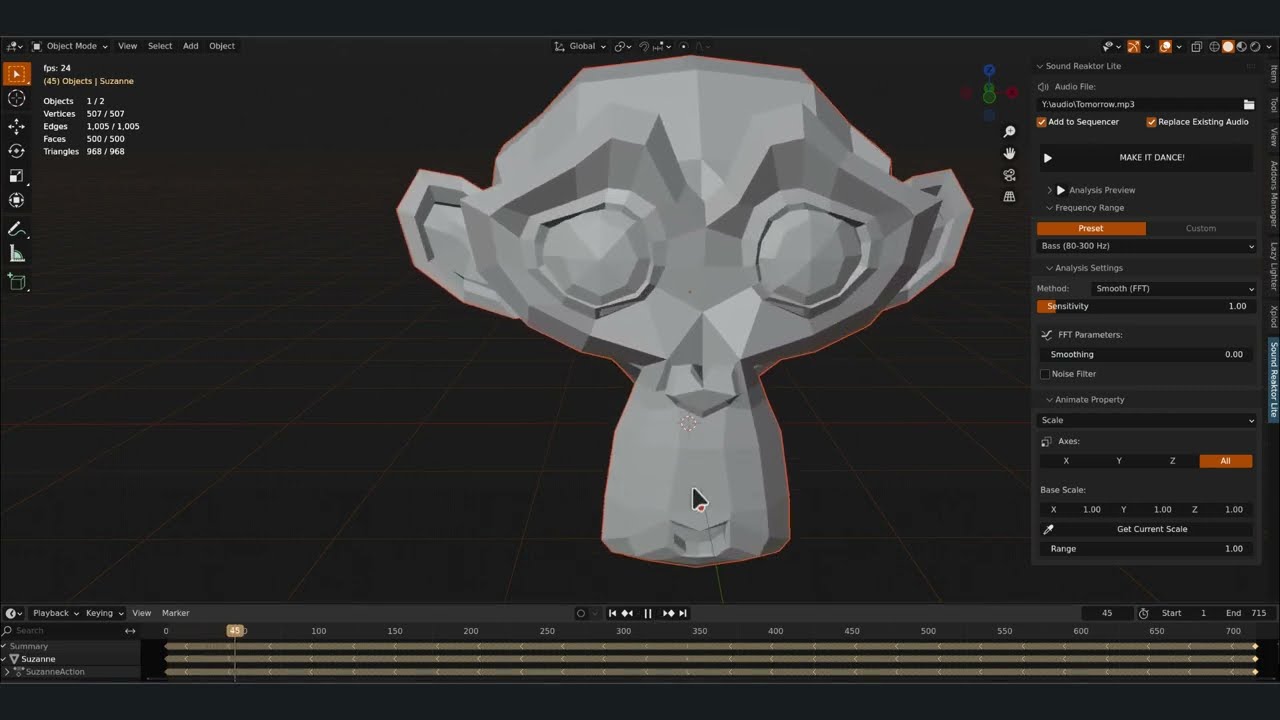
I may have some more ideas if you are planning to develop this further or if you are looking for any kind of audio/track files for test ing, let me know.
Ok…back in to getting getting deeper in to hydrogen drum…todays learning creating drum patterns, many genres to learn, there’s like so many of them :crazy_face:

1 Like

Glad you liked how the addon works! It honestly handles any kind of electronic music really well. The only time it struggles a bit is if you throw some super dense, muddy frequencies at it, like in certain noise or aggrotech tracks.

But even then, it’s got the tools to handle pretty much anything with a really high success rate.

That’s weird. It’s a process I repeat constantly, and I’ve never had anything like that happen before. I tried to reproduce it using Blender 4.5.7 with Sound Reaktor Lite, and it worked exactly as it should: when loading a new track, the addon clears the previous one and replaces it with the new one. Pressing play correctly plays the new track. I’ve recorded a short video so you can see the process, in case something was overlooked.

Did you leave ‘Add to Sequencer’ and ‘Replace Existing Audio’ checked?

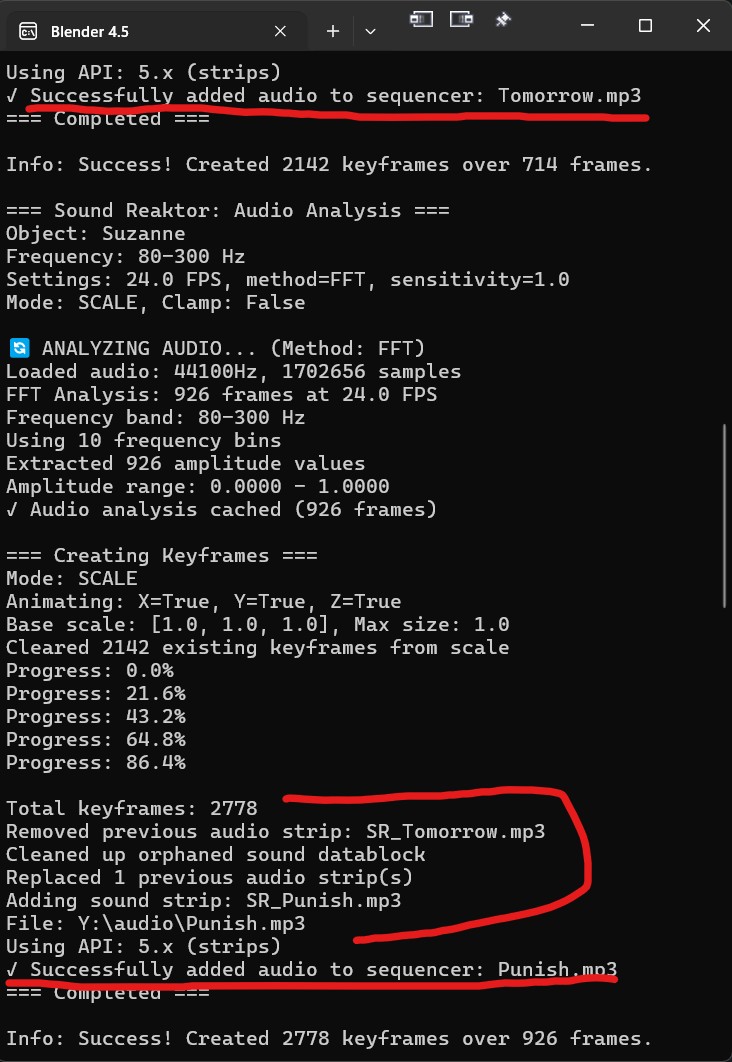
Sound Reaktor prints a ton of info to the Blender console. You might find some clues about the problem there. In this screenshot, I’ve highlighted in red how it shows the audio track switching. Do you see anything similar when you test it?

The Lite version of the addon lets you use ‘Bipolar’. I recorded a couple of examples in the video above to show you how it works. Basically, it’s only available in ‘Location’ and ‘Rotation’ modes (it doesn’t make much sense in the others). Also, for Rotation, as you can see in the video, you can’t use it if Accumulative mode is on (again, it just doesn’t make sense there).

Not sure I fully get what you mean, sorry! Sound Reaktor basically creates a keyframe for every single frame, so there’s not much room for manual tweaking. Sure, learning animation is a great idea, but honestly, the addon handles everything automatically.

I’m always open to any suggestions, thanks so much! Have fun creating those drum patterns.

Btw, it’s totally possible (and a great idea) to work with Sound Reaktor using individual instrument tracks exported from your DAW. You can analyze and animate each instrument, knowing exactly which frequencies are moving, and then just load the full track at the end. It’s the best method for precise animation!

Hey there,

Had some time to check that issue I had…

I was using 4.5.5, updated to 4.5.7, problem fixed. 4.5.7 release logs stated a python upgrade…must have been the issue.

Yea, that was my bad, did not carefully read info, was looking for it while in “Scale” mode.

As far as the “Animation” question, my plan was to:
– Have some sort of background…textured scene, HDRI scene, etc.
– Lighting, static…animated
– Camera animation…follow track type of thing
– animated textures, etc.
I’m thinking I am going to have to that in key framing? I’m a total noob when it come to actual animating. But I know the basic concept, thus the question.
Like I see in your YT videos. Hard to tell if the Pro version will do this?

Speaking of DAW’s , wondering if you use one or any?
Been having a bit of a struggle working with Ardour9, mainly with the UI, having a Hi-DPI issues with seeing UI cursors being too small. Getting nowhere with work around’s. Issue with “Session: cannot have two events of type TransportStateChange at the same sample” errors also.

Going to check out more of sound reaktor this weekend.
How’s the response been? Just curious. :thinking:

1 Like