Hi,I would like to apply a texture of some small trees on a mountain, and the mountain uvs are not straight. If I align the uvs (in X and Y) in the UV editor, it does not make the trees straight on the mesh; if I make the uvs bigger in the UV Editor, it goes beyond the bounds, because the width is very large, and if I just stay with this size of uvs, I have to make the trees a lot smaller with Gimp, but in this case the trees are blurred because of their small size… How could I just have the little trees straight, even though my mesh does not have straight lines?Here is the image: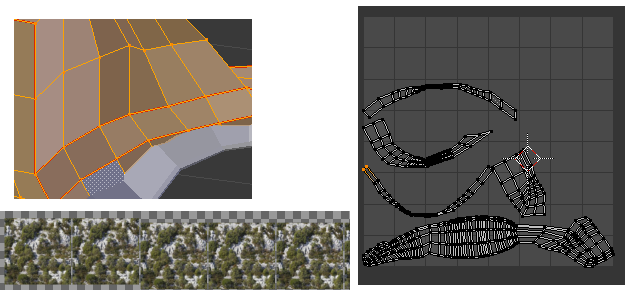
Thanks
The UV editor tries to minimize stretching by preserving the angles in the mesh. If you want a straight line in the UV unwrap, you either need a straight line in the mesh, or you need to do it vertex by vertex in the UV editor and be willing to accept some really ugly stretched textures.
If your concern is just getting the unwrap to fit better, just add more seams. There’s no reason to have such long pieces, especially if the details won’t be visible.
Thanks, yes actually I could separate the mesh with more seams, thanks for your answer!