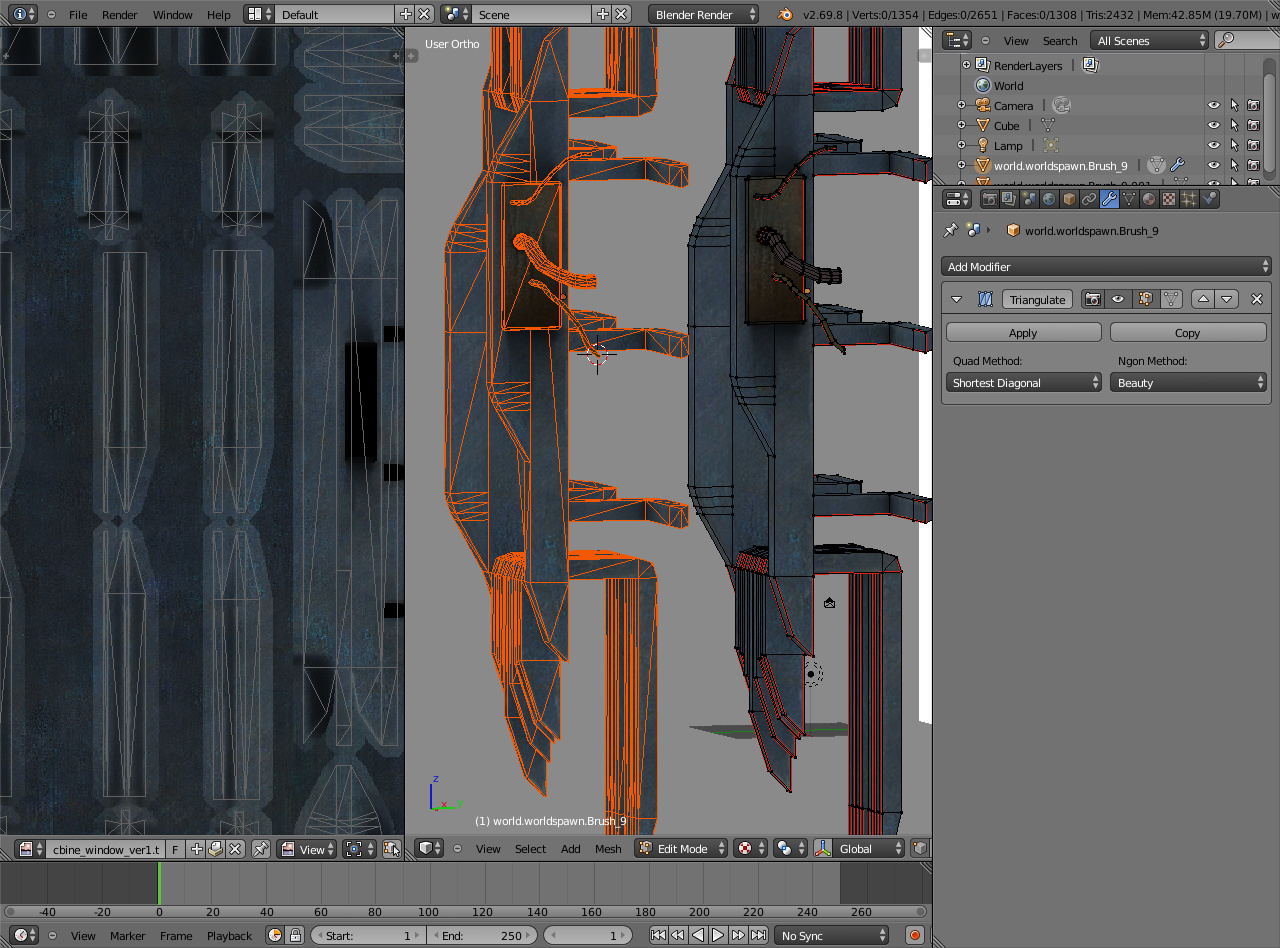
Hi I am still learning blender was wondering can anyone help me, I am creating a new combine window for source HL2 and the texture seems to be warped in object mode but not in edit mode, I really don’t understand why this is happening.
Object mode warped at the edge
Edit mode does not seem to be warped
In the UV layout one can see that the UV is not stretched so I am confused why this is happening
I am not sure if this is correct let me know. I could not seem to pack the file. I could not attach this using the manage attachments option on the forum perhaps it is too large I am not sure why. In the end I used my sky drive. I hope this works.
It’s fine, texture was in there. If you check the link in my signature, there are more instructions.
But I don’t get the difference between edit and object modes. For me they are the same. I tried with Blender 2.69 and 2.69.8 on Linux 32-bit.
The object scale was 1,1,1 like it should, no modifiers that could make those modes look different, one UV map, so not sure what is going on. You have a duplicate of the texture there but there are no differences on the face you showed in the screenshot.
In case you’re not aware already, viewport shading mode was set to multitexture and textured solid was on. That means it shows what is assigned on UVs in the UV/Image editor, both in textured and solid viewport shading modes.
If you switch multitexture to GLSL (from properties panel, N), it shows what is assigned for material texture, in textured viewport shading mode. But there were no differences that could explain what you were getting.
Thanks JA12 for the advice, I checked the link at your signature, I was having problems packing the file. Blender was saying it cannot find one of the images. I never compressed before I will try to do that next time.
It seems to be okay in your pictures, I wonder why. I left the scale at 1,1,1 As I imported the mesh/brush from hammer that should be the size it is in hammer.
what I meant before about the warping or more like stretching of the texture, it occurs on the edges, it can be seem here.
object mode
This is in edit mode
I am still new to blender I have little experience in GLSL mode but it seems to me to have lighting in real time it seems more CPU intensive than the other modes I could be wrong. I didn’t know that muti-textured and textured solid checked meant that shows what the UV’s in both modes. I have been wondering why view port shading in solid mode it shows the texture. And not sure why it gets brighter in texture mode in view port shading?
Overall regarding this problem I don’t know it seems okay for you., I just don’t know why
One thing that you could try is to turn mipmapping off temporarily and see if it’s still different in object and edit modes.
You find mipmap option in user preferences -> system: mipmaps.
If it stays the same, then perhaps try turning mipmaps back on and turn off GPU mipmap generation underneath and see if that makes a difference.
Textured solid option is on in properties panel (N). In solid shading viewmode it should then show the texture without lighting, while textured viewport shading should show the lights. Here’s a tutorial that explains these http://www.youtube.com/watch?v=EIMJxX9i490
Thanks again JA12, I checked the video you posted it is real helpful, I will need to go over it again. Though I have rarely used GLSL mode as hammer/source has its own lighting engine. Everything I have mostly done in blender other than tutorials is usually exported to hammer.
Regarding mipmaps, I went to mipmaps at system this changes the smoothness of the texture to pixels no blurring, I never knew that. It did not fix the stretching though. It is the same as my previous pictures I have posted just the stretching is pix-elated now.
GPU Mipmap generation does not seem to change anything, as well as 16bit float textures.
It is not a big problem, though I wonder why this is happening. My concern though is if I export this as a model using the smd tools will the texture be stretched like that. Also, which represents the true version the object mode version or the edit mode version? will it be exported stretched? These are questions I would like to know the answers to. I probably would go with that the texture I created has no stretching then that means the true version is the edit mode version. I am probably wrong, little things like this slow me down for some reason.
I guess there is nothing I can do about it if it is. I still ask how can I fix it so it does not stretch like that?
I’m almost out of ideas since I can’t even reproduce the error. The mesh has split edges which might be the cause for what you’re getting but I can’t be sure. Face assigned textures should still show up exactly as they are assigned on UV’s. Exporting those UV’s and image texture to the external application should work (within the capabilities of that software), despite how Blender viewport shows it. Only way to be sure is to try.
You could make sure the triangulation is exactly how you want it. Shouldn’t matter in this case but it’s good to be aware of this.
All faces you see on the screen are triangulated even though you use quads and n-gons in modeling. Games usually use triangle polygons so the model has to be converted to triangles at some point. It can be very important to make sure the triangulation stays the same between two applications so that baked images (especially normal maps) are baked and showed the same way.
You want to keep the non-triangulated version around for modeling but triangulate for baking. Blender has triangulate modifier you could use to preview the triangulation before applying it on a duplicate object.
Texture image utilization could be better too. It’s not always possible to organize UV islands well enough to do that, but currently only about half of the image is used for texturing (including the margin).
I tried too the blend provided and as JA12 that error is not reproducted…usually that type of stretching to me happens when i have a subsurf modifier or similar.