If you are going to add them to my file, you would have to parent them to the bones so they follow the animation. It’s not very hard, but don’t hesitate to ask if you have questions about doing it.
Thanks! I haven’t gotten back to it yet. It might be complicated. I know adding the control car will be. Getting it to be part of the simulation, or however you created that would be very difficult I think. It would break away and fall off at the same time the ship is breaking in two.
How do you control how the ship breaks apart? I’m not exactly sure what causes the break up, I mean the direction of the wind and the forces that make it come apart. I will have to go back and read about that. I was just wondering how difficult it is to make changes to the motion of the thing.
Do you intend to just make the car fall, or go further and have it tear a piece of the airship with it? If it just falls, that’s pretty easy, just some keyframe animation can do it.
The tearing is actually not a part of the physics sim. The cloth sim is only there to make the parts flap after I separate them, but doesn’t cause the separation. The main movement of the tearing is done entirely with the armature, with different sections being controlled by different bones and is fully animated by hand.
At the beginning, most vertices are pinned in the cloth sim (they are part of a vertex group that prevents them from simulating), so their movement is decided entirely by the armature.
Then, as the bones move apart from each other, I used the “AnimAll” addon to animate the vertex group and unpin the vertices around the tear so they are free to flap and so they stop following the bones.
In parallel, I also keyframe the armature’s groups a bit to make sure each section becomes rigged to exactly one bone after the separation, or there would be a risk some vertices would stretch and follow while the pieces separate.
–
A modification of the movement would need changing the armature’s animation in pose mode (disable the cloth’s visibility to see the armature’s effect).
The tearing (vertices being suddenly allowed to simulate cloth) is controlled by some keyframes, which can be seen on the timeline if you select the 3 meshes with simulation on them.
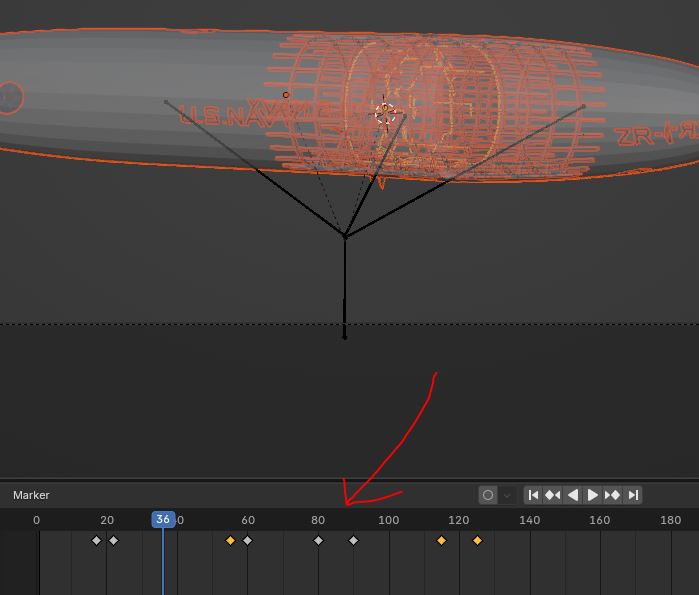
You could select them and move them on the timeline to change the timing of the tear if needed (the cloth will need re-baking to see the effect).
Changing the tearing pattern is the most complicated part. It would require going into edit mode or weight paint mode and use the AnimAll addon to re-keyframe weights on multiple weight groups. This is quite tricky, the addon seems rather capricious and I sometimes struggle to understand its logic even though I made the effect. Changing the timing or movement shouldn’t be too hard, but if you need changing the tearing pattern, I would offer doing it.
The transfer has expired on this file. Could you re-new it?
Thanks!
Sure, here is a new upload.
Thanks!
I located the story that got me interested in this so many years ago. It describes the whole event from the moment the ship takes off. It goes into detail about the storm and tells how the ship breaks up. I suppose I should make up some kind of storyboard. Here it is: Death of a Dirigible
by John Toland
Airship.mht (102.9 KB)
Would you be willing to make one? Even if it’s just some crude scribbles. That way, I could animate the tearing how you envision it. I did read the story, as you had already posted it earlier and I could always try to interpret it myself, but it would be simpler if I knew your expectations.
Or, an alternative to a storyboard could be a very basic animation in Blender, just to show the timing and movement. It can even be made out of basic cubes or something. That’s actually something that is done in some big production.
Yes, I’ll work on something like that. Thanks.